
You're between meetings when the useful thought arrives. Instead of opening a blank document and trying to type at the speed of your ideas, you hold a shortcut, speak the follow-up email, and release it. The draft appears where your cursor is, ready for a quick edit before you send it.
That small change captures the practical value of voice recognition software. It removes the typing bottleneck between thinking and drafting, helps you keep your hands free, and can make written work more accessible for people who find extended keyboard use tiring. The technology isn't a novelty anymore. It has become a productivity layer for emails, notes, reports, customer replies, and prompts.
The difficult part is choosing intelligently. You need to decide where recognition runs, how much privacy you're willing to trade for broader language coverage or accuracy, and which tool fits the way you already work. The right answer depends less on a glossy feature list than on your accent, vocabulary, apps, connectivity, and tolerance for sending audio to a vendor.
Table of Contents
- Why Voice Recognition Matters Right Now
- How Voice Recognition Software Actually Works
- First, the microphone captures sound
- Next, the system identifies speech sounds
- Finally, language context selects the words
- On-Device Versus Cloud Processing
- Four trade-offs to compare
- Privacy, Data, and What “Local” Really Means
- Local does not mean automatically deleted
- Key Features That Separate Tools Worth Using
- Accuracy has context
- Workflow fit beats novelty
- Reliability appears when conditions worsen
- How to Choose the Right Voice Recognition Tool
- Use six decision criteria
- Common Mistakes When Adopting Voice Recognition
- Fix the habits that cause avoidable errors
- The Real Future of Voice as an Input Layer
Why Voice Recognition Matters Right Now
Typing forces your hands to keep pace with your thoughts. That works well for careful editing, but it can interrupt brainstorming, delay a response, or turn a short idea into something you postpone. Speaking lets you preserve the idea first and refine the wording afterward.
A project lead might dictate a customer follow-up while walking between rooms. A researcher can capture a question before it disappears. A support agent can produce a detailed reply without moving between a call window and a text field. In each case, voice works as a first-draft mechanism, not as a replacement for judgment.
The most useful mental model is speech in, editable text out. You speak naturally, the system converts your audio into words, and you correct names, punctuation, tone, and facts before the final version reaches another person. That last editing step matters because even strong systems can mishear specialized vocabulary, background speech, or unfamiliar accents.
Practical rule: Treat dictation as a fast drafting surface, not an automatic publishing button.
Voice recognition has also become a substantial software category. Its history runs from IBM's 1962 Shoebox, which understood 16 spoken English words, through DARPA's goal of a 1,000-word system in 1971, Carnegie Mellon's Harpy reaching 1,011 words in 1976, and Dragon Dictate's consumer launch in 1990 at about $9,000. Deep neural networks later reduced error rates by as much as one-third in a single step, and Microsoft reported a 5.9% word error rate on the Switchboard benchmark in 2017, a milestone often associated with human parity on conversational speech tasks. These historical milestones are documented in this history of speech recognition.
The market has moved well beyond experiments. One estimate places the global voice and speech recognition market at USD 17.33 billion in 2025, projecting USD 71.75 billion by 2034 at a 17.1% CAGR, while another estimates USD 19.09 billion in 2025 and USD 104.05 billion by 2034 at a 20.30% CAGR. These are market estimates, not guarantees, but they show why voice now appears inside operating systems, mobile devices, productivity suites, meeting platforms, and business software. The estimates are collected in Straits Research's voice and speech recognition market overview.
If you work with recorded speech or want to check whether an audio sample was synthetically generated, an AI audio detector guide can help you understand the adjacent tools and terminology. For everyday productivity, though, the central question remains simpler: how reliably can a system turn your spoken intent into usable text?
How Voice Recognition Software Actually Works
A voice recognition system turns a moving sound wave into a sequence of written symbols. You don't need equations to understand the pipeline. Think of it as three connected jobs.
First, the microphone captures sound
Your voice creates pressure changes in the air. A microphone detects those changes and converts them into an electrical signal, which a device samples and stores as digital audio. The quality of that first capture matters because the system can't recover words that the microphone never recorded clearly.
Distance, room echo, keyboard noise, fans, and overlapping speakers all complicate the signal. A close microphone usually gives the recognizer a cleaner starting point than a laptop microphone across a desk.
Next, the system identifies speech sounds
The software analyzes the audio as patterns that change over time. An acoustic model looks for likely phonemes, the small sound units that make up spoken language. It doesn't hear a complete word in the same way a person does. It estimates which sound patterns are present and how confidently they were detected.
A useful analogy is a blurred receipt. You might recognize the shape of individual letters even when some ink is missing, then use nearby words to work out the line. The acoustic model does something similar with speech. It compares the audio pattern with patterns learned from many examples and produces likely sound sequences.
Finally, language context selects the words
A language model evaluates which word sequence makes the most sense. If the sound could represent “right” or “write,” the surrounding sentence helps choose between them. Context also helps with punctuation, common phrases, formatting, and words that tend to appear together.
This resembles phone autocomplete, but the input isn't typed characters. It's a stream of estimated phonemes. The model predicts the most plausible sentence from those sound clues, grammar patterns, and the context around them.
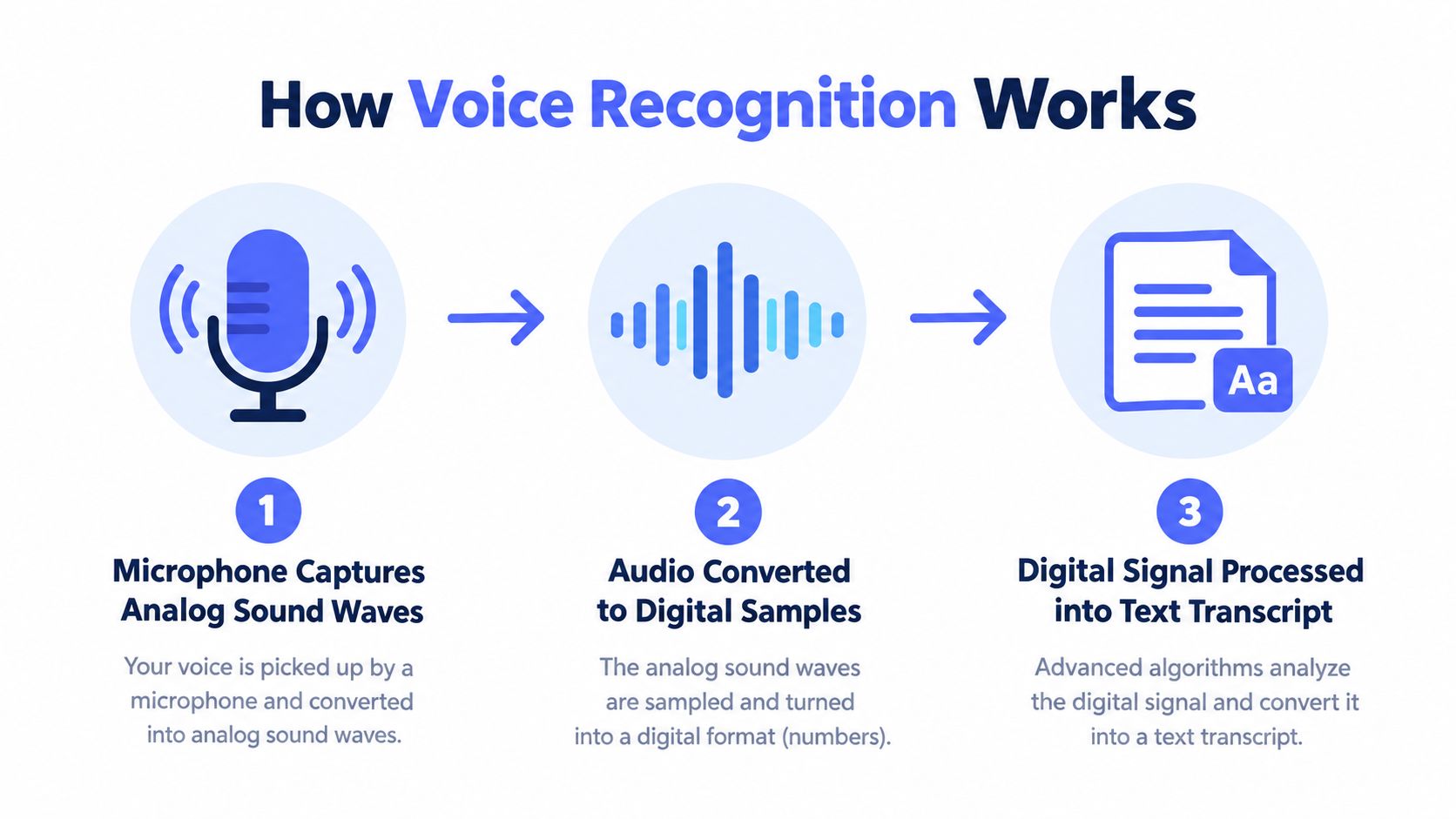
Modern systems often combine these stages in a neural network rather than exposing three separate modules to the user. That integration helped move voice recognition from narrow, speaker-specific commands toward dictation and conversational software that works across more situations.
The difference between recognition and understanding is important. Automatic speech recognition produces text. A separate language-processing system might summarize that text, extract tasks, answer a question, or trigger an action. For example, a voice-based AI assistant for HVAC can turn spoken requests into operational workflows, but the underlying speech-to-text step still has to capture the words correctly. You can see how that type of application connects voice input with business action in this voice-based AI assistant for HVAC example.
For a deeper technical explanation of the models and their development, read this guide to artificial intelligence in speech recognition.
The practical result is simple: a recognizer doesn't merely “listen and type.” It captures sound, estimates speech units, and uses language context to decide what you probably said. Every accent, noisy room, unusual name, and technical phrase tests one or more of those stages.
On-Device Versus Cloud Processing
The biggest architectural choice is whether the system processes speech on your device or sends it to remote servers. Neither option wins in every situation. A local model may respond quickly and keep audio off the network, while a cloud model may offer broader language coverage or more computing capacity.
Four trade-offs to compare
| Factor | On-Device | Cloud |
|---|---|---|
| Processing location | Runs on your phone, laptop, or desktop | Runs on the vendor's remote servers |
| Latency | Usually immediate and less dependent on network quality | Depends on upload speed, server response, and connection stability |
| Accent and noise performance | Depends on the local model and available device resources | May benefit from larger models and broader training coverage, but still requires testing |
| Language and domain coverage | Can be narrower if storage or computing resources are limited | Often supports broader language and vocabulary options |
| Privacy | Audio can remain on the device | Audio is sent to the provider for processing |
| Offline behavior | Can continue without an internet connection if the model supports it | Usually stops or degrades when the connection fails |
On-device recognition runs the acoustic and language models directly on your computer or phone. That can make it feel nearly instant, and the audio doesn't need to leave the machine. The trade-off is that local performance depends on the model installed and the device's processing capacity. A small local model may struggle more with uncommon vocabulary or difficult audio than a larger hosted model.
Cloud recognition uploads audio to a remote service. The provider can run larger models, update them centrally, and support more languages without asking you to install a new model. That convenience introduces network dependence and a clear data-governance question, because your raw audio has crossed your device boundary.
Accent performance deserves special attention. A multicountry benchmark of 18 recognizers found sharp degradation for many systems on African-accented and noisy speech, with harder conditions often producing 20% to 70% WER, while some accents in Kenya and Uganda reached average WERs around 12% to 18%. The findings in the multicountry ASR benchmark show why a vendor's clean-demo performance can't stand in for your own testing.
Language models can improve transcription when they use context effectively. Google researchers reported relative word error reductions of 6% to 10% across systems with baseline WERs from 17% to 52%, and found that increasing model size by two orders of magnitude reduced WER by about 10% relative. The results in this Google research paper on language-model integration support a practical conclusion: model size helps, but integration, contextual biasing, and normalization matter too.
Choose on-device processing when your priorities are local control, quick response, and offline continuity. Choose cloud processing when language breadth, centralized updates, and peak performance on your tested audio matter more. Some workflows sensibly use both. A local model can handle routine drafting, while a cloud service processes a difficult recording only when the content and policy allow it.
For a focused look at local models and their practical constraints, see this guide to on-device speech recognition.
Privacy, Data, and What “Local” Really Means
Privacy isn't a label on a pricing page. It's a question about which data exists, where it goes, how long it remains, and who can use it.
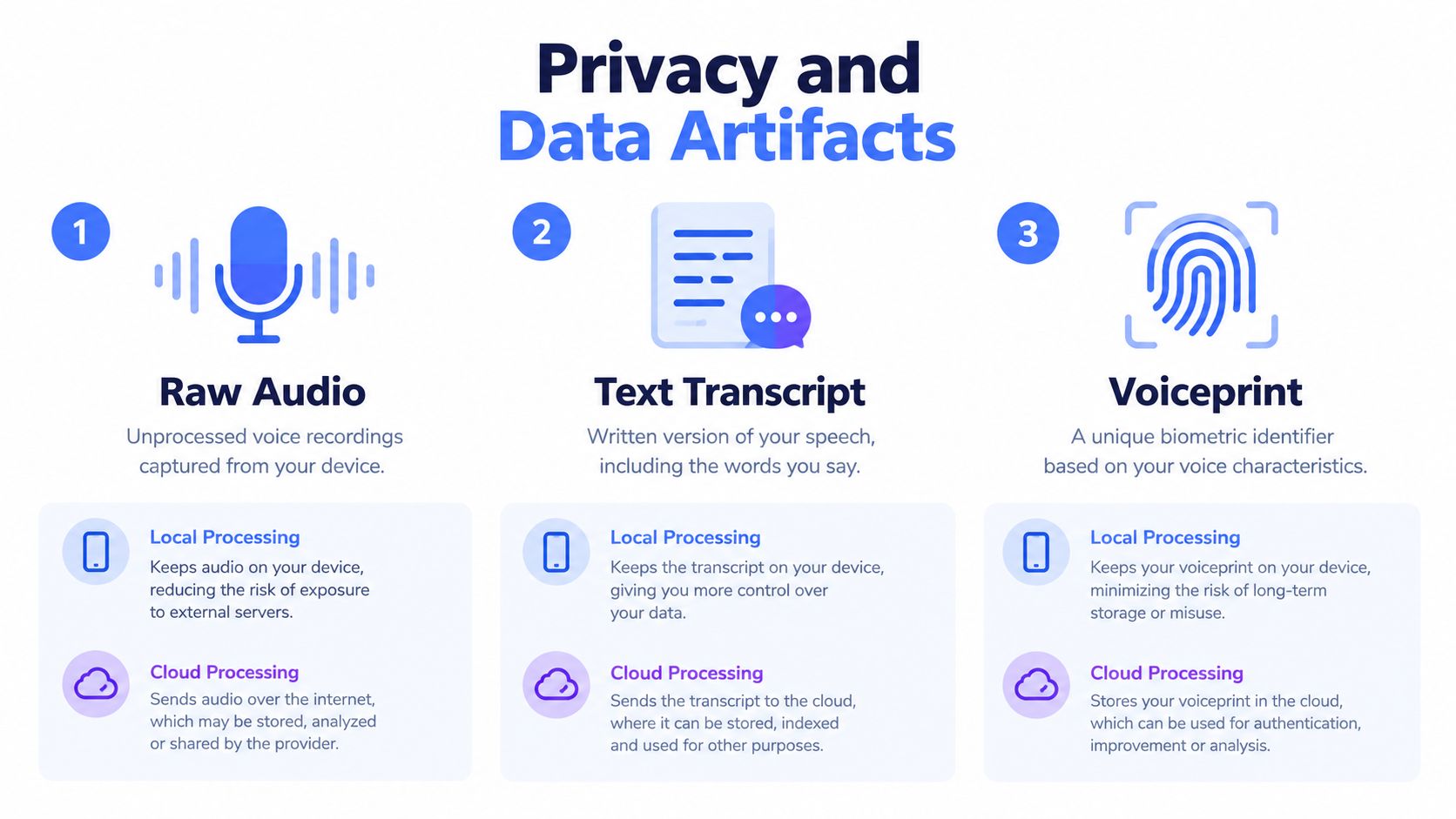
A voice workflow can create at least three distinct artifacts:
- Raw audio: The original recording of your voice and any background speech.
- Text transcript: The written output, which may contain names, client details, financial information, or confidential ideas.
- Voiceprint: A speaker-related representation that can help identify or distinguish a person.
These artifacts don't have identical risks. A transcript may reveal the content of a meeting. Raw audio may reveal the content plus tone, background conversations, and environmental clues. A voiceprint can connect speech to an individual, which makes it relevant to biometric-data governance.
Local does not mean automatically deleted
On-device processing usually means the audio doesn't travel to a vendor's servers during recognition. It doesn't necessarily mean the audio or transcript disappears afterward. Your application may save a history, your operating system may retain files, or a backup service may copy the resulting text.
Cloud processing creates a different exposure. The provider receives the audio, may retain it for a stated period, may store the transcript, and may use some data for service improvement or model training depending on its policy and your settings. Account compromise can expose stored recordings, while metadata can reveal meeting times, participants, devices, or locations even when the transcript itself seems harmless.
Independent privacy coverage highlights the distinction between cloud and local workflows, including the possibility that cloud dictation stores, shares, or uses audio for model training. It also explains why voice data may qualify as biometric data under privacy laws. This voice data privacy resource is useful when reviewing a vendor's policy.
Use a short privacy filter before adopting any product:
- No unnecessary audio upload: Can you keep sensitive dictation local?
- No unwanted training use: Is model training disabled by default, or can you opt out clearly?
- Visible retention: Can you see what is stored and delete it without searching through obscure settings?
A tool that passes all three checks may still require organizational approval, encryption, access controls, and a retention policy. The point is to replace the vague word “private” with conditions you can verify.
For a practical implementation focused on keeping transcription on the computer, compare approaches in this guide to local voice-to-text.
Key Features That Separate Tools Worth Using
A voice recognition tool earns its place through repeated small interactions. The best feature list won't help if the system inserts text in the wrong window, drops words when the network changes, or makes you correct every proper noun.
Accuracy has context
Ask how the vendor measures quality, then test the audio that resembles your work. Word error rate, or WER, counts transcription errors, but one average number can hide failures on accents, jargon, names, numbers, or noisy rooms.
A legal researcher should test case names and citations. A developer should test identifiers and technical terms. A sales team should test customer names, product names, and CRM fields. Custom dictionaries and vocabulary hints can make a bigger practical difference than a generic claim about overall accuracy.
Accent coverage is not an optional accessibility detail. A 2025 comparative study found that Standard American English was the only accent below 5% mean WER, while regional, second-language, and less common first-language accents showed a systematic gap. Another accessibility study found Whisper large-v3 averaged 9.3% WER overall, but some groups, including Sylheti and Haitian Creole speakers, performed 15 to 20 percentage points worse than better-represented groups. The findings are reported in this comparative study of accent and language bias.
Workflow fit beats novelty
Look for controls that match your hands and attention:
- Push-to-talk: Useful when you want an explicit start and stop, especially around confidential conversations.
- Global shortcuts: Let you dictate into email, documents, browsers, chat tools, or CRM fields without copying text between windows.
- App integration: Inserts text at the cursor rather than forcing you to work in a separate transcription editor.
- Mobile continuity: Helps when ideas begin on a phone and finish on a desktop.
- Command support: Lets you say punctuation, paragraph breaks, capitalization, or editing actions without reaching for the keyboard.
Editing control separates a draft generator from a daily input tool. Check whether you can remove filler words, revise a selected phrase, move through text by voice, and apply a cleanup style without losing your original meaning.
Reliability appears when conditions worsen
Test what happens when Wi-Fi drops mid-sentence. Does the tool stop, queue the audio, switch to a local model, or lose the utterance? Offline fallback can matter more than an impressive demo because real work happens in trains, shared offices, client sites, and unreliable home networks.
Latency also changes how natural dictation feels. A short delay may be acceptable for a recorded interview, but it becomes distracting when you're composing a message and waiting for each phrase to appear.
Some features sound impressive but rarely change the daily result. A long list of integrations doesn't matter if your main editor isn't supported. An assistant that can trigger many actions isn't useful if dictation takes too many steps. Weight your repeated workflow, not the largest number on the pricing page.
How to Choose the Right Voice Recognition Tool
A shortlist becomes useful when each candidate faces the same questions. Score tools against your own recordings and applications, not against a generic feature matrix.
Use six decision criteria
Accuracy on your speech: Record representative samples with your accent, pace, names, technical terms, and typical room conditions. Compare the corrections you make, not only the vendor's published benchmark.
Processing location: Decide which content must stay local and which content may go to a cloud provider. Make this a rule for categories of information, not an improvised choice each time.
Latency and offline behavior: Dictation should feel responsive in your normal connection environment. Test airplane mode or a deliberately interrupted connection if offline continuity matters.
Integration: Open the email client, document editor, CRM, browser, or development environment you use every day. Confirm that the tool inserts text where the cursor sits and that shortcuts don't conflict with other software.
Total cost: Include subscription fees, setup time, vocabulary configuration, training, editing effort, and the cost of switching between windows. A cheaper tool that requires constant cleanup may consume more working time.
Retention and training policy: Find the answers to where audio is processed, what gets saved, how long it remains, who can access it, and whether your data enters model training.
A quick test can use a small set of routine tasks: dictate a short email, capture a meeting note, enter a CRM update, and speak a paragraph containing names or specialized terms. Repeat the same tasks with each candidate and record both the output quality and the number of interruptions.
| Category | Processing | Best For | Privacy Posture | Typical Cost |
|---|---|---|---|---|
| On-device dictation | Local model on a computer or phone | Offline drafting and privacy-sensitive input | Stronger local control, subject to device storage and backups | Free or included, sometimes paid |
| General cloud APIs | Remote servers | Developers building speech features into products | Requires review of upload, retention, and training policies | Usage-based or contract pricing |
| Meeting transcription services | Usually cloud-based | Multi-speaker recordings, transcripts, and summaries | Recording and participant-data policies need careful review | Subscription or usage-based |
| OS-level voice control | Built into the operating system | Accessibility and hands-free commands | Varies by operating system and feature | Often included with the OS |
| Integrated on-device productivity suites, such as Voice Control Pro | Local processing options combined with app-level dictation and assistance | Cross-app drafting, cleanup, and voice-driven productivity | Can offer a local mode, but review which features use cloud processing | Free local mode or paid feature tiers |
Typical profiles map to different categories. A privacy-sensitive writer who works offline should start with on-device dictation. A developer building a multilingual application may need a cloud API and a formal data review. A team reviewing interviews needs speaker handling and searchable transcripts. A professional who writes across many apps may prefer an integrated cursor-based dictation layer rather than a meeting-focused product.
Don't leave the test until after purchase. A short, controlled trial exposes accent, latency, privacy, and workflow problems before they become habits.
Common Mistakes When Adopting Voice Recognition
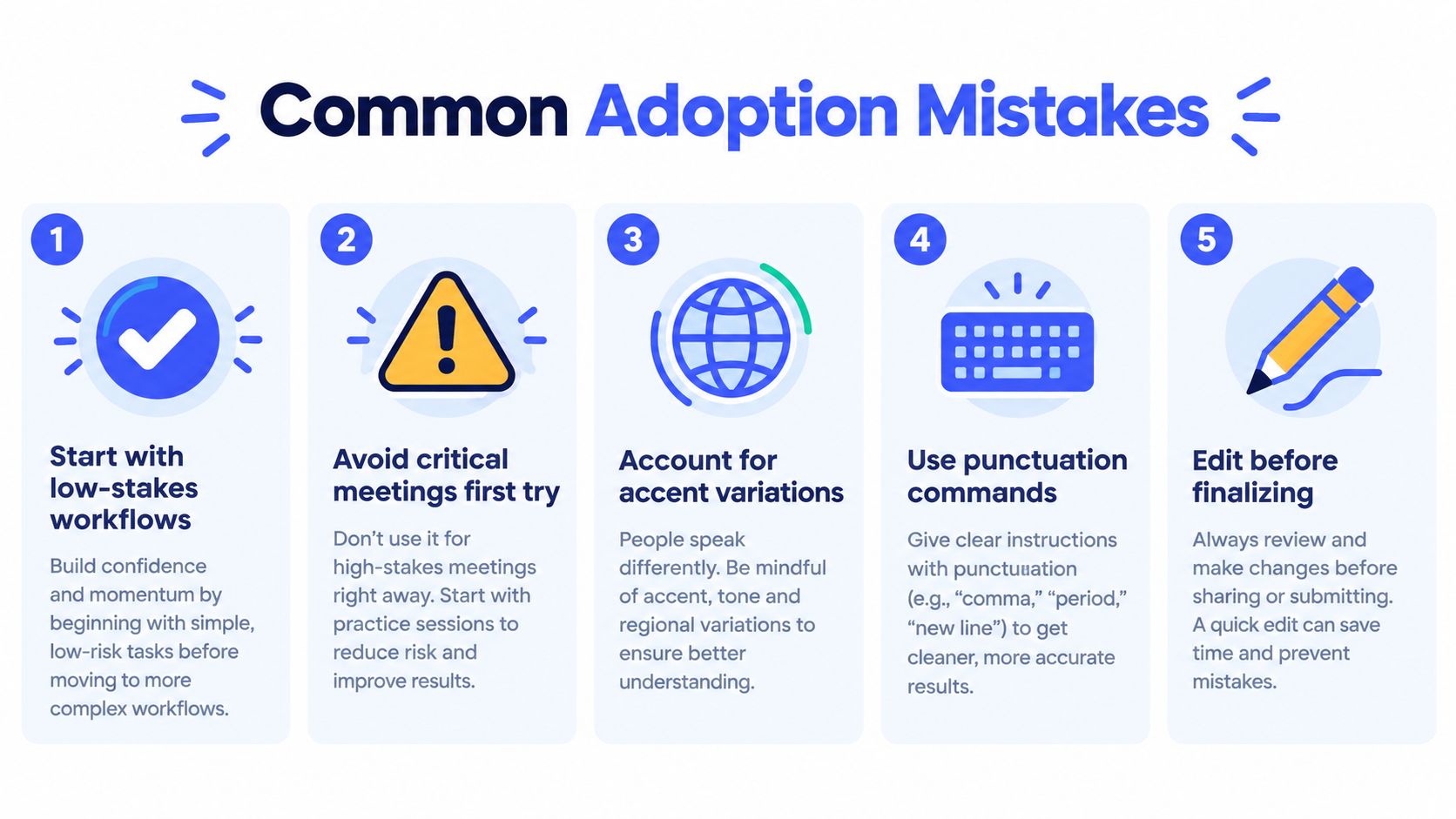
The fastest way to reject voice input is to test it on a high-stakes task under bad conditions. Dictating a deadline-critical client email in a noisy office, with an unfamiliar microphone and no vocabulary setup, tells you very little about the tool's normal value.
Start with low-risk work: personal notes, internal messages, rough outlines, or a list of questions. You can learn the controls without putting an external commitment at risk.
Fix the habits that cause avoidable errors
- Speaking too quickly: Slow down enough to separate words and clauses. Natural doesn't have to mean rushed.
- Ignoring punctuation commands: Say “comma,” “period,” or “new paragraph” when the tool needs explicit structure.
- Expecting names to work immediately: Add recurring people, products, places, and technical terms to a custom vocabulary.
- Using a distant microphone: Keep the microphone close enough to capture your voice clearly, ideally within about six inches when your setup allows it.
- Editing only at the end: Correct obvious errors while the context is fresh, then perform a final review before sending or publishing.
The environment matters as much as the model. An open-plan office, a moving car, or a room with overlapping conversations can make an otherwise capable recognizer look unreliable. Test in the places where you will dictate, not only in a quiet room.
Switching tools repeatedly also creates misleading results. Each system has different punctuation commands, correction methods, and vocabulary settings. Give one workflow enough time to become familiar, and treat the first month as calibration rather than a final verdict. Your pace, microphone position, command vocabulary, and editing routine all influence the outcome.
The Real Future of Voice as an Input Layer
Voice recognition is becoming less like a single destination and more like a shared input layer. It can sit inside a writing app, operating system, CRM, browser, design tool, or development environment, just as keyboards and touchscreens already do.
That changes the buying question. Instead of asking which one engine should handle every situation, choose the combination that fits each context. A fast local model may handle private notes, while a cloud system may process a permitted recording that needs broader language coverage or more contextual help.
Research and product development are also moving toward real-time translation, prosody and emotion detection, voice biometrics, and assistants that act on spoken intent. Those capabilities create new privacy and consent questions, especially when systems analyze not only what someone said but how they said it.
The practical advantage will go to people who combine specialized tools rather than demand perfection from one product. Pairing local dictation for quick drafting with a carefully governed cloud service for selected final transcripts can be more useful than chasing a single do-everything solution.
Voice Control Pro provides cross-platform dictation that inserts polished text at the cursor across apps, with a local mode for on-device processing and optional assistant features for rewriting, screen questions, and app launching. If you want to test a workflow built around fast, privacy-aware voice input, visit Voice Control Pro and compare it with the six criteria above.