
You finish a confidential draft, reach for dictation, and then pause. If the next sentence includes client names, medical notes, legal language, or an unreleased product idea, sending the audio to a cloud service suddenly feels like a bigger decision than the typing itself. That's the real appeal of local voice to text, it keeps speech on your own device while still giving you fast, cursor-level transcription where you actually work.
| Criteria | Local Voice to Text | Cloud Voice to Text |
|---|---|---|
| Privacy and control | Audio stays on-device when the workflow is genuinely offline | Audio is sent to remote servers for processing |
| Latency and availability | Can work instantly and without internet | Depends on connectivity and remote processing |
| Accuracy | Modern local models can get close to cloud quality in practical use | Often strong, especially for large general-purpose models |
| Cost | Often tied to the device or one-time software cost | Usually tied to subscriptions or API usage |
| Workflow fit | Strong for system-wide insertion and private drafting | Strong for collaborative, managed, or highly connected workflows |
Table of Contents
- Introduction to Local Voice to Text in Modern Workflows
- How Local Voice to Text Evolved to Rival Cloud Accuracy
- Why that history changes the decision
- Local vs Cloud Voice to Text Compared on What Actually Matters
- Where local wins
- Where cloud still has the edge
- When hybrid makes sense
- Accuracy and Efficiency Benchmarks for On Device Models
- How to read those numbers
- Real World Use Cases Where Local Voice to Text Wins
- Where multilingual work changes the picture
- Setting Up and Verifying a Truly Offline Voice to Text Workflow
- A practical verification sequence
- Choosing the Right Local Voice to Text Setup for Your Needs
Introduction to Local Voice to Text in Modern Workflows
Local dictation used to mean compromise. You either accepted clunky accuracy, or you let a cloud model handle the hard part and trusted someone else with the audio. That trade-off is narrower now, because on-device speech recognition has become good enough to compete on everyday text entry, not just as a privacy fallback.
The practical question is no longer whether local transcription exists. It's whether it behaves the way you need it to, inside your editor, email client, chat window, or browser, without leaking audio during setup, cleanup, or sync. That distinction matters because an app can sound local and still make outbound requests for model downloads, telemetry, transcript syncing, or feature validation.
Practical rule: if a product only says it uses a local model, that's not the same as proving the workflow is offline.
That's why the best way to judge local voice to text is by three things at once, privacy, latency, and device fit. A fast laptop with a clean microphone input can make an on-device engine feel immediate, while a weak machine or poorly tuned multilingual setup can make the same software feel unreliable. Cloud tools still make sense when you need broader language coverage, managed infrastructure, or collaborative features, but the default assumption has changed. Local is no longer a niche choice for people willing to sacrifice quality, it's a serious option when the workflow needs speed and control at the same time.
How Local Voice to Text Evolved to Rival Cloud Accuracy
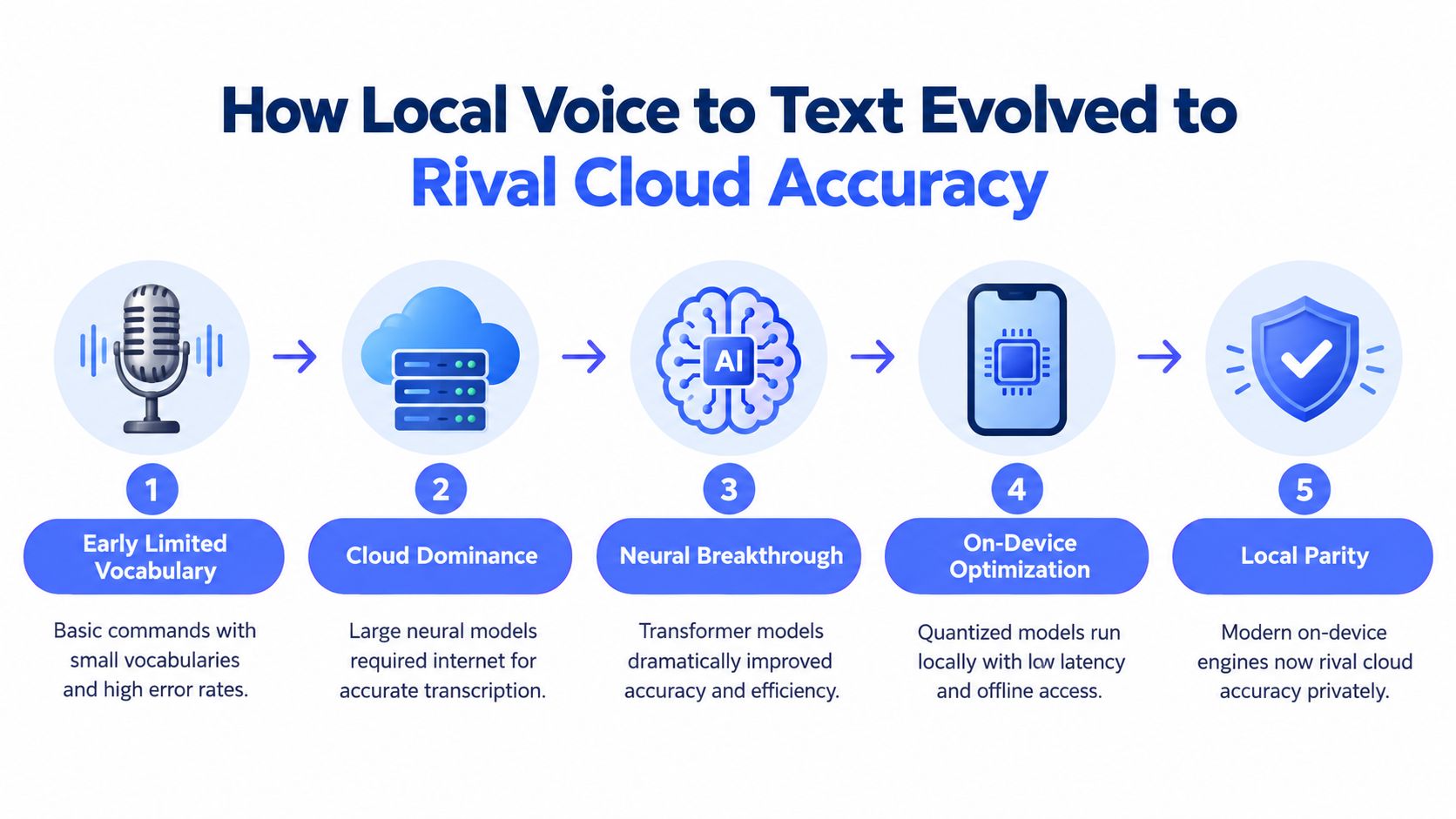
Local dictation became practical through steady improvements in recognition quality, modeling, and device hardware. IBM's history traces the field from early work in the 1950s and Bell Laboratories' Audrey in 1952, often described as the first speech recognition engine, to systems in 1970 that handled only about 1,000 words. Dragon NaturallySpeaking later advanced consumer dictation, and by 1997 it was reported to understand up to 100 words per minute. IBM's speech recognition history documents that progression.
The important shift is that local engines now face a serious benchmark, not a weak offline baseline. Cloud recognition matured through statistical modeling and neural methods, and reported results moved from IBM's 6.9% word error rate in 2016 to 5.5%, while Google claimed 4.9%. Those figures mark the point at which speech recognition became dependable infrastructure rather than an experimental feature. The comparison for local tools is therefore practical: can a specific device, model, and language configuration deliver similar results under real working conditions?
Why that history changes the decision
Modern on-device models inherit decades of progress instead of rebuilding recognition from scratch. Smaller models can apply those advances within the processing and memory limits of a laptop or phone. Learn how modern on-device speech recognition achieves near-cloud accuracy on local hardware.
For macOS and iOS users, Apple's benchmark offers a useful example. SpeechAnalyzer reportedly reached 2.12% WER on clear English speech and 4.56% WER on more difficult speech, compared with Whisper Small at 3.74%/7.95% and an older system recognizer at 9.02%/16.25%. Apple benchmark paper These results describe an optimized stack, not every local engine. They do show why device-specific testing matters: hardware acceleration, model size, microphone quality, and language support can change the outcome substantially.
The conclusion is narrower than “local beats cloud.” Local voice to text now belongs in the same practical accuracy discussion, while offline behavior and hardware fit determine whether that accuracy survives outside a benchmark. Verify that audio remains on the device, then test the model with your language, microphone, and normal workflow before choosing it.
Local vs Cloud Voice to Text Compared on What Actually Matters
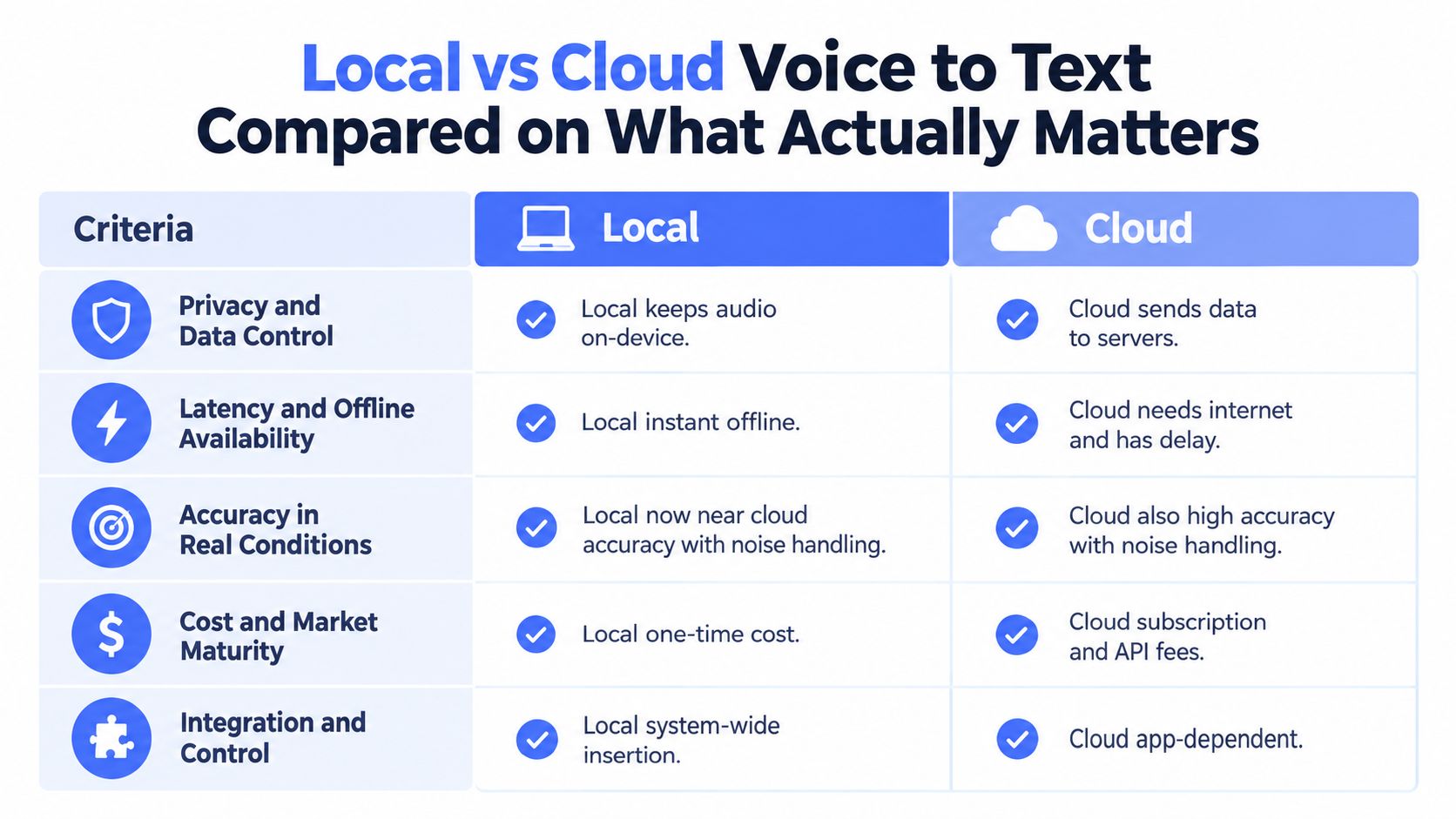
A commuter dictating beside traffic, an employee using a locked-down laptop, and a lawyer handling confidential notes face different constraints. The useful question is whether the chosen engine continues working with the available hardware, language, microphone, and network conditions. Market estimates for digital dictation software indicate strong expansion, helping explain why local and cloud providers are targeting similar workflows. Market estimate
| Criteria | Local Voice to Text | Cloud Voice to Text |
|---|---|---|
| Privacy and data control | Audio can remain on the device | Centralized processing is acceptable for the workflow |
| Latency and offline availability | Works without internet and can insert text quickly | Performs well when connectivity is stable |
| Accuracy in real conditions | Depends heavily on model, hardware, language, and microphone | Often consistent across varied devices and general use cases |
| Cost and market maturity | Avoids dependence on per-minute processing charges | Provides managed updates and easier scaling |
| Integration and control | Supports system-wide shortcuts and cursor insertion | Often integrates most deeply with its own service ecosystem |
Where local wins
Local processing is the stronger choice when confidentiality determines where audio may go. It also fits travel, restricted workplaces, unreliable Wi-Fi, and field work where connectivity cannot be assumed. Immediate insertion into the active application is another practical advantage. The user can dictate into an editor, email, or form without uploading the recording or changing context.
That advantage should be verified rather than inferred from a product label. Disable the network, start a fresh dictation, and confirm that transcription still works. Check whether audio, transcripts, or error logs are created elsewhere. A tool that advertises local processing but requires a connected account or remote fallback does not provide the same privacy boundary as an offline workflow.
Where cloud still has the edge
Cloud processing remains attractive for broader language coverage, shared administration, and managed updates. It can also be easier when a team uses mixed hardware because model execution and memory requirements are handled remotely. That convenience matters when users cannot tune model sizes or maintain enough local processing capacity.
Cloud is not automatically more accurate in every situation, and local is not automatically private in every implementation. The relevant test is behavior under the conditions that matter: disconnectivity, sensitive audio, language variation, background noise, and sustained dictation.
When hybrid makes sense
A hybrid setup keeps local recognition as the default and reserves cloud processing for cleanup, unsupported languages, or unusually difficult recordings. Teams can then limit remote transfers to cases that justify them. A relevant speech to text tool can help evaluate how transcription fits a broader content workflow rather than a single application.
For a structured comparison of privacy, connectivity, accuracy, and maintenance trade-offs, consult this local versus cloud speech recognition guide.
If audio is sensitive, verify offline behavior before judging accuracy. If the device is weak and the audio is routine, cloud processing may provide the better working experience.
Accuracy and Efficiency Benchmarks for On Device Models
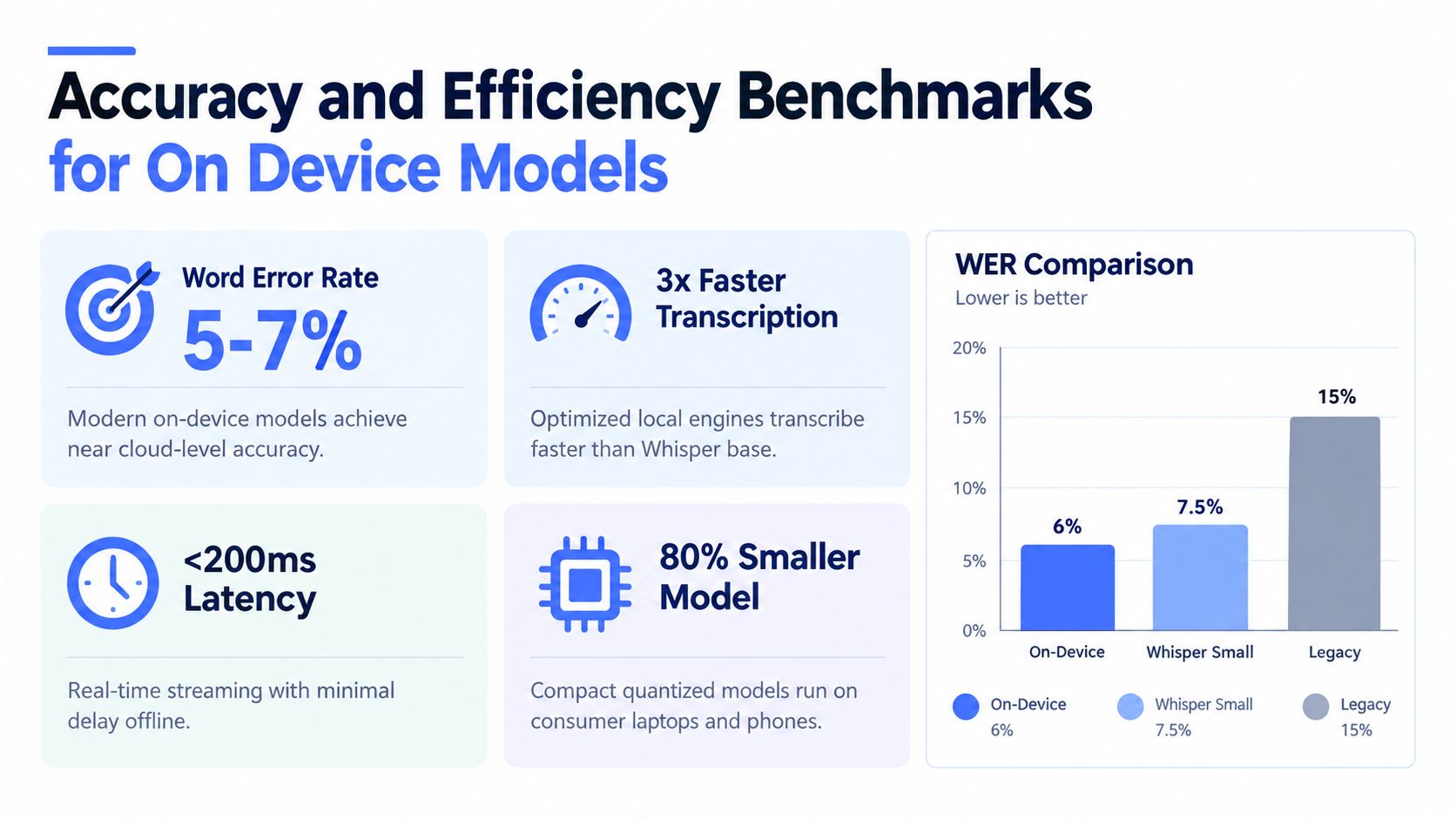
Benchmarks show whether a local model can meet a workflow's requirements, rather than merely appear promising. Apple's on-device SpeechAnalyzer reportedly outperformed Whisper Small and an older system recognizer on the same test set, recording 2.12% WER on clear English speech and 4.56% WER on more difficult speech, according to the Apple benchmark paper. Those results indicate that on-device speech recognition can support clean dictation at a high level when the software and hardware are well matched.
Efficiency determines whether that accuracy remains useful during continuous work. Benchmark reporting for Leopard Speech-to-Text compared its offline engine with Amazon, Azure, Google, IBM Watson, and Whisper models across six languages. It describes Leopard as 12x more efficient than Whisper Base and 6x more efficient than Whisper Tiny, while outperforming both in supported non-English languages. The Leopard model benchmarks provide the comparison context. A model that consumes fewer resources can respond sooner and reduce battery or processor load during repeated dictation.
How to read those numbers
A lower WER generally means fewer corrections, but benchmark accuracy does not measure the entire interaction. A slow model can make short notes feel awkward even when its transcript is precise. An efficient model may respond quickly yet struggle with multilingual speech, accents, specialist terms, or code-switching.
Hardware changes the result. A model that feels immediate on a recent laptop may lag on an older phone or run with reduced settings. Language support matters just as much. Some engines prioritize clean English, while others accept a small accuracy trade-off to remain light enough for consumer devices and broader language coverage.
The benchmark table narrows the options, but it cannot replace a device-specific test. Disconnect the device, dictate representative phrases, switch between your working languages, and measure both response delay and correction effort. That test reveals whether the engine remains usable in the conditions that matter.
Rule of thumb: if a local model is accurate only after delayed batch processing, it is not solving the same problem as cursor-level dictation.
A practical buying standard combines three checks: accuracy for your language and vocabulary, response speed on your hardware, and resource use during sustained work. Local voice to text succeeds when all three stay within the limits of your workflow.
Real World Use Cases Where Local Voice to Text Wins
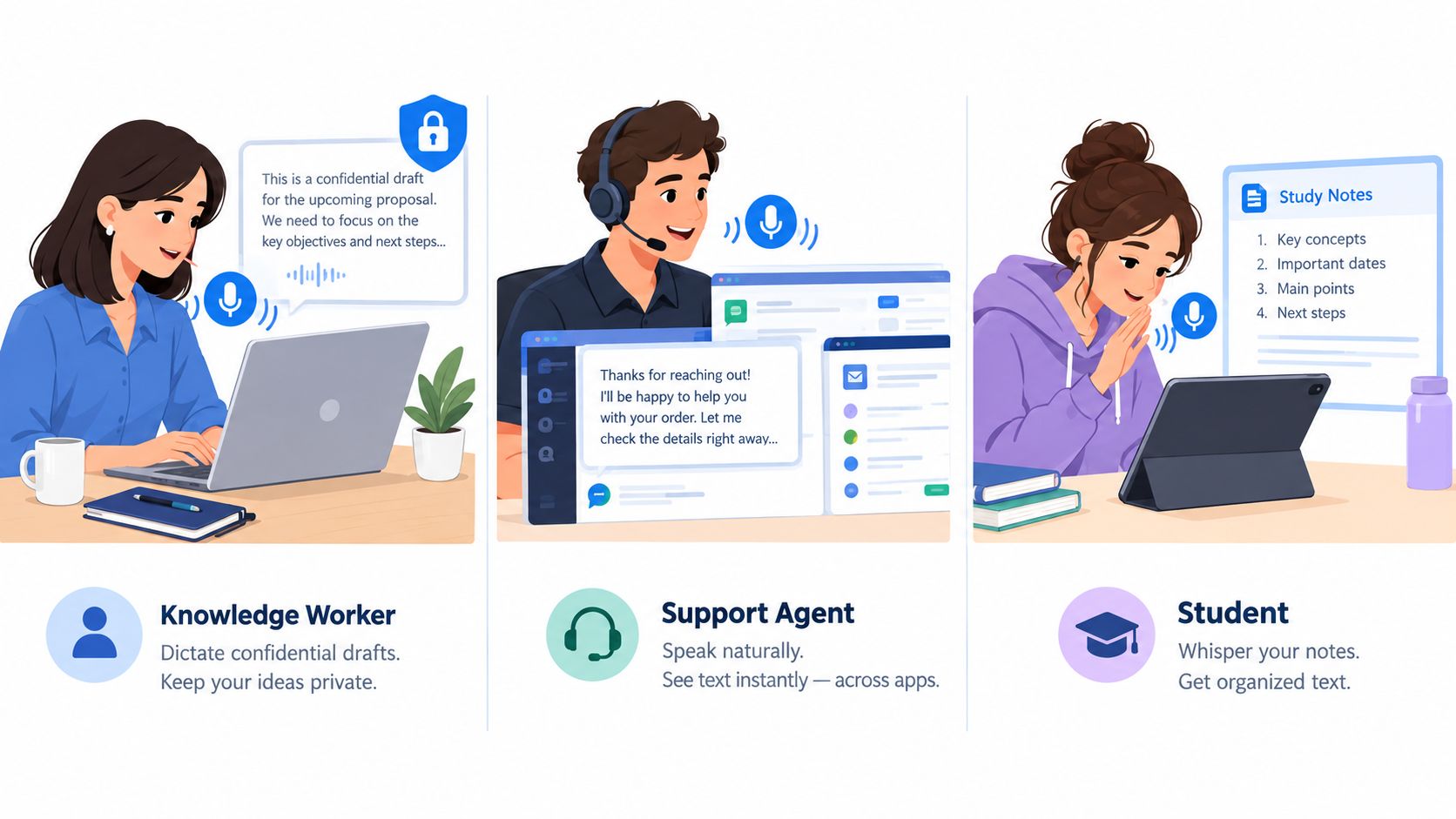
A confidential draft can make cloud dictation the wrong default. A knowledge worker may dictate performance notes, merger comments, incident reports, or client follow-ups without wanting audio or transcripts stored on a remote service. Local processing keeps that material on the device, reducing the need to assess upstream retention before work begins.
Support and sales teams face a different constraint: insertion speed. Agents need to place polished text in a CRM, chat window, or ticketing tool while handling the conversation. A global shortcut and direct cursor insertion can save more time than a small accuracy advantage, particularly when dictation is repeated throughout the day.
Students and researchers often value local processing in ordinary offline settings, such as a lecture hall with weak connectivity, a library where they prefer not to create another account, or a commute where ideas arrive faster than typing allows. The same workflow can support accessibility by reducing repetitive keystrokes and limiting movement between screens and windows.
Where multilingual work changes the picture
Language coverage can change which local engine fits the job. Leopard Speech-to-Text benchmark reporting covered six languages and found that the engine outperformed Whisper Base and Whisper Tiny in each supported non-English language, while using resources more efficiently. Leopard model benchmarks The result does not establish that every local model handles multilingual speech well. It does show that on-device processing is not limited to English.
Hardware and language requirements should therefore guide selection. A confidential legal workflow may prioritize local execution and retention control. A support agent working across several applications may prioritize shortcut access, cursor insertion, and low response delay. A student recording ideas in multiple languages may need broader language support, even if that choice involves more corrections or a larger model.
Run a short trial with representative vocabulary, accents, and language switches before committing. Test the exact device and input method you will use, because a model that performs well on one computer may respond too slowly on another. Check whether the application continues working after network access is removed, then compare correction time with the convenience of a cloud service.
Choose local when the cost of sending audio out is higher than the cost of occasionally correcting a transcript.
The buying decision starts with the working environment, not the feature list. A lawyer, student, and support agent may all need voice to text, but their acceptable trade-offs between privacy, language coverage, insertion speed, and hardware load will differ.
Setting Up and Verifying a Truly Offline Voice to Text Workflow
An app can advertise offline processing while still contacting its servers during setup or use. Verify the behavior before trusting it with sensitive speech. The relevant test covers outbound requests, telemetry, model downloads, syncing, and optional cleanup services, not only where inference runs. Use airplane mode or a network monitor to check each stage. Offline verification guidance
Start with the device configuration. On-device streaming ASR can be limited by power availability and hardware capacity, while offline speech recognition and local AI cleanup on newer Windows systems depend on the machine class, including Copilot+ PCs. On-device power constraints A model that works well on a desktop may lag on a laptop, particularly during sustained dictation, multilingual input, or heavy background activity.
A practical verification sequence
- Download the model, then disconnect. Complete installation first and remove network access. Continued requests indicate that the workflow is not fully offline.
- Test in airplane mode or with a network monitor. Confirm that recording, transcription, and insertion still work without outbound traffic. Test after login as well as during ordinary use.
- Inspect microphone quality. Background noise, clipping, and poor placement can obscure the model's actual performance.
- Dictate into your primary applications. Check cursor-level insertion, punctuation, shortcuts, and behavior when switching between fields.
- Match cleanup to your writing. More aggressive cleanup may suit polished prose. Lighter processing better preserves shorthand, product names, and unusual vocabulary.
Run the sequence with representative phrases, accents, language switches, and the terminology used in your work. Record response delay, missing words, corrections, battery impact, and failures after longer sessions. Those observations distinguish a model limitation from insufficient power headroom, competing processes, or an unsuitable language configuration.
The result should be a workflow decision, not a feature checklist. Keep local processing as the default when the device sustains acceptable latency and the privacy benefit outweighs correction time. If performance degrades, a smaller model, different quantization, or a hybrid fallback may fit better than abandoning local transcription entirely.
For a practical reference, compare your results with this offline voice-to-text app guide. Treat its workflow recommendations as a starting point, then verify the specific application, device, and network behavior yourself before using local dictation for confidential work.
Choosing the Right Local Voice to Text Setup for Your Needs
Choose the setup according to privacy requirements, device capacity, and correction time. Fully local processing suits sensitive material. Cloud processing may be easier on a weak device or when you need broad language support. Hybrid workflows keep local dictation as the default and send selected tasks online only when necessary.
Hardware can determine whether a capable model feels practical. Industry research on on-device streaming ASR identifies power constraints as a continuing barrier to always-on dictation. On-device power constraints Newer computers may sustain responsive local transcription, while limited processors, memory, or battery capacity can create delays and interruptions. Match model size and language support to the machine you use, not the specifications of a test device.
Voice Control Pro offers cursor insertion, a local dictation mode, and Fly Mode, which keeps processing on the computer. Its free local mode supports unlimited on-device dictation. It fits workflows where speech should appear directly in the active field rather than in a separate transcription window. See this offline voice-to-text app guide for a practical comparison, then verify the app's behavior on your own hardware.
Test the same representative passage offline and online. Disable the network, confirm that transcription still works, and watch for hidden fallback behavior. Compare delay, language handling, cleanup, battery use, and correction effort. Make local, cloud, or hybrid your default based on sustained performance and the privacy value of keeping audio on the device.
If you need cursor-level insertion with local processing, visit Voice Control Pro. Its local options support privacy-focused dictation with fewer workflow interruptions.