
Most advice about typing and carpal tunnel starts in the wrong place. It tells people to stop typing, as if the keyboard itself is the villain, when the evidence points to a more complicated mix of wrist posture, force, mouse use, and total time on task. If you work at a computer all day, the useful question isn't “Should I quit typing?” It's “How do I reduce the load on the median nerve while still getting my work done?”
That shift matters because the research doesn't line up with the old folk wisdom. Large studies have often failed to show keyboarding as a strong causal risk factor, and one worker study even found lower CTS prevalence with higher reported keyboard use, from 5.2% in the no-keyboard group to 2.6% in the highest-use group, with a significant trend test, P=0.032 (PubMed). At the same time, lab studies show typing can still raise carpal tunnel pressure and trigger short-term nerve swelling, so dismissing keyboard work entirely would be just as misleading (PubMed, PMC, PubMed).
If you're trying to figure out whether your symptoms are “just typing” or something that needs attention, see how much your carpal tunnel claim can depend on symptom documentation and work history. The bigger point is simpler. You don't need fear, but you do need a better model.
Table of Contents
- Why Typing and Carpal Tunnel Is a More Complicated Story Than You Think
- What Carpal Tunnel Syndrome Actually Is
- What makes CTS different from ordinary wrist pain
- How Typing Loads the Median Nerve
- The two forces that matter most
- Reading Your Symptoms and Workstation Like a Clinician
- Symptom clues that deserve attention
- A Day in the Life of a Wrist-Smart Knowledge Worker
- Treatment Options From Self-Care to Surgery
- Start with the least invasive options
- When clinicians add therapy or procedures
- When Voice Dictation Becomes a Real Alternative
- Your 7-Day Plan and the Red Flags You Should Not Ignore
Why Typing and Carpal Tunnel Is a More Complicated Story Than You Think
The cleanest myth to retire is the idea that typing alone causes carpal tunnel syndrome. The body rarely works that neatly. In the historical literature, keyboarding by itself has often looked less dangerous than people assume, and one major review found that computer or typewriter use was inversely associated with CTS in comparisons against the general population or other occupational groups, with a pooled odds ratio of 0.72 (PubMed).
That does not mean keyboard work is harmless. The same review found a different pattern inside office settings, where CTS was positively associated with computer or typewriter use, mouse use, frequent computer use, frequent mouse use, and longer duration of computer work. That split matters because it points to the office setup itself, especially desk height, mouse habits, and long stretches of repetition, as part of the risk picture.
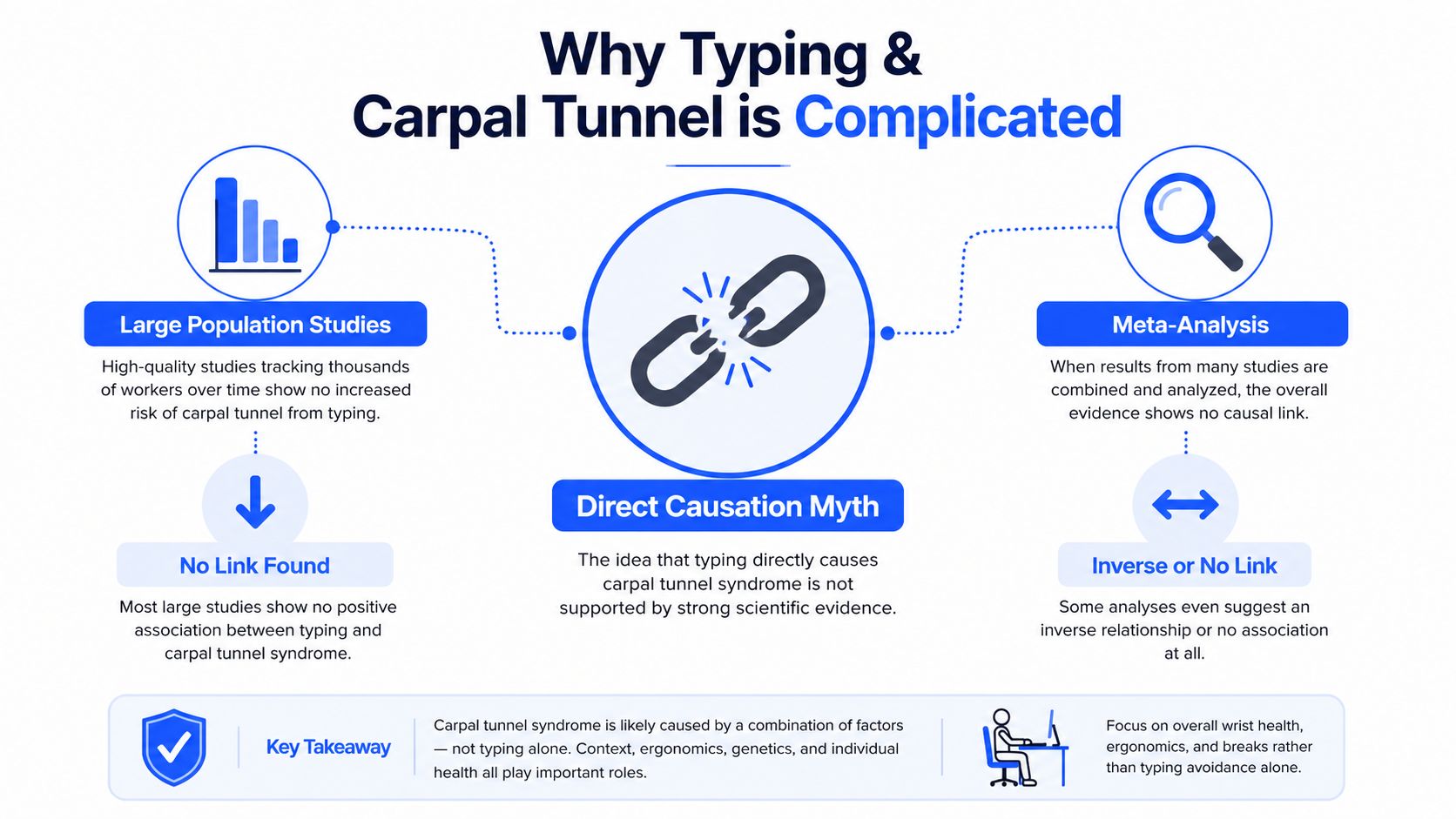
Practical rule: do not ask whether typing is “the cause.” Ask whether typing, mouse use, and posture are adding up to more load than your wrist can comfortably handle.
Lab work fills in the missing mechanism. Typing can raise pressure inside the carpal tunnel even when posture is controlled, and wrist extension or radial deviation adds still more stress (PMC). Another study showed that continuous typing can produce measurable median nerve swelling that settles after rest, which helps explain why symptoms often show up after long sessions instead of the first minute at the keyboard (PubMed).
That is why the right response is a better framework, not panic. Posture plus volume plus rest explains more than any single culprit does, and it leaves room for practical changes that reduce strain without pretending you can work all day with no hand use at all. If you have ever wondered whether your pain is “real enough” to care about, the answer is yes, and the next question is what your work pattern is doing to your wrist. If you need help judging that in a real-world claim context, you can see how much your carpal tunnel claim.
What Carpal Tunnel Syndrome Actually Is
Think of the wrist as a rigid tunnel with a busy cable running through it. That tunnel is the carpal tunnel, and the cable is the median nerve, the nerve that carries sensation to the thumb, index finger, middle finger, and half of the ring finger. When something squeezes that cable, the nerve complains, and the result is carpal tunnel syndrome.
What makes CTS different from ordinary wrist pain
General wrist soreness can come from tendons, joint irritation, or even how hard you're gripping a mouse. CTS is more specific. The classic pattern is numbness, tingling, or burning in the median-nerve fingers, often worse at night or after repetitive use, sometimes with weak grip or dropping things.
That's why people get confused. A sore wrist after a long day doesn't automatically mean CTS, and CTS doesn't always announce itself with dramatic pain. The sensory pattern matters more than the ache itself. If your thumb side feels asleep, or your first three and a half fingers tingle while the pinky stays normal, that's a clue worth taking seriously.
A practical comparison helps. Tendon problems tend to hurt with movement and pressure. CTS tends to create nerve symptoms, especially numbness and tingling. Arthritis usually feels more joint-centered and stiff. Thoracic outlet syndrome can mimic hand symptoms, but the compression point is elsewhere, higher up in the neck and shoulder region.
For a plain-language comparison of symptom patterns, is it carpal tunnel or tendonitis is a useful reference point if you're trying to separate tendon pain from nerve trouble.
The most useful symptom question is not “Does my wrist hurt?” It's “Do I get numbness or tingling in the median-nerve fingers, especially at night or after repetitive hand work?”
Once you know that vocabulary, your own body becomes easier to read. You can describe the problem in a way a clinician can use, instead of saying only that your wrist feels “off.” That specificity helps because the next step depends on what kind of tissue is being irritated, not just on the fact that your hand hurts.
How Typing Loads the Median Nerve
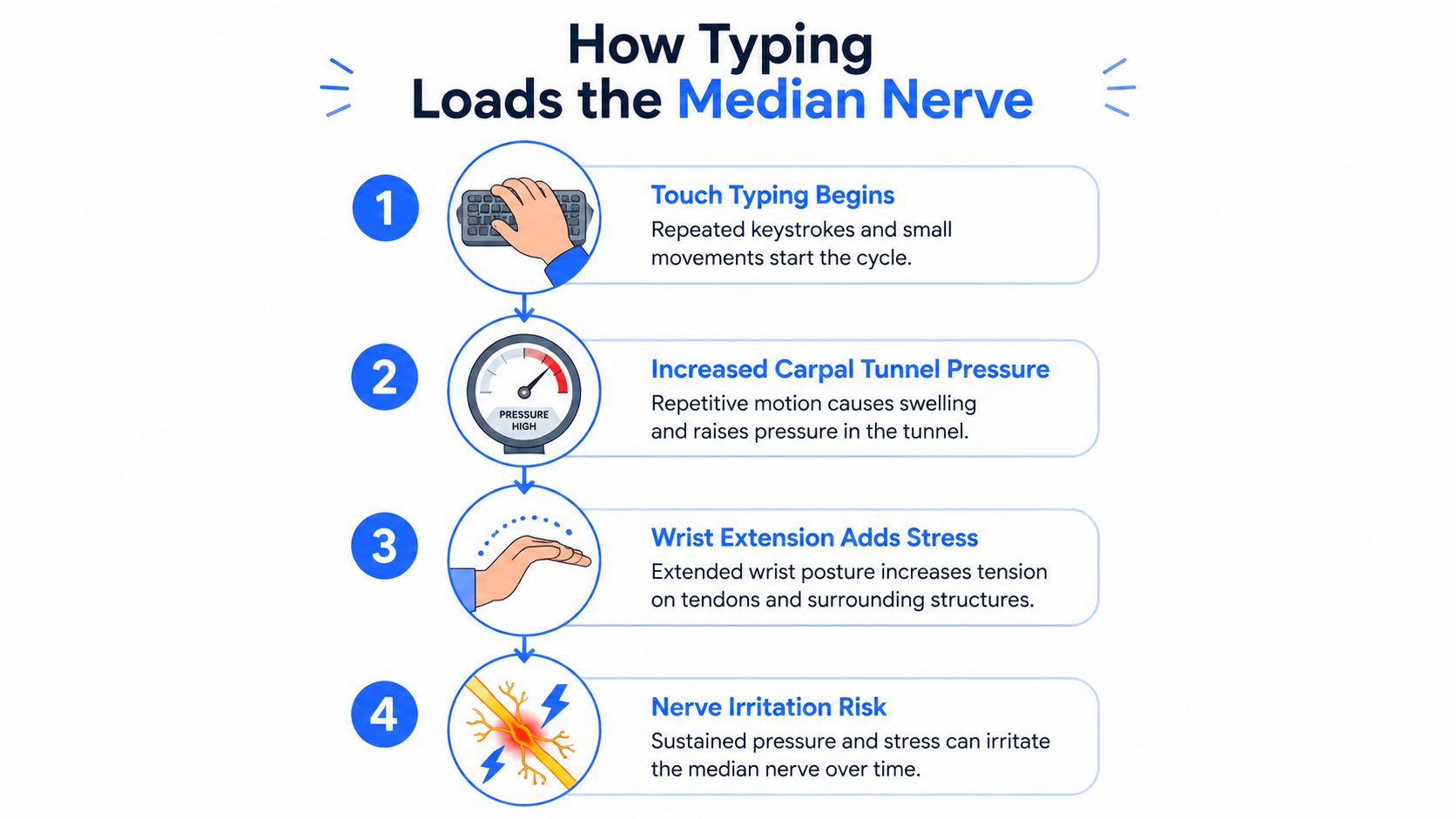
Typing is repeated hand work, but the wrist does not absorb that work evenly. The median nerve runs through a narrow passage at the wrist, and typing can raise the pressure around it, especially when the hand stays bent for long stretches. In a controlled lab study, touch typing raised carpal tunnel pressure by a mean of 0.53 kPa compared with holding the hands suspended over the keyboard, and wrist extension or radial deviation raised pressure as well.
The two forces that matter most
That pattern gives you two practical levers. Keep the wrist as close to neutral as you can. Neutral means the hand is not cocked up, collapsed down, or angled toward the thumb or pinky side. Then shorten the time you stay in any loaded position, because pressure is only part of the story. Duration matters too.
The nerve can also react to sustained work in a visible way. In one study, the median nerve's cross-sectional area and swelling ratio increased after 30 and 60 minutes of typing, then returned to baseline after 30 minutes of rest (PubMed). That is a useful reminder for knowledge workers. The nerve is not just being asked to endure a long session. It is responding to the load, and it can settle when the load stops.
A few setup changes follow directly from that evidence:
- Lower or flatten keyboard tilt: a steep back-up tilt can push the wrist away from neutral.
- Try a split or tented keyboard: these layouts can make it easier to keep the forearm and hand aligned.
- Use a timer for breaks: do not wait for pain. A scheduled pause is easier to follow than a signal that arrives late.
- Keep the mouse close to the keyboard: reaching away increases time in a strained position, especially if you spend long periods in spreadsheets or design tools.
- Use voice dictation as a rotation tool when typing volume is hard to cut: it can reduce continuous keyboard load during drafting, note-taking, or email bursts.
Practical rule: if a session is long enough to make your hand feel hot, tight, or tingly, rest should have happened earlier.
The short version is simple. Typing can add pressure, posture can add more, and rest can reverse part of the nerve response before it grows into a bigger problem. That is why a wrist-smart setup beats any single accessory that promises to fix everything on its own.
Here's a useful video demo of the basic mechanics.
Reading Your Symptoms and Workstation Like a Clinician
Symptoms tell part of the story, but your workstation often explains why they're showing up. If you want a practical self-check, start with the body first. Then look at the desk, because the two are connected more often than people think.
Symptom clues that deserve attention
Classic CTS usually shows up as nighttime numbness or tingling, especially in the thumb, index, middle, and part of the ring finger. Some people notice a weak grip, clumsiness, or dropping objects because the hand doesn't quite “listen” the way it should.
Not every hand symptom is CTS, and not every ache is minor. Pain at the base of the thumb, forearm soreness, or general wrist stiffness may point somewhere else, but it still deserves evaluation if it keeps returning. The important pattern is persistence, nerve-like sensations, or symptoms that interrupt sleep or daily tasks.
A quick at-desk screen can help you decide whether it's time for a formal exam. Phalen's maneuver recreates symptoms when you hold the wrists flexed, and Tinel's sign may reproduce tingling when the median nerve is tapped at the wrist. These are not a diagnosis by themselves, but they're useful flags when the symptom pattern already looks suspicious.
| Setup Element | Target Position | Common Mistake |
|---|---|---|
| Monitor height | Top line near eye level | Screen sits low, chin drops forward |
| Elbows | Roughly 90 degrees | Arms reach upward or hang too low |
| Keyboard | Flat or negatively tilted | Back edge lifted, wrists extend |
| Mouse | Beside keyboard at same height | Mouse placed far out to the side |
| Feet | Fully supported | Feet dangle or tuck back under the chair |
For a broader ergonomic checklist, the guide at this repetitive strain injury prevention resource pairs well with a workstation audit.
If the desk setup forces your wrists to bend just to reach the keys, the problem may be the furniture before it's the keyboard.
A clinician's eye is basically this same process, just more formal. They listen to the symptom map, watch how your wrist moves, and compare that to your setup. Doing a rough version at home gives you a head start and helps you talk about the problem in specifics.
A Day in the Life of a Wrist-Smart Knowledge Worker
A good prevention plan doesn't look like a second workout. It looks like a normal workday with a few deliberate pauses built in. The point is to keep the wrist from spending hours in the same stressed position.
Maya, a project manager, starts with a 60-second reset before logging in. She opens her hands, gently flexes and extends the wrists, and does a couple of slow nerve-glide motions. Then she checks that her keyboard is flat, her mouse sits close, and her elbows aren't creeping up toward her shoulders.
During the morning, she works in focused blocks. After a typing-heavy burst, she uses a 30-second break to let her hands drop, stand up, or look away from the screen. The breaks are short on purpose. She doesn't need a full routine every time, just enough to interrupt sustained load before the wrist stays loaded too long.
The habit that sticks is the one that fits inside the task, not outside it.
By afternoon, she changes the mix of work. She batches reading, call prep, and inbox triage together, then saves the heaviest drafting for a window when she can also take a better break afterward. That keeps high-volume keying from stacking back-to-back with no recovery.
If she has a long writing session, she also uses a dictation block for the first draft and saves the keyboard for cleanup. That approach is especially helpful when the work is repetitive, since not every sentence needs to be typed by hand. If you want a speed-focused complement to that habit, improve typing speed and accuracy can help you reduce wasted keystrokes on the parts you still do type.
She gives her hands a short cool-down, especially if they feel stiff. The win here isn't perfection. It's keeping the wrist from being trapped in one position for hours, every day, without relief.
Treatment Options From Self-Care to Surgery
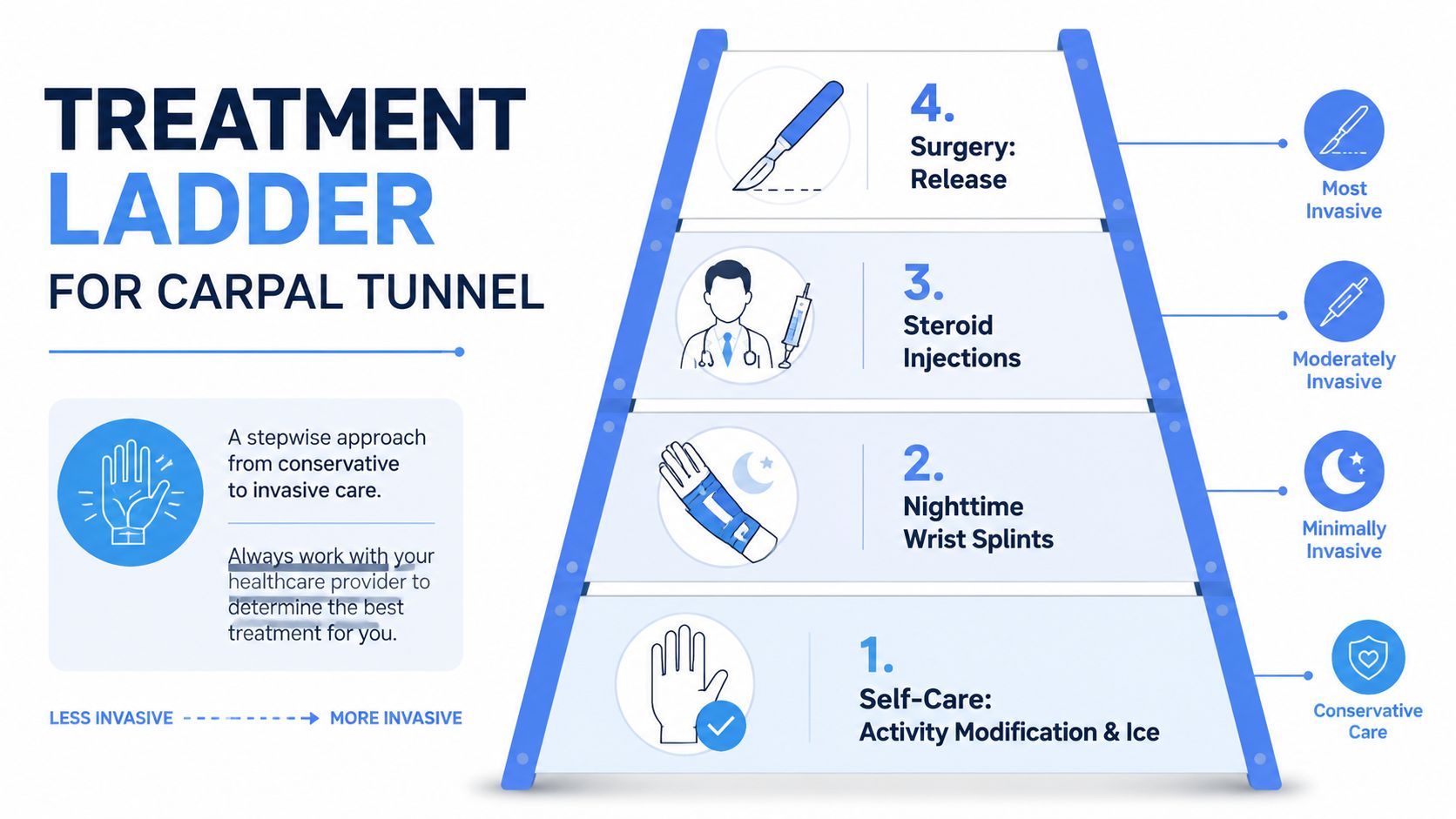
Treatment works best when it matches severity. Mild symptoms don't need the same response as persistent numbness or weakness, and a good clinician usually walks you up the ladder rather than jumping straight to the most invasive step.
Start with the least invasive options
The first layer is activity modification. That means changing the tasks, posture, or timing that keep provoking symptoms. Nighttime neutral-wrist splints are another common step because many people flex their wrists in sleep without realizing it, and that can worsen nerve irritation by morning.
Over-the-counter anti-inflammatories are sometimes used for pain control, but they don't fix the compression itself. They can be a short-term support, not the whole plan. If the symptom pattern keeps returning, the conversation usually moves toward formal therapy.
When clinicians add therapy or procedures
Hand therapy, nerve-glide exercises, and ergonomic coaching can help people learn how to move and load the wrist more intelligently. For confirmed CTS with measurable nerve involvement, a clinician may also discuss corticosteroid injection. That option is aimed at reducing inflammation and pressure enough to calm the nerve, especially when conservative steps haven't been enough.
Surgery sits at the far end of the ladder. Carpal tunnel release cuts the transverse carpal ligament so the median nerve has more room. People often worry surgery means the wrist is “broken,” but the goal is the opposite, to remove a fixed squeeze point so the nerve can recover.
Recovery varies with the person and the job, but the key principle is simple. Surgery tends to work best before nerve damage becomes severe, which is why delayed evaluation can matter. If symptoms are getting more persistent, that's a reason to talk with a clinician sooner rather than trying to outwork the problem.
When Voice Dictation Becomes a Real Alternative
Voice dictation helps most when the keyboard volume is high. Long email drafts, document creation, note-taking, AI prompting, and late-night work are the places where speech can replace a lot of repetitive finger motion without slowing the task down. Short chat replies are different. If you only need a sentence or two, speaking may create more friction than it saves.
That's why voice input works best as a load-reduction tool, not a total replacement. You still want neutral wrists, sensible breaks, and medical care when symptoms warrant it. Dictation just lowers the number of keystrokes your hands have to absorb on heavy-input days.
For people dealing with related nerve irritation, the broader principle is the same as in this guide to cubital tunnel syndrome relief, reduce the positions and repetitions that keep provoking the nerve. The anatomy is different, but the workday strategy overlaps.
Voice Control Pro fits that kind of workflow because it inserts clean text directly at the cursor across apps, so you can speak a first draft and keep moving without copy-paste detours. A global shortcut, local-only processing in Fly Mode, and a free local dictation mode make it a practical option for people who want to lower typing load without changing their whole setup.
If you want a deeper breakdown of the workflow idea, reducing wrist pain with voice input shows how dictation can sit alongside ergonomics instead of replacing them.
Use dictation for volume, typing for precision, and breaks for recovery. That combination is usually more realistic than trying to “fix” your wrist with one tool.
Your 7-Day Plan and the Red Flags You Should Not Ignore
Start small and make the changes stick.
- Day 1, workstation audit: Fix one thing, such as keyboard height or mouse position.
- Day 2, movement timer: Set a 30-minute reminder to pause and reset before your hands lock into one position.
- Day 3, warm-up: Add a 60-second wrist and hand routine before your first work block.
- Day 4, voice block: Replace one long typing stretch with dictation for a draft or note.
- Day 5, symptom check: Notice whether tingling, numbness, or grip changes are better, worse, or unchanged.
- Day 6, night support: If symptoms are present, try a nighttime neutral-wrist splint.
- Day 7, decide next steps: If the problem hasn't improved, book a clinician visit instead of guessing longer.
Stop self-experimenting and get evaluated promptly if you have persistent numbness, symptoms that wake you multiple nights, weakness or visible thumb-pad wasting, or symptoms after an acute injury. Those signs deserve more than a desk tweak.
Voice Control Pro gives you a way to cut down the heaviest typing blocks without giving up fast, polished input. If you're trying to protect your wrists while still working efficiently, visit Voice Control Pro and see how voice dictation can fit into a wrist-smarter workflow.