
The email is accurate, but it's stiff, overlong, and due before your next meeting. You ask an AI to make it clearer. The new version reads smoothly, but now it sounds as if you've promised a delivery date that was never confirmed. That's the risk with a rewrite: the prose can improve while the meaning shifts without anyone noticing.
When you rewrite text with AI, the original already carries facts, names, qualifications, and a writer's intent. The job isn't to create a polished-sounding replacement at any cost. It's to improve the text while keeping its meaning, uncertainty, and voice intact.
Table of Contents
- Why Rewriting Text with AI Changes the Draft
- Build a Context-First Rewrite Workflow
- Prompt Patterns That Keep Your Meaning Intact
- Check Meaning Voice and Hidden Drift
- Choose a Rewrite Tool and Know When to Disclose
- Put the Rewrite Workflow into Daily Use
Why Rewriting Text with AI Changes the Draft
A support response needs to be shorter, a report paragraph easier to scan, or a study note clearer before sharing. Each draft already carries decisions: what happened, what remains uncertain, and what the writer is willing to promise. Rewriting should preserve those decisions while changing the wording.
AI rewriting differs from generating a first draft. A generated draft starts with instructions and may fill gaps with plausible details. A rewrite starts with existing text, which gives the model something to follow, but doesn't ensure it will keep every distinction. “We may be able to help” can become “we'll resolve this.” A qualified finding can turn into a firm claim.
Research by economists Shakked Noy and Whitney Zhang illustrates the potential benefits. In their study, roughly half of 444 college-educated professionals received access to ChatGPT while completing occupation-specific, incentivized writing tasks. Across the experiment, AI assistance reduced average completion time by about 40% and increased independently evaluated output quality by 18% (the Noy and Zhang experiment).
The results suggest AI can help with more than producing a first draft. It can help reorganize, clarify, and polish professional writing. The study involved short, incentivized assignments, not every kind of real-world editing, and gains were larger for lower-performing participants. Treat the findings as evidence of potential, not a promise about your next report, email, or application.
Before accepting a rewrite, check what changed besides the phrasing. Did it strengthen a commitment, remove a qualification, or present uncertainty as fact? A useful rewrite makes the text easier to read or better suited to its audience without changing what the writer meant. Fluency is only one measure. If the meaning has drifted, the draft needs another edit before it is sent.
Build a Context-First Rewrite Workflow
A sentence doesn't carry its whole meaning on its own. The paragraph around it may explain what “this” refers to, while the audience determines whether a direct phrase sounds clear or abrupt. Give an AI the context a careful editor would need, rather than asking it to improve a line in isolation.
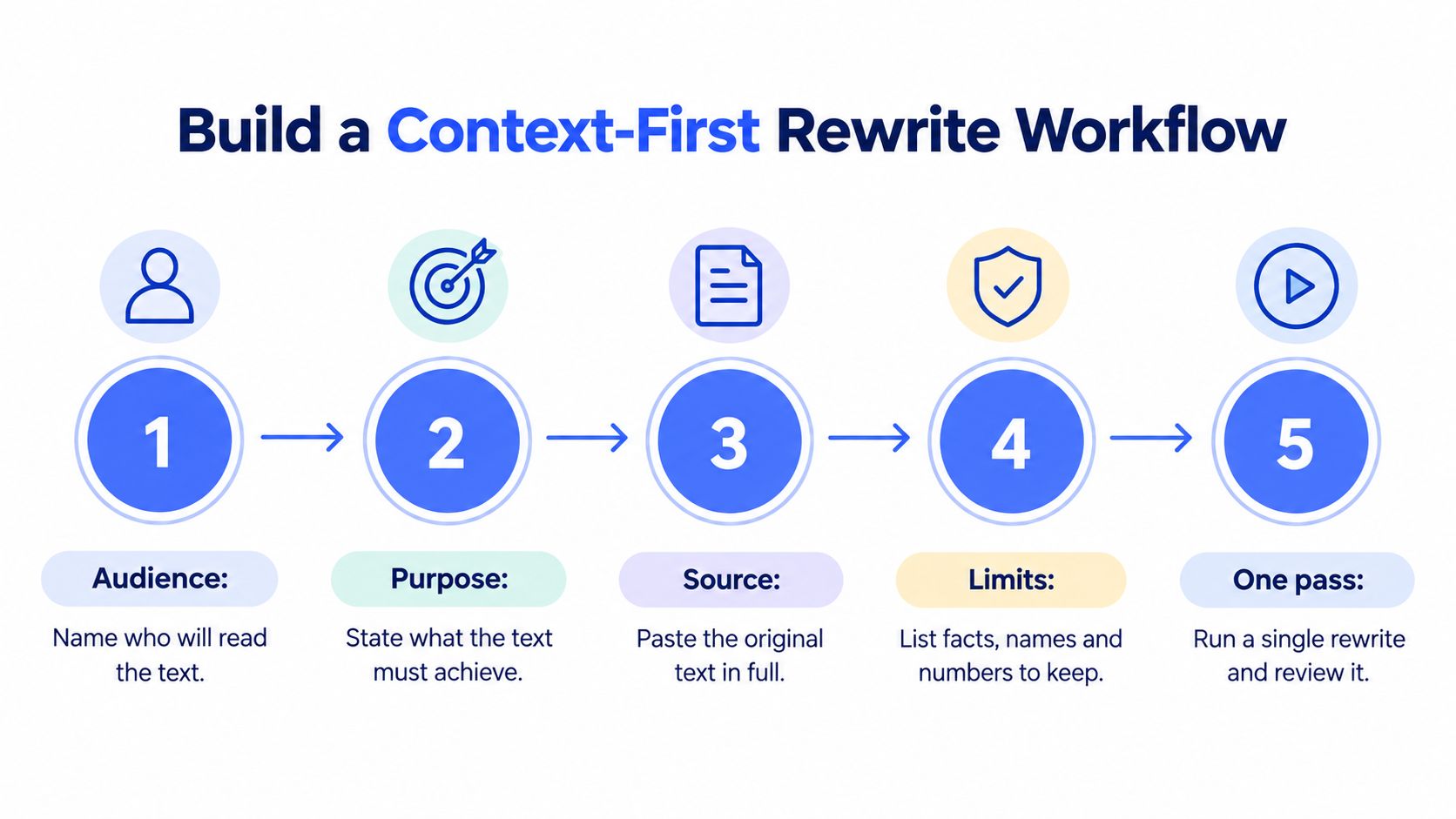
Start with the original passage and its purpose. Include the surrounding paragraphs when they affect meaning, name the intended reader, and identify facts that must stay unchanged. For example, a note to a colleague and a reply to a frustrated customer might describe the same delay, but they need different framing.
Next, name the transformation you want. “Make this shorter and warmer” is more useful than “make this better.” Add a clear boundary: preserve the meaning, don't introduce new facts, and don't change any commitments or qualifications. Ask for one rewrite and a brief list of substantive changes, so you can see whether the AI altered more than wording.
Context matters because people have preferred context-aware stylistic rewrites in research comparing contextual and non-contextual versions. Common sentence-level measures such as ROUGE and SBERT correlated poorly with human preferences, with reported correlations ranging from 0 to 0.3 (research on context-aware stylistic rewriting). In plain terms, a rewrite can share many words with the original and still miss what a reader needs.
Consider a customer reply that says, “We're investigating the issue and will update you when we know more.” You want it to feel warm, not cold. If the rewrite adds “We'll issue a refund today,” it may sound helpful, but it has added a commitment the source never made.
Acceptance gate: Keep the rewrite only if it preserves meaning, follows your instruction, fits the audience, reads clearly, and stays factually accurate.
Before sending business, legal, medical, or customer-facing text, get human approval if a rewrite changes commitments, qualifications, safety language, or customer intent. The person responsible for the message must be able to verify those changes against the source.
Prompt Patterns That Keep Your Meaning Intact
A vendor update arrives without a confirmed delivery date. You need to make it clearer for a client, but a smoother sentence must not turn uncertainty into a promise. Four prompt patterns can help you control that editorial layer: specify the change, identify what must stay, and ask for a record of substantive edits.
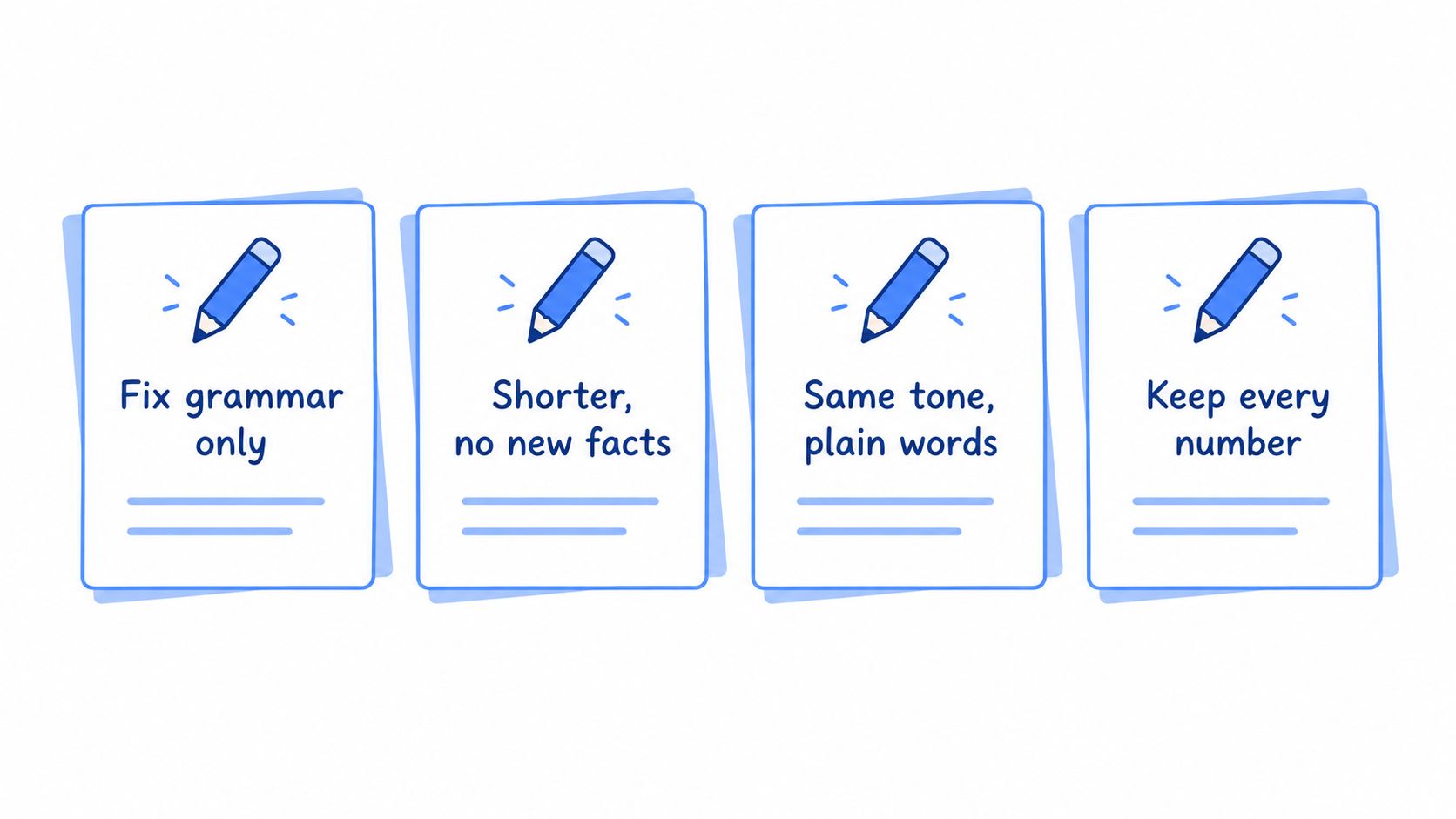
- Grammar and clarity only: “Correct grammar and improve clarity in the text below. Keep my meaning and voice. Don't add facts or remove qualifications. Preserve all names, numbers, and dates. List any substantive changes.”
- Shorter without new claims: “Make this more concise without adding claims or changing the meaning. Keep all numbers, names, and important details. Preserve words that show uncertainty, such as ‘may' and ‘not yet confirmed.’ List what you changed.”
- Tone shift without changed commitments: “Rewrite this to sound warmer and professional. Keep every commitment, deadline, and qualification exactly as stated. Don't make the message more certain or apologetic than the original. Note any substantive changes.”
- Restructure for a named reader: “Reorganize this for a busy executive [or a student]. Make the main point easier to find, but don't add or remove claims. Keep my uncertainty and key terms. Return one version and list what you changed.”
Adapt the pattern to email, support replies, notes, or prompts you're refining. For a structural change, name the reader and what they need to understand. “For a new student who doesn't know this terminology” gives a clearer target than “make it simpler.” Each instruction acts like an editing boundary: it lets the AI change the wording while keeping your meaning and the reader's needs in view.
Apply the patterns to the vendor update: “We're still waiting on the vendor. I don't have a confirmed date.” A faithful client-facing rewrite could be: “We're waiting for confirmation from the vendor and will share an update when we have a confirmed date.” The wording is more polished, but it preserves the delay and uncertainty. By contrast, “The vendor expects to resolve this by Friday” invents both a date and confidence the source doesn't contain.
The distinction matters: fluency can make invented details sound credible. Treat the AI as an editorial layer, not an authority on what happened. Before accepting a change, check that it preserves the source's meaning, keeps uncertainty visible, and does not add a commitment. The change list can help direct your comparison, but it is not proof that every substantive edit has been caught.
Check Meaning Voice and Hidden Drift
A rewrite can read cleanly and still alter what the original says. In a preference study, expert writers ranked professionally edited text highest, AI-edited text second, and unedited model-generated text last. Readers preferred the AI-edited version to the unedited version, but it did not match the quality of professional editing (the preference study on AI-edited text). Fluency is one test, not the final measure. Check whether the rewrite preserves meaning and uncertainty.
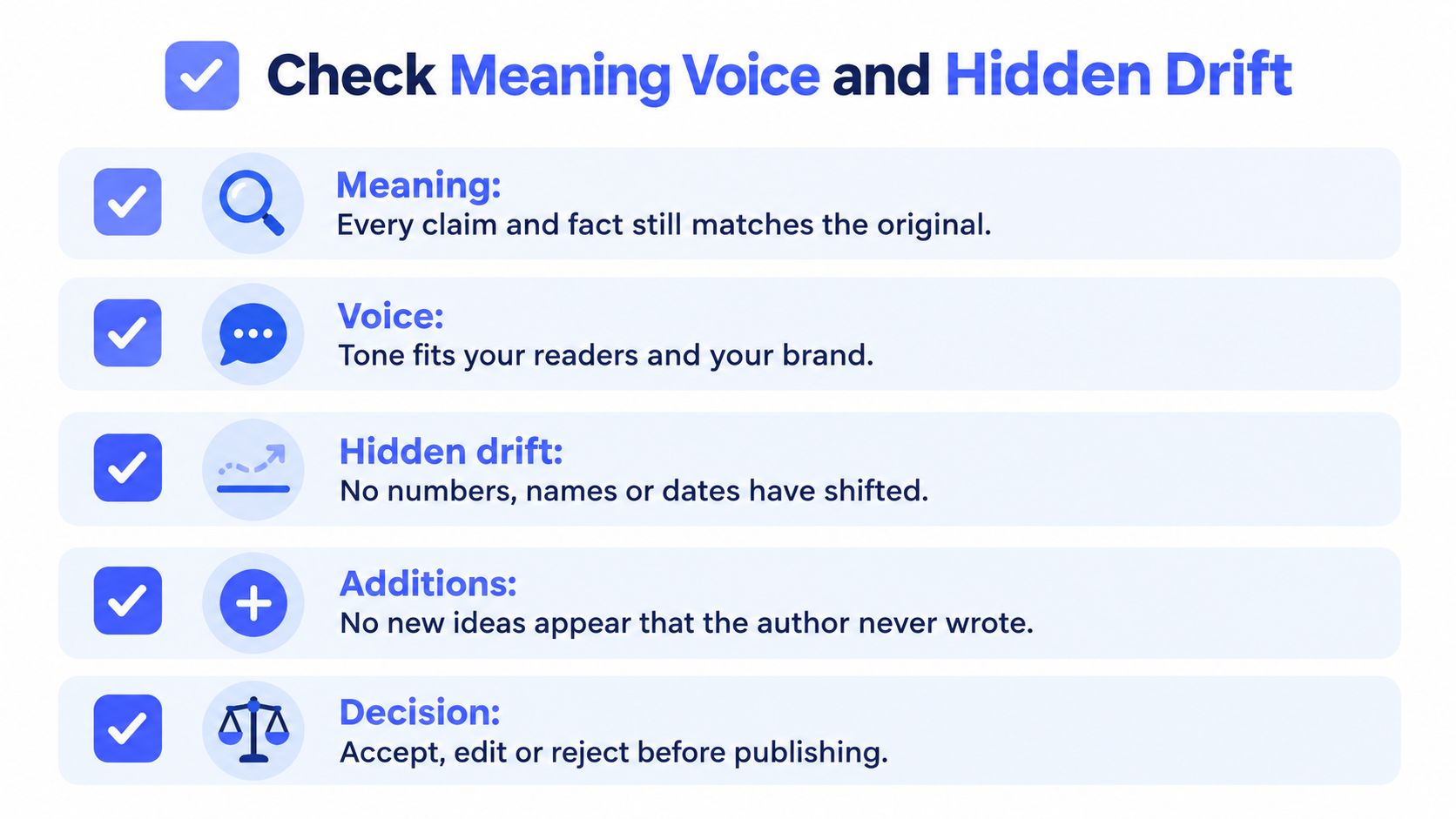
Compare the original and revised text side by side. Treat each change like an edit in a marked-up draft: ask what it improves, then verify that it has not changed the facts, scope, or tone. Look for claims, numbers, qualifiers, names, citations, commitments, and emotional tone. A missing “may” can turn uncertainty into a promise; a newly added deadline can make an unsupported claim sound settled.
| Check | What to look for |
|---|---|
| Claims and facts | Does every statement still match the original? |
| Qualifiers | Did “may,” “might,” or “not yet confirmed” disappear? |
| Names, numbers, and dates | Are they unchanged and attached to the right claims? |
| Citations and commitments | Did the rewrite add a source, deadline, or promise? |
| Voice and emotional tone | Does it still sound appropriate for the writer and reader? |
Set boundaries before asking for an edit: grammar only, preserve uncertainty, keep my voice, or do not add facts. These instructions can help non-native English writers, support teams, and people writing across cultures. Hedging may communicate accurate uncertainty, and a regional phrase may be deliberate. Do not treat either as an error without checking its purpose.
Research on AI-assisted English writing reports gains in grammar, vocabulary, cohesion, and argument structure. Higher-education writing research also flags hallucinations, faulty reasoning, and poor referencing, so polished prose still needs factual review. A review of English-writing studies found that none of the 20 included studies clearly resolved concerns about privacy, algorithmic bias, or transparency (research on English-writing support). These findings support a controlled editorial role for AI: improve the wording, then verify the meaning and any remaining uncertainty.
For practical ways to clean up text, focus on changes you can justify against the source. If a smoother sentence changes the truth, reject it, revise it yourself, or ask for a narrower edit.
Choose a Rewrite Tool and Know When to Disclose
A sentence revised inside a document may need less setup than a paragraph rebuilt for a new audience. Choose a tool based on where your text lives and how much context it needs. A general chat assistant lets you provide background and compare versions. A document editor is handy when the draft is already open. An in-flow assistant can revise selected text without moving it elsewhere.
Voice Control Pro is a cross-platform voice-to-text tool for macOS and Windows that inserts polished transcription in any app. Its Hey Max assistant can rewrite selected text, answer contextual questions, analyze what's on screen, and launch installed apps by voice. Fly Mode processes locally while cloud features are paused, and its free local dictation mode uses an on-device model. Max adds 99+ languages, cleanup levels, a custom dictionary, history, and Hey Max tools. Compare these features with other options in this overview of AI writing assistant software.
Disclosure should reflect the work the AI did and the rules that apply. Correcting grammar in a sentence you wrote is a narrower edit than asking for a new explanation containing claims absent from your draft. The linked ethics discussion of AI disclosure questions whether mandatory disclosure is always justified when AI only edits existing text for grammar, style, or readability. That point does not settle what a school, journal, employer, or client requires. Check the relevant policy rather than treating a general argument as permission to omit disclosure.
| Change type | What the AI may do | Safer default |
|---|---|---|
| Proofreading | Correct grammar, spelling, and punctuation | Check school, employer, journal, or client rules |
| Restructuring | Reorder existing points for clarity | Disclose if required by the relevant policy |
| Tone conversion | Adjust formality, warmth, or directness | Check that voice and commitments remain yours |
| Summarization | Condense material and omit details | Disclose when rules treat AI summaries as assistance |
| Factual expansion | Add explanations, examples, or claims | Verify additions and disclose when required |
| Full generation | Draft new content from instructions | Disclose when the applicable policy requires it |
Treat fluency as a surface check, not proof that the meaning stayed intact. Before sending, confirm that any added explanation is accurate and that uncertainty, commitments, and authorship remain clear. Students, researchers, and employees should follow the rules set by their school, journal, employer, or client. If disclosure is required, a concise line can state: “I used AI to revise wording for clarity and checked the final text for accuracy.” A light edit of your own writing may preserve more of your authorship than a new draft with unverified claims, but you remain responsible for the submitted text.
Put the Rewrite Workflow into Daily Use
Choose a real paragraph you expect to send today, such as an email, CRM note, report line, or study summary. Keep the source visible, tell the AI the audience and the specific change you want, and forbid new facts. Ask it to identify substantive changes before you consider replacing the original.
Then make the human pass: compare the numbers, names, hedges, and promises. Read the revision as the recipient, not just as its author. Decide whether disclosure is needed based on what the AI changed, and follow your organization or school's policy if it applies.
Keep the original and revised text together. The revision shows what you may send; the comparison shows what happened to the meaning. That simple record also makes it easier to undo a polished phrase that added certainty, removed a constraint, or changed the tone in a way you didn't intend.
If you dictate first, an assistant that works where you're already writing can reduce the friction of switching between a draft and a separate chat window. For a voice-first editing routine, see how to edit by voice on desktop. The aim is not to let AI take responsibility for your words. It's to shorten the route from rough draft to sendable text while keeping you accountable for every claim.
Voice Control Pro combines cross-platform dictation with Hey Max tools for rewriting selected text in place, so you can refine a draft without losing sight of the original. Visit Voice Control Pro to explore its editing features, including Fly Mode for local processing when cloud features are paused.