
A lot of managers still frame automation as a headcount story. That misses the bigger opportunity. Process automation delivers an average ROI of 240% within the first 12 months, and 60% of companies reach full payback in under a year, according to business automation statistics compiled by Lead Response. The strongest teams don't treat that as a finance metric alone. They treat it as an operating model upgrade.
That matters because the best process automation benefits show up in places standard ROI decks understate: cleaner handoffs, fewer avoidable errors, tighter compliance, better decision speed, and more room for people to do work that requires judgment. For managers running finance, operations, support, HR, or knowledge-heavy teams, the practical question isn't whether automation helps. It's which benefits matter most, how to measure them, and what hidden costs can erode the gains if the rollout is sloppy.
Table of Contents
- What Are the Real Benefits of Process Automation
- Unpacking the Core Benefits of Process Automation
- Why the benefits stack together
- A KPI table managers can actually use
- Measuring the ROI of Your Automation Strategy
- What goes into a credible ROI model
- A simple accounts payable example
- Process Automation Examples Across Industries
- Department examples that create fast wins
- Why knowledge workers get multiplier effects
- A Practical Guide to Implementing Automation
- Start with process selection, not software demos
- Pilot, measure, then scale
- Avoiding Common Process Automation Pitfalls
- Where automation friction shows up
- How to reduce monitoring fatigue
- Your Next Steps Toward Intelligent Automation
What Are the Real Benefits of Process Automation
The value of automation isn't that software does tasks faster. It's that teams stop spending their best attention on work a system can execute more consistently. That shift changes throughput, quality, and the way managers allocate talent.
A useful way to think about process automation benefits is this: automation is a productivity multiplier, not just a labor substitute. In practice, that means routine approvals move without chasing, data gets entered once instead of copied across systems, and reporting stops depending on whoever remembers to compile it on Friday afternoon. Teams get more reliability, and managers get clearer control over process performance.
That's also why the conversation shouldn't collapse into “cost savings versus jobs.” In many environments, automation improves the work itself. Repetitive effort drops, exceptions become more visible, and people can focus on judgment-heavy tasks like reviewing unusual cases, solving customer issues, or improving the workflow instead of babysitting it. If you want a broader operational view, this guide for business operators on automation is a helpful companion to the management lens used here.
Practical rule: Automate the predictable path so your team can spend its energy on exceptions, decisions, and customer-facing work.
The strongest automation programs also measure benefits beyond finance. A manager should be tracking cycle time, error rates, exception volume, rework, employee effort, and service quality. When those indicators improve together, automation is doing what it's supposed to do. When one improves while two others worsen, the process probably needs redesign, not more bots.
Unpacking the Core Benefits of Process Automation
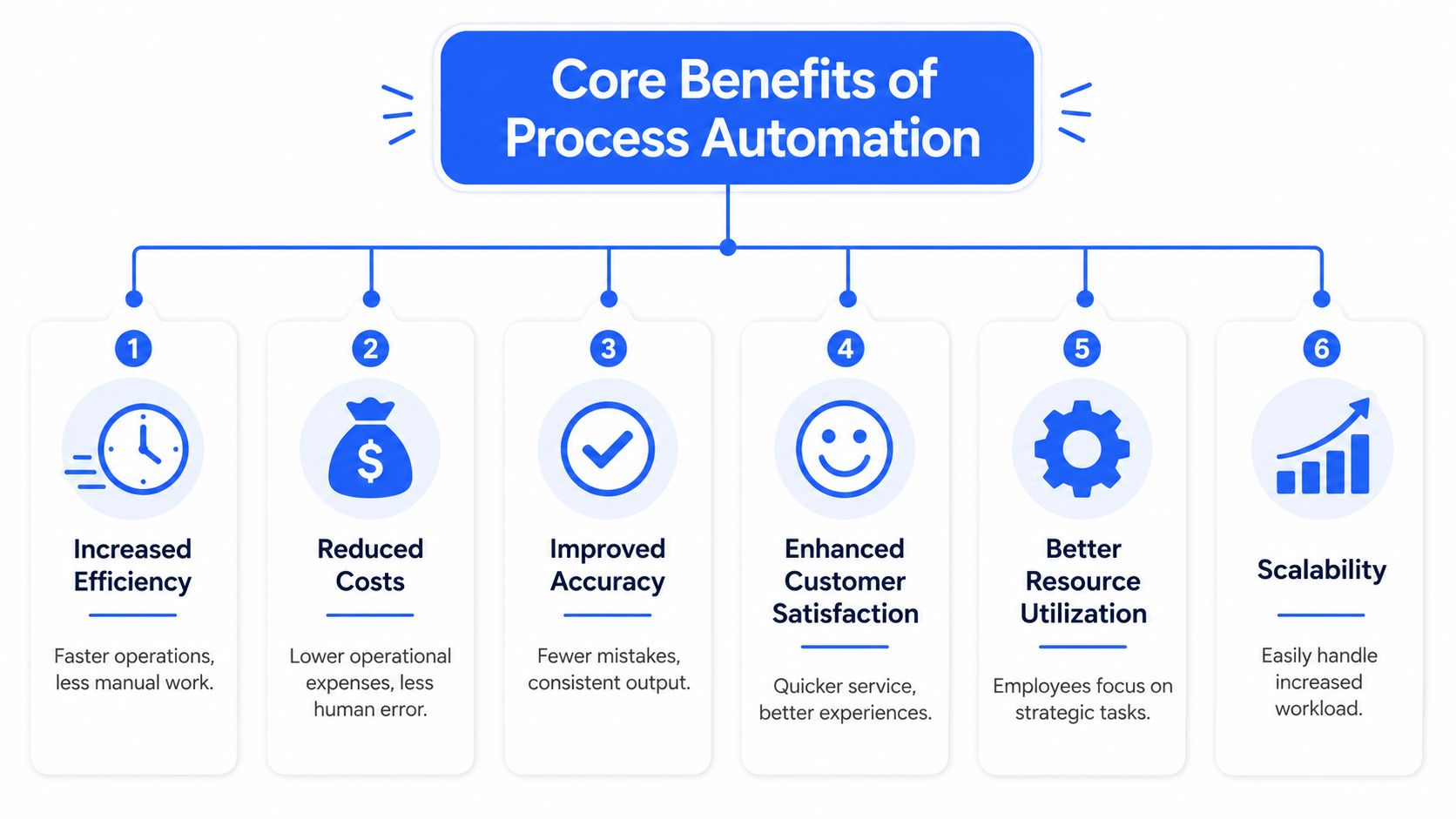
Managers often hear the same vague promises: faster, cheaper, smarter. Those labels aren't wrong, but they're too broad to guide decisions. The six most useful process automation benefits are efficiency, accuracy, cost control, scalability, compliance strength, and employee experience.
Why the benefits stack together
Efficiency is usually the first visible win. Work moves with fewer pauses because a workflow engine doesn't forget, wait for inbox triage, or lose track of a handoff. Think of it as replacing a relay race with a conveyor system. The work still needs oversight, but it spends less time sitting idle.
Accuracy matters just as much. In high-frequency operational work, process automation can reduce manual error rates by up to 90%, which is especially important when manual coding or reconciliation carries a 3–5% baseline error rate. Intelligent automation systems can reach 99.5–99.9% accuracy through consistent validation logic, as outlined by OneAdvanced's overview of scalable process automation. That's not just a quality gain. It cuts rework, audit exposure, and the drag of fixing downstream mistakes.
Direct cost savings follow from both of those improvements. Lower handling time, less rework, and fewer exceptions all reduce the cost per transaction. Many business cases often begin here, but it's rarely the whole story.
After that comes scalability. A manual process often breaks when volume rises because each increase requires more supervision, more coordination, and more repetitive labor. A well-built automated workflow handles higher demand with less disruption. The team still manages exceptions, but the standard path no longer depends on linear staffing growth.
Then there's compliance. Good automation creates a cleaner chain of evidence. Approvals are timestamped, routing rules are explicit, and required steps can't be skipped casually. For regulated teams, that's often more valuable than the raw speed gain.
The last benefit is employee experience, and it's often misunderstood. People usually don't hate hard work. They hate fragmented work, duplicate entry, and preventable cleanup. When automation removes that friction, the work feels more professional.
Automation works best as a digital operating system for repeatable work. It shouldn't replace judgment. It should protect it.
A KPI table managers can actually use
Here's a simple way to connect each benefit to a measurable outcome.
| Benefit | Primary KPI for Measurement | Example |
|---|---|---|
| Efficiency | Process cycle time | Time from request submission to final approval |
| Accuracy | Error rate | Incorrect entries in reconciliation or reporting |
| Cost reduction | Cost per transaction | Cost to process one invoice or one onboarding case |
| Scalability | Volume handled per team | Number of requests completed without added staffing |
| Compliance | Audit exception rate | Missing approvals or policy violations |
| Employee experience | Time spent on repetitive work | Hours reclaimed from manual updates and follow-up |
Measuring the ROI of Your Automation Strategy
Automation projects with a clear baseline and a defensible ROI model get funded more often than projects built on general promises. Managers want to know how many hours return to the team, which errors disappear, what capacity increases, and how long the payback period will be.
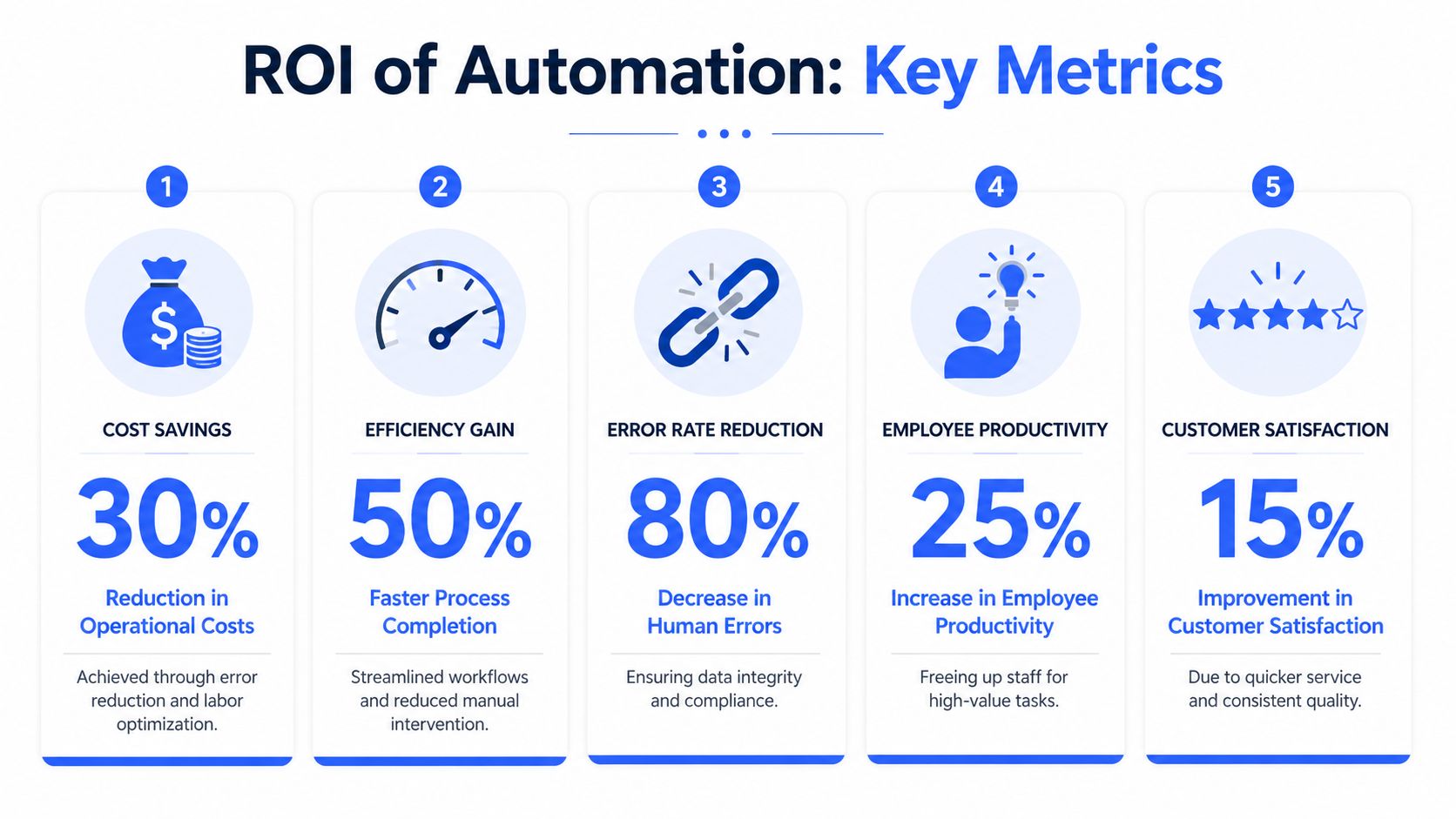
The best ROI cases are small, specific, and grounded in current-state data. Start with one workflow that has enough volume to matter and enough repetition to measure. Then build the model around what your team is dealing with now, not what a vendor demo suggests is possible.
What goes into a credible ROI model
Use four categories, not just one.
- Labor savings
Measure time removed from manual handling, follow-up, data entry, and status chasing. Multiply that by loaded labor cost, but only count the portion that turns into real value, such as avoided overtime, delayed hiring, or reclaimed specialist time. Be honest about what is monetizable.
- Error and rework savings
Put a cost on bad entries, duplicate work, missed fields, exception handling, customer callbacks, and audit prep caused by poor handoffs. In many teams, the strongest return often lies in these areas because rework consumes expensive attention.
- Speed and throughput gains
Faster cycle time has value even if headcount stays flat. That value can show up in quicker invoice approval, faster case resolution, shorter lead response times, or more transactions completed per week.
- Friction reduction
This is the line item many business cases miss. If automation adds clumsy handoffs, extra checks, or constant tool switching, the savings on paper will not show up in practice. Good measurement includes cognitive load. Count how often staff need to re-enter context, correct machine output, or leave one system just to finish a routine task.
Manager's shortcut: If you cannot define the before state in hours, error counts, touchpoints, and exception volume, the after state will turn into guesswork.
A practical way to strengthen the model is to compare the workflow against adjacent service operations. If your plan affects customer-facing work, this framework for evaluating AI customer support platforms shows the kind of financial discipline that keeps software decisions grounded. The same principle applies to internal operations, especially when teams are trying to improve resource allocation across knowledge-heavy workflows.
Modern tools can multiply the return, but only if they remove effort instead of adding another layer to manage. Voice input is a good example for knowledge workers. If a manager can approve, dictate notes, update a CRM field, or log a follow-up without breaking focus, the automation saves both task time and context-switching cost. That gain rarely appears in a vendor calculator, but teams feel it immediately.
A short explainer can help stakeholders who prefer visual context before looking at the spreadsheet.
A simple accounts payable example
Accounts payable is a good test case because the work is repetitive, visible, and easy to baseline. A typical team receives invoices by email, extracts line items, checks them against purchase orders, routes exceptions, and posts approved invoices into the finance system.
Track these numbers before you automate:
- Handling time per invoice: Including review, data entry, and follow-up
- Exception rate: Percentage of invoices that need manual investigation
- Rework time: Hours spent fixing incorrect entries or duplicate processing
- Cost per invoice: Labor plus processing overhead
- Cycle time: Receipt to approval, then approval to payment-ready status
- Touches per invoice: How many people or systems interact with each case
Then add the less visible costs. Measure how often staff have to switch systems, retype supplier information, chase missing approvals, or stop to interpret unclear exception flags. Those are friction costs. They slow throughput and wear down the team, even when the formal process map looks efficient.
The ROI formula stays simple:
ROI = (Annual benefit - Annual cost) / Annual cost
The discipline comes from the assumptions. Use conservative time savings, include maintenance and exception handling, account for training, and price in the cleanup work that follows a poor rollout. If the project still clears your payback threshold under those conditions, the case is usually strong enough to act on.
Process Automation Examples Across Industries
The easiest way to understand process automation benefits is to look at where teams feel them day to day. The pattern is consistent across departments: automate the routine path, leave humans in control of the exceptions, and tighten the handoff between systems.
Department examples that create fast wins
In finance, invoice approvals, expense checks, and payment routing are common starting points. These processes are rule-heavy, repetitive, and sensitive to delay. Good automation removes inbox chasing and makes exception handling explicit instead of informal.
In HR, onboarding is a strong candidate. A workflow can collect documents, assign training, notify managers, and trigger account setup without relying on someone to remember each step. The result is usually more consistency, not just less admin work.
In customer support, automation helps with triage, routing, tagging, and follow-up prompts. Support leaders care because customers feel the difference when the first handoff is right. Teams using workflow automation complete 45% more work, employees save 3.6 hours per week when repetitive tasks are automated, and AI-augmented workflows support 34% faster decision-making, according to Swiftcase's workflow automation statistics summary.
A similar pattern appears in legal operations. Contract-heavy teams often automate intake, clause checks, approval routing, and first-draft generation. For legal departments evaluating specialized drafting tools, automated legal contract drafting shows how this category is evolving from template reuse toward more structured workflow support.
Why knowledge workers get multiplier effects
Knowledge work adds a different layer. The process doesn't end when the workflow completes. Someone still has to interpret output, write a response, summarize findings, or draft the next action.
That's where modern input tools can multiply the benefit of automation without changing the underlying workflow. A marketer might automate reporting pulls, then dictate the analysis instead of typing it from scratch. A sales manager might receive an auto-generated summary, review the exceptions, and speak the follow-up notes directly into the CRM. A product manager might turn meetings into action items faster by pairing automated note capture with real-time transcription workflows.
Here's the practical distinction: workflow automation removes process friction between systems, while better input methods remove friction between the worker and the next action. Used together, they reduce context switching, preserve momentum, and help teams act on information while it's still fresh.
The biggest gains often come from combining system-level automation with personal workflow tools that reduce the effort of reviewing, writing, and responding.
A Practical Guide to Implementing Automation
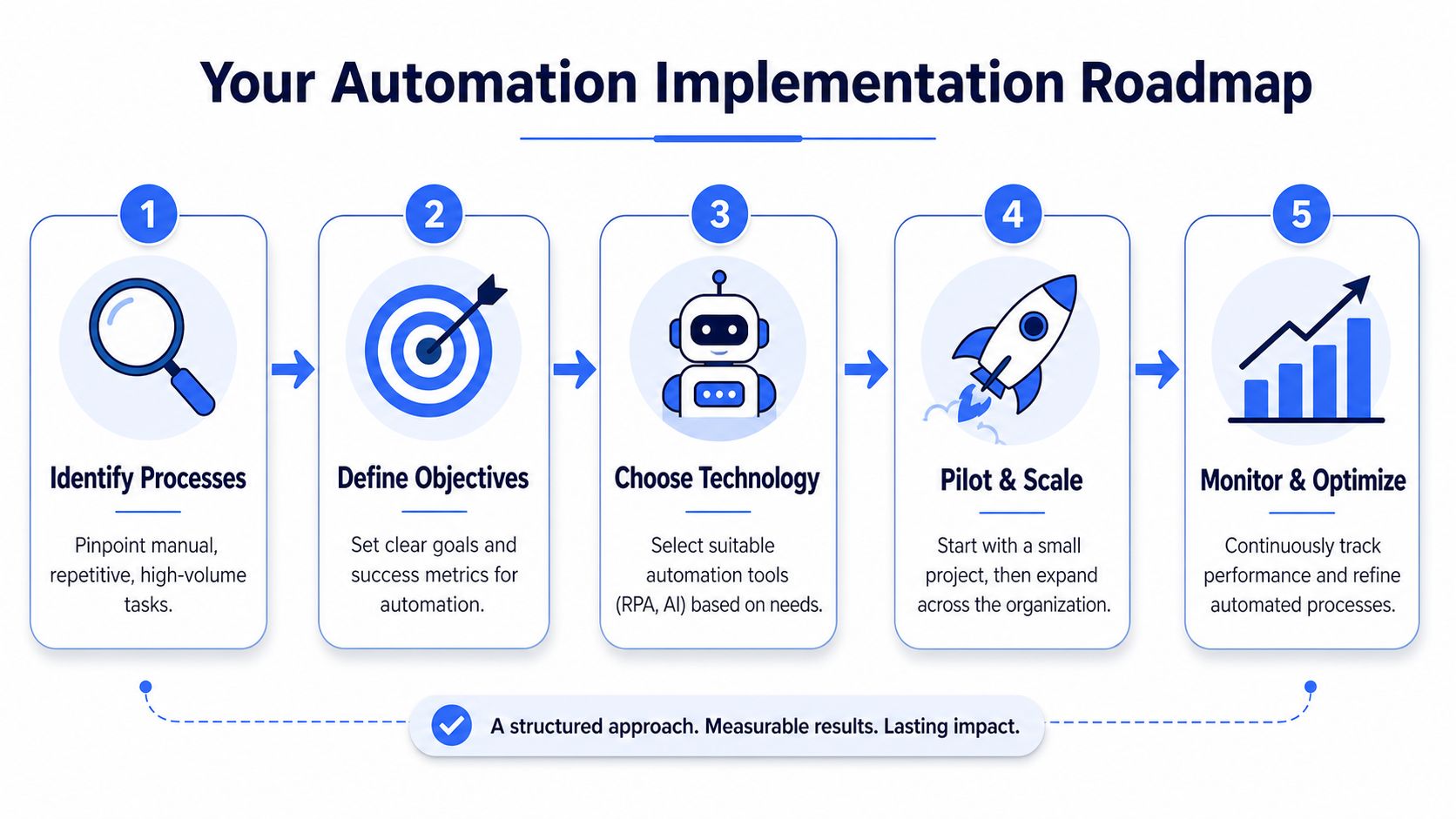
Most stalled automation projects fail before the software does. They fail because the team picked a messy process, skipped process mapping, or launched too broadly. The safer approach is narrower and more operational.
Start with process selection, not software demos
Pick one workflow with four traits:
- High volume: It happens often enough to matter.
- Rule based: Most cases follow a predictable path.
- Painful by hand: The current method creates delays, rework, or frustration.
- Stable enough to standardize: You're not automating a process that changes every week.
Once you've picked it, map the current state in plain language. Where does the request start? Who touches it? What triggers an exception? Which data fields matter? If nobody can answer those questions clearly, automation won't fix the confusion.
Next, define success before buying anything. Use a small KPI set tied to the process: cycle time, error rate, exception volume, completion time, and effort spent per case. If the workflow involves documents, decisions, or text-heavy work, it also helps to understand which natural language processing tools fit the process instead of forcing a generic bot into a language problem.
Pilot, measure, then scale
Run a pilot with one team, one process, and a clear owner. The goal isn't to prove that automation is good in theory. The goal is to learn where the workflow breaks in practice.
A sensible sequence looks like this:
- Design the happy path
Build the standard route first. Don't start by solving every edge case.
- Define exception handling early
Decide when the workflow should stop, escalate, or ask for human review.
- Train the users who live in the process
Managers often overtrain admins and undertrain frontline users. That's backwards.
- Review the data weekly
Look for bottlenecks, failed handoffs, and repeated exceptions. Those reveal whether the process needs rule changes or whether the underlying workflow was weak to begin with.
- Scale only after the pilot is stable
Reuse the operating pattern, not just the technology. Templates help, but governance matters more.
Start with the process that annoys people every day, not the one that looks best in a transformation slide deck.
Avoiding Common Process Automation Pitfalls
Analysts at Appian describe a pattern many managers recognize. Automation can stall when exception handling, integration work, and oversight demands grow faster than expected. That risk belongs in the business case from the start, not in the postmortem.
Where automation friction shows up
The first failure point is process design. If approvals are ambiguous, source data is inconsistent, or nobody owns the handoff between teams, automation speeds up confusion instead of improving throughput. I usually test this with a simple question: when a case goes off the happy path, does the team know who decides, who fixes it, and how long that should take?
The second problem is friction after go-live. Exception queues pile up. Integrations break after upstream system changes. Rule updates sit with one admin who already has too much on their plate. On paper, the workflow is automated. In practice, the team is spending hours each week monitoring, correcting, and re-routing work. Those hidden costs show up in three places managers can measure: exception volume per 100 cases, mean time to resolve an exception, and hours spent on automation support each month.
Tool fit causes the third pitfall. RPA works for stable, rules-based interface tasks. It struggles when screens change often, inputs arrive in different formats, or the work depends on judgment buried in emails, documents, and notes. In those cases, APIs, workflow orchestration, or document processing tools are usually a better fit. The wrong choice does not just raise maintenance cost. It also creates user workarounds, duplicate handling, and lower trust in the system.
How to reduce monitoring fatigue
Supervision load is easy to underestimate, especially in AI-assisted workflows. When reviewers have to check unclear outputs all day, cognitive load rises and decision quality drops. Teams feel this before they can name it. They start delaying approvals, skimming validation steps, or keeping side spreadsheets because the system no longer feels reliable.
Design the review model with the same discipline used for the automation itself.
- Set review thresholds by risk: Send only high-impact, ambiguous, or policy-sensitive cases to humans.
- Show why the system made a decision: A short rationale, confidence signal, or audit trail cuts rework.
- Track alert quality: Measure false-positive alerts and repeat exceptions so reviewers are not buried in noise.
- Assign one owner for change control: Someone needs authority to update rules, pause workflows, and approve rollback decisions.
One more trade-off gets missed. If automation removes clicks from the system but adds mental effort for the people supervising it, the process did not improve as much as the dashboard suggests. That is why I look at reviewer time per case, rework rate after human validation, and user-reported effort alongside speed and accuracy metrics.
Good automation removes steps, reduces decisions, and lowers the amount of attention a task consumes. Bad automation shifts the effort into monitoring screens, fixing exceptions, and explaining failures.
Modern tools can reduce that burden when they are matched to the work. For example, if knowledge workers still spend too much time typing updates, notes, or follow-ups around an automated workflow, voice input and text automation tools can cut that leftover friction. The gain is not just speed. It is lower context switching and less cognitive drag on the team.
Your Next Steps Toward Intelligent Automation
Automation pays off when managers treat it as an operating discipline. The strongest process automation benefits come from combining speed, consistency, visibility, and better use of human judgment. That's why the best programs don't start with “Where can we cut labor?” They start with “Where are we losing time, accuracy, and attention on work a system should handle?”
The practical move is small. Pick one repetitive workflow. Measure the baseline. Define success in business terms. Run a pilot with a clear owner and a real exception path. If the process becomes faster, cleaner, and easier for people to manage, then expand from there.
Intelligent automation works best as a partnership between people and systems. Software handles the routine path. People handle ambiguity, accountability, and improvement. When that balance is right, the gains don't just show up in cost lines. They show up in how reliably the team operates every day.
If your team already automates parts of the workflow but still loses time writing updates, notes, summaries, and follow-ups, Voice Control Pro can help close that gap. It lets you speak naturally into any app, insert polished text where your cursor is, and reduce the typing and context switching that slow knowledge work down. For managers looking to extend automation gains into everyday drafting and response work, it's a practical next layer.