
Your team buys a promising voice-to-text tool. The announcement lands in everyone's inbox, a short training session fills the calendar, and the first few users test dictation with curiosity. A month later, many users are back to typing. The tool still works, but the workflow around it never changed, managers stopped asking for feedback, and nobody checked whether it reduced drafting time or rework.
That failure usually isn't a technology problem. It's an implementation problem. A successful rollout connects leadership support, user needs, process design, training, privacy choices, and measurement into one adoption system. The same principle applies whether you're introducing cloud infrastructure, a customer platform, or voice-enabled work. Engineering leaders considering cloud computing adoption for engineering leads face a similar challenge: selecting a platform is only the beginning, while aligning people and operating practices determines whether the investment becomes part of daily work.
The practical question isn't “How do we install this tool?” It's “How do we help people use it correctly, safely, and consistently, then verify that it improves their work?” This guide answers that question step by step. You'll learn how to align stakeholders, design a useful pilot, train people without overwhelming them, choose privacy and performance settings for voice workflows, and measure gains beyond login counts.
Table of Contents
- Introduction Why Great Tools Fail Without Great Implementation
- What Implementation Best Practices Really Mean
- Five recurring strategies
- Planning and Stakeholder Alignment That Prevents Rework
- Define the problem before choosing the tool
- Map influence and workflow impact
- Agree on short-term evidence
- Clarify ownership and risks
- Pilot Design Rollout and Training That Builds Momentum
- Compare the two rollout paths
- Privacy Security and Performance Choices for Voice Workflows
- Use a tiered architecture
- Separate fast actions from rich transformations
- Measuring Adoption and ROI Beyond Login Counts
- Use a four-layer scorecard
- Real World Examples and Checklists for Knowledge Teams
- A practical decision aid
- Rollout checklist
- Conclusion Your Next Steps for Sustainable Adoption
Introduction Why Great Tools Fail Without Great Implementation
A new tool can fail even when its features are strong. A support manager may want faster replies, while agents worry that dictation will create embarrassing errors. A developer may like the idea of speaking prompts, but still need a keyboard for code syntax. An executive may approve the purchase, yet never explain how the tool supports the team's mission.
These people aren't resisting the same change. They're evaluating different risks and benefits. If the rollout treats them as one audience, the implementation team misses the objections that determine adoption.
The 2022 review of change-management practice found five strategies recurring across major frameworks: communicating about the change, involving stakeholders at all levels, focusing on organizational culture, aligning the change with mission and vision, and providing encouragement and incentives. The same study also found that more than 40 participants reported frequently using tactics such as senior leadership support, listening to employee concerns, setting measurable short-term goals, and asking managers for feedback. The review of change-management practice supports a practical conclusion: successful rollouts rarely depend on one announcement.
Practical rule: Treat implementation as a repeating loop of alignment, action, observation, and adjustment.
For knowledge workers, that loop might begin with a narrow workflow. A support agent dictates a first draft into a CRM, reviews the result, and records where errors occur. The manager notices that replies are faster but punctuation still needs editing. The team adjusts its vocabulary and training, then measures the workflow again.
This approach changes the role of implementation best practices. They aren't a final checklist to complete before launch. They're operating habits that help people understand the change, try it in realistic conditions, recover from mistakes, and see evidence that the new method helps them.
What Implementation Best Practices Really Mean
Buying a tool is like buying buses. Implementation is launching the transit route. You need to decide where the route starts, which neighborhoods it serves, how passengers transfer, how often vehicles run, and what happens when a connection fails. A fleet of buses parked in a depot doesn't improve transportation. A licensed application sitting unused doesn't improve work.
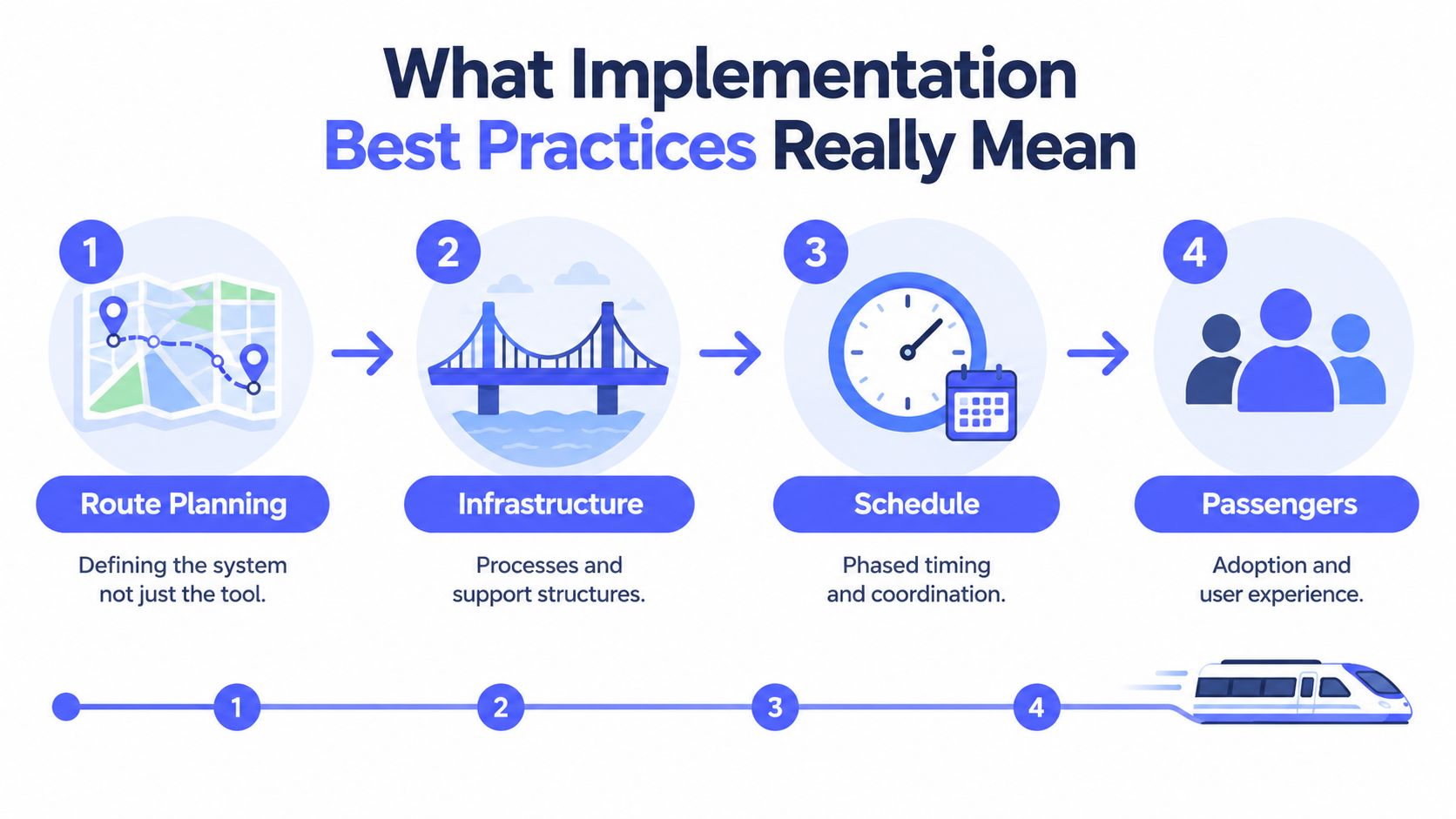
The analogy separates three ideas that teams often blend together:
- Installation puts the technology in place. It covers access, configuration, permissions, and technical readiness.
- Change management helps people move from an existing way of working to a new one. It addresses concerns, expectations, incentives, and habits.
- Implementation connects the two with workflow ownership, timing, support, measurement, and iteration.
A voice-to-text rollout illustrates the difference. Installation may involve downloading an application and approving microphone permissions. Change management may involve explaining why the team wants to reduce repetitive typing. Implementation defines which tasks should use dictation, who reviews output, how users report errors, and what evidence will justify expansion.
Five recurring strategies
The 2022 review identified five recurring strategies across major change-management frameworks. In plain language, they create a connected system:
- Communicate the change. Explain the problem, the expected behavior, and what won't change.
- Involve stakeholders at every level. Include executives, managers, technical owners, and daily users.
- Work with culture. Match the rollout to existing norms around quality, autonomy, privacy, and collaboration.
- Connect the change to mission and vision. Show how the new workflow supports the work people already value.
- Provide encouragement and incentives. Recognize useful experimentation and remove friction from early adoption.
A directive such as “Everyone must use voice input” skips the route planning. It tells passengers to board without explaining the destination or timetable. Layered execution gives people a reason to participate and a way to improve the service when the first version doesn't fit.
Planning and Stakeholder Alignment That Prevents Rework
Start with the workflow, not the product. Ask what people struggle to complete today, where delays occur, and which parts of the task require judgment. “Adopt voice-to-text” is a technology objective. “Help support agents produce accurate first drafts without switching between chat, CRM, and notes” is an implementation objective.
Run an alignment workshop around five decisions. Give each decision an owner and a way to record unresolved questions.
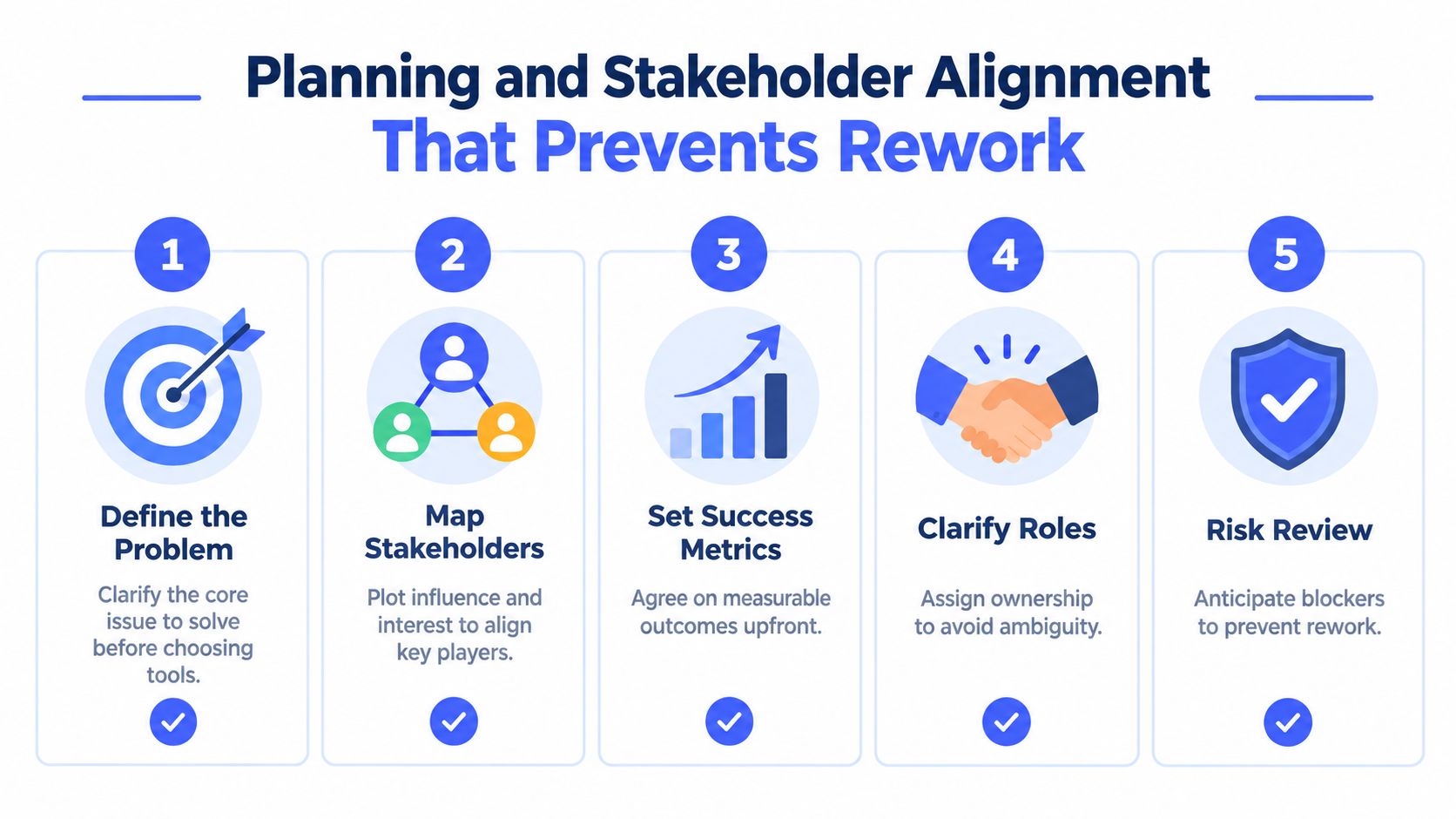
Define the problem before choosing the tool
Describe the current workflow in observable terms. A documentation team might lose time moving ideas from meetings into drafts. A sales team might struggle to capture follow-up notes while maintaining eye contact. A developer might spend too much effort rewriting prompts between tests.
Then define the desired behavior. Will users dictate a rough draft, insert polished text directly into an application, or use voice to trigger actions? Each outcome requires different training and measurement.
Map influence and workflow impact
List everyone affected, not only the people who approve the budget. Executives provide sponsorship, managers shape local expectations, IT or security teams assess controls, and users reveal practical barriers. Accessibility specialists may identify needs that a standard rollout would miss.
Ask two questions for each group: How much influence does this person have over adoption? and How much does the workflow affect their daily work? A person with modest formal authority can still determine success if colleagues copy their habits.
Agree on short-term evidence
Set goals that users can understand and managers can inspect. Examples include completing a defined drafting task, reducing avoidable rework, or keeping sensitive speech in an approved processing mode. Don't make login activity the main success measure. It shows access, not value.
Assign a person to collect feedback and another to decide which changes the team will make. The 2022 review specifically highlights measurable short-term goals and manager feedback as recurring implementation tactics. That combination keeps the rollout concrete without pretending the first design will be perfect.
Clarify ownership and risks
Write down who configures the tool, who answers user questions, who approves cloud features, who maintains vocabulary, and who reviews performance. Document risks before launch, including inaccurate transcription, privacy concerns, application compatibility, and tasks where keyboard input remains more reliable.
Teams that are standardizing work across applications can use workflow standardization guidance to turn these decisions into repeatable operating practices. The point isn't to create bureaucracy. It's to ensure that an unresolved question has a named owner before it becomes a rollout failure.
Pilot Design Rollout and Training That Builds Momentum
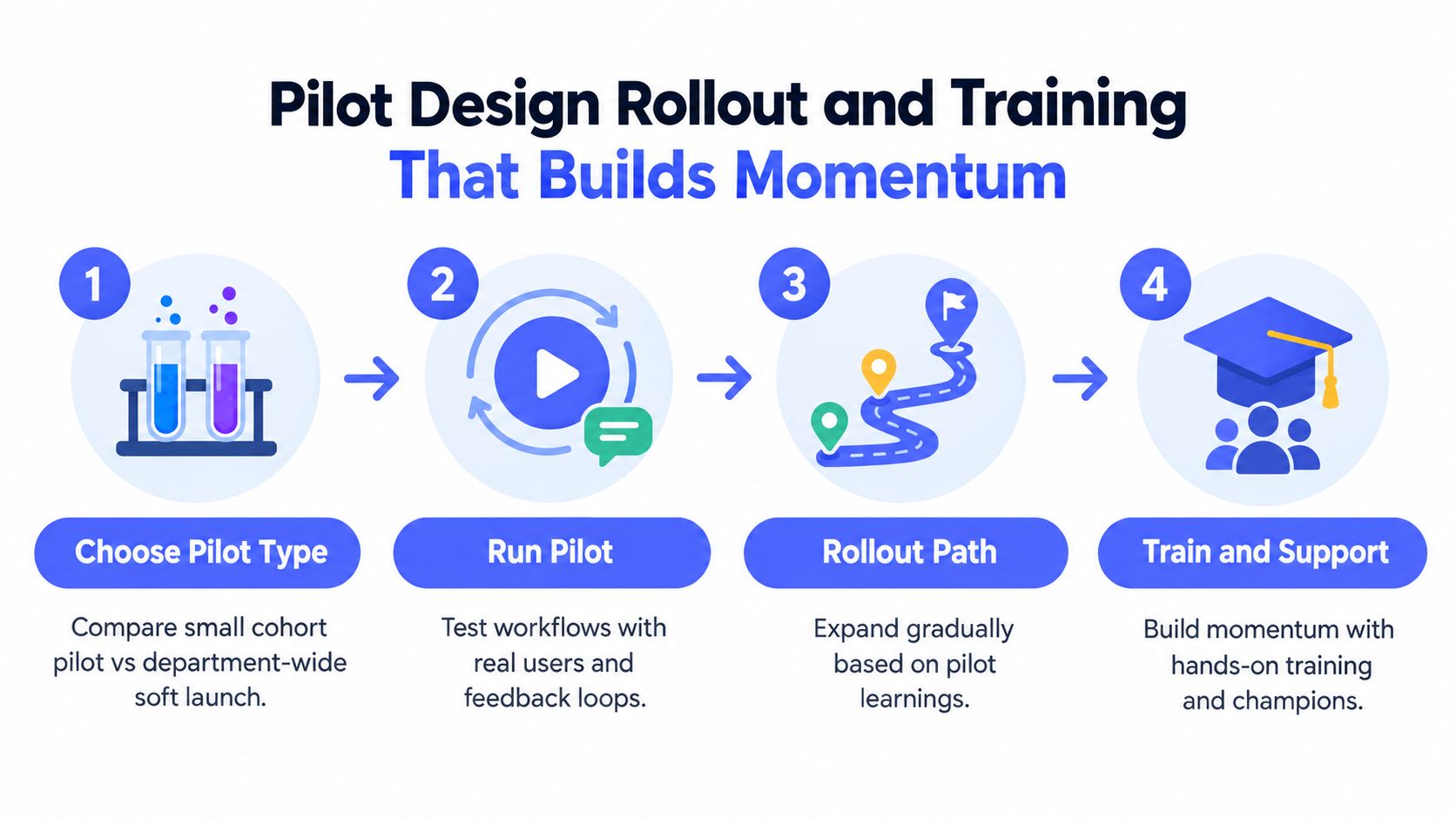
A pilot should create learning, not publicity. The right design depends on how varied the workflows are, how much disruption the team can tolerate, and how quickly leaders need evidence.
A small cohort pilot works well when the organization has distinct roles, sensitive data, or uncertain technical requirements. Select users who represent different work patterns, including enthusiastic adopters and cautious participants. A small group makes it easier to observe individual workflows and correct configuration issues before they spread.
A department-wide soft launch can work when the workflow is relatively consistent and peer learning matters more than tight control. Everyone gets access, but participation remains structured. Managers collect common questions, champions demonstrate practical uses, and the implementation team watches for patterns rather than treating every user as a separate project.
Compare the two rollout paths
| Pilot choice | Useful when | Main risk | Control that helps |
|---|---|---|---|
| Small cohort | Workflows vary or privacy questions are unresolved | The group may not represent ordinary users | Select users from different roles and confidence levels |
| Department soft launch | Tasks are similar and peer support is strong | Problems can spread before they're understood | Use clear boundaries, office hours, and rapid issue triage |
Define pilot success before users begin. A voice workflow might need to produce usable first drafts, work across the applications people use, and preserve the chosen privacy mode. Ask participants to record where dictation helps, where editing cancels the benefit, and which commands they remember without assistance.
Training should follow the moment of need. Start with a short demonstration, then let users complete a real task. Provide a one-page reference for the press-speak-release sequence, application permissions, correction methods, and escalation routes. Later sessions can cover custom vocabulary, rewriting, or advanced commands.
Choose champions for practical credibility rather than job title. A respected support agent who can explain how to dictate a reply, review names, and switch to the keyboard will often influence peers more effectively than a generic presentation.
Adoption grows through visible recovery. Users trust a rollout when they see the team notice errors, fix them, and communicate the fix.
Managers should gather feedback on a short cadence while the pilot is active. The implementation owner then sorts feedback into configuration changes, training gaps, product limitations, and tasks that shouldn't use voice. Guidance on user experience optimization can help teams frame these observations around friction rather than enthusiasm alone.
Privacy Security and Performance Choices for Voice Workflows
Voice data can contain names, account details, health information, product plans, and private conversations. Implementation teams need to decide where processing occurs before users begin, not after a privacy concern appears.
On-device processing reduces the privacy risk surface because raw audio and inferred data remain on the user's computer. Research on client-side privacy in speech recognition describes local processing as the highest-control option and notes that it limits the number of parties handling sensitive speech data. It also identifies a tradeoff: stronger privacy can require more local computing or smaller model capacity. Speech privacy research on local processing provides the architectural basis for making that tradeoff explicit.

Use a tiered architecture
A practical setup has three layers:
- Local default: Use an on-device model for ordinary dictation, especially when users handle confidential material or work without reliable network access.
- Optional cloud enhancement: Enable cloud processing only for features that need greater model capacity, broader language coverage, or richer rewriting.
- Clear user controls: Label the modes plainly, show when cloud processing is active, and make the offline path usable rather than merely available.
This pattern suits many environments, including teams evaluating medical virtual assistants where speech privacy and workflow speed must be considered together. The specific controls will depend on the organization's policies, contracts, and data classification.
Performance needs its own design. Microsoft Research reported a clear latency and accuracy tradeoff in interactive dictation: a smaller model reached 28% single-command interpretation accuracy at 1.3 seconds, while a larger model reached 55% at 7 seconds. Microsoft Research's interactive dictation study shows why maximizing model size can make a voice interface feel less usable.
Separate fast actions from rich transformations
Use a fast path for short dictation and immediate insertion. Reserve heavier models for tasks the user explicitly requests, such as rewriting selected text or producing a more elaborate transformation. Benchmark the experience in seconds, including microphone activation, recognition, insertion, and correction.
The same Microsoft-linked evidence discusses privacy-preserving, real-time on-device filtering that removed about 83% of sensitive entities, compared with about 31% for an older comparable system on the same benchmark. Treat those figures as evidence for testing local filtering, not as a promise for every product or language.
Measuring Adoption and ROI Beyond Login Counts
A login tells you that someone opened a tool. It doesn't tell you whether the tool improved work. A better measurement system follows the workflow from input to finished result.
Start with a baseline. Observe how long a representative task takes, how much editing it requires, how often users switch applications, and how frequently another person must correct the output. For support teams, measure the path from reading a customer message to sending a reviewed reply. For researchers, measure the path from capturing a note to finding and using it in a document.
Use a four-layer scorecard
| Layer | Questions to ask | Evidence to collect |
|---|---|---|
| Reach | Who has access and who tries the workflow? | Participation by role and task |
| Quality | Is the output usable and accurate enough? | Corrections, rework, and review findings |
| Flow | Does the workflow remove friction? | Task duration, app switching, and interruptions |
| Outcome | Does the team perform better? | Completed work, service quality, and user judgment |
Keep governance light enough to preserve momentum. Define which data may be processed locally, which cloud features require approval, and where a human must review output. Avoid adding approval steps to low-risk drafting if those controls don't improve quality or safety.
The Asian Development Bank's assessment offers a useful institutional benchmark for the value of disciplined execution. Its average project success rate rose to 79% from 67% in 2004–2006, a 12-point increase, as described in the Asian Development Bank's project outcomes report. The benchmark doesn't predict the result of a voice rollout, but it reinforces the broader lesson that planning, monitoring, stakeholder alignment, and delivery controls affect outcomes at scale.
Use human review at critical checkpoints. If a support agent sends an external reply, the important measure isn't whether dictation was used. It's whether the final message was accurate, timely, and appropriate.
Teams tracking service quality can connect workflow measures with customer satisfaction metrics. For security-focused organizations, a review of top SOC 2 compliance tools may also help organize evidence collection, access reviews, and control monitoring. The key is to connect these systems to decisions. If a metric doesn't change what the team does, it may not belong on the rollout dashboard.
Real World Examples and Checklists for Knowledge Teams
A support team can start with dictated first drafts for routine replies. Agents speak naturally, review names and account details, then use the keyboard for precise edits before sending. The team should maintain a vocabulary for product terms and customer names, while managers inspect rework rather than rewarding raw dictation volume.
A researcher may use voice to capture observations while moving between a browser, notes application, and draft document. The useful pattern is speak first, organize later. Voice handles ideas and rough notes, while the keyboard remains better for references, tables, and exact formatting.
A developer or prompt engineer can dictate an initial explanation, test instruction, or code comment, then switch to the keyboard for syntax-sensitive work. Voice may accelerate iteration around code without replacing the editor's precise controls.
A practical decision aid
Choose dictation when:
- The task involves drafting, brainstorming, replies, summaries, or natural-language notes.
- You want to preserve thought flow while moving between applications.
- The first version matters more than exact formatting.
Stay keyboard-first when:
- The task contains dense code, formulas, identifiers, or punctuation.
- You're making small corrections where voice commands create more edit overhead.
- The final output requires exact layout or careful visual comparison.
For a cross-platform option, Voice Control Pro inserts transcription wherever the cursor is, supports local dictation through Fly Mode, and offers optional cloud features and Hey Max tools for rewriting, screen questions, and app launching. Treat it as one component in the wider implementation system. Configure the privacy mode, test the applications users rely on, and measure finished workflow results rather than app activity.
Rollout checklist
- Planning: Name the problem, affected roles, owner, risks, and success evidence.
- Pilot: Include representative users and test real tasks.
- Training: Teach the smallest useful workflow first, then add advanced features.
- Support: Give users champions, reference material, and a fast feedback channel.
- Measurement: Compare completed work, quality, editing, and context switching with the baseline.
Conclusion Your Next Steps for Sustainable Adoption
Sustainable adoption comes from a loop, not a launch event. Leaders provide visible support, users test realistic workflows, managers collect concerns, technical owners adjust the system, and the team verifies whether the finished work improves.
Use a simple action plan:
- This week: Define one workflow, identify stakeholders, document privacy boundaries, and choose a baseline task.
- Within the next phase: Run a representative pilot, train users through real work, and review feedback frequently.
- After the pilot: Expand only where quality and workflow evidence support expansion. Keep keyboard-first exceptions visible.
- As usage grows: Review permissions, vocabulary, support requests, and outcome measures without adding controls that don't protect quality or people.
Implementation best practices work when they keep execution close to human needs. For voice-enabled knowledge work, that means using speech where it removes friction, using the keyboard where precision wins, and improving the system through verified feedback.
Voice Control Pro provides cross-platform voice-to-text insertion, local dictation through Fly Mode, and optional tools for rewriting, screen questions, and app launching. Visit Voice Control Pro to evaluate it against one real workflow, set privacy defaults, and begin measuring finished work rather than logins.