
A client asks for an update. One person checks email, another searches a project board, and a third opens a spreadsheet that no one has maintained consistently. The work itself may be straightforward, but the team spends time reconstructing what happened, who owns the next step, and whether the latest version is trustworthy.
That pattern creates more than inconvenience. Inconsistent handoffs produce rework, status chasing, uneven customer experiences, and decisions based on incomplete information. Better communication efficiency helps, but communication alone won't fix a workflow that has no shared sequence, ownership model, or reliable status record.
Workflow standardization gives teams a practical way to replace guesswork with agreed working rules. It doesn't mean forcing every situation into an inflexible script. It means defining the repeatable core of a process, making exceptions visible, and giving people and software the same basic map.
The timing matters because modern knowledge work now crosses email, chat, customer relationship management systems, document platforms, spreadsheets, automation tools, and AI assistants. A workflow can be partly manual and partly automated, yet still fail at the reporting layer. Teams may complete tasks without being able to answer a simple question: what is the current state of this work?
This guide moves from the basic meaning of standardization to practical implementation, measurement, governance, and tool selection. The central idea is simple: standardize the minimum control surface that keeps human and AI work consistent, auditable, and visible without removing useful judgment.
Table of Contents
- Introduction Why Work Feels Chaotic Without Standards
- What Workflow Standardization Really Means
- The three parts of a usable standard
- Standardization isn't the same as rigidity
- Benefits Trade Offs and When to Standardize
- Where the trade off appears
- Frameworks and Stages for Implementing Standardization
- Discover and map the current route
- Design the minimum standard
- Document and train in context
- Roll out in a bounded pilot
- KPIs Governance and Keeping Standards Alive
- Governance for human and AI work
- Common Pitfalls and How to Avoid Them
- Imposing rules before integration
- Excessive customization
- Poor training and weak feedback
- Real World Examples Templates and Tool Considerations
Introduction Why Work Feels Chaotic Without Standards
Consider a support team handling a complex customer request. The intake arrives in email, the account details live in a CRM, approvals happen in chat, and the final response is drafted in a shared document. One agent records the decision in the CRM. Another leaves it in a private note. A third sends the response before the approval is complete.
Everyone may be working hard. The problem is that each person follows a slightly different route. When a manager asks for a status update, someone has to search several systems and ask multiple colleagues. If the customer replies with a new detail, the team must decide which record is current before it can act.
A standardized workflow changes the question from “Where did this person put the information?” to “Which step are we on, and what record should contain the answer?” That shift supports faster handoffs, clearer accountability, and more reliable quality control.
The issue is not limited to support. Sales teams lose context between discovery and proposal. Finance teams reconcile information across disconnected files. Operations teams repeat checks because no one can tell whether a previous reviewer completed them. Distributed teams face the same problem across time zones, where an unclear handoff can wait hours before the right person notices it.
Workflow standardization helps by defining a shared operating path. The path can include required fields, approval gates, response formats, escalation rules, and a source of truth for status. It can also specify where people should use judgment instead of pretending every case is identical.
The distinction matters. Documentation gives people something to read. Standardization gives them a consistent way to act and lets the organization evaluate whether the process works. A team can have polished process documents and still operate with unpredictable handoffs.
The rest of the guide treats standardization as an operating discipline rather than a template exercise. The focus is practical: identify the repeatable work, protect flexibility for exceptions, measure visibility as well as speed, and add governance before AI or automation multiplies inconsistency.
What Workflow Standardization Really Means
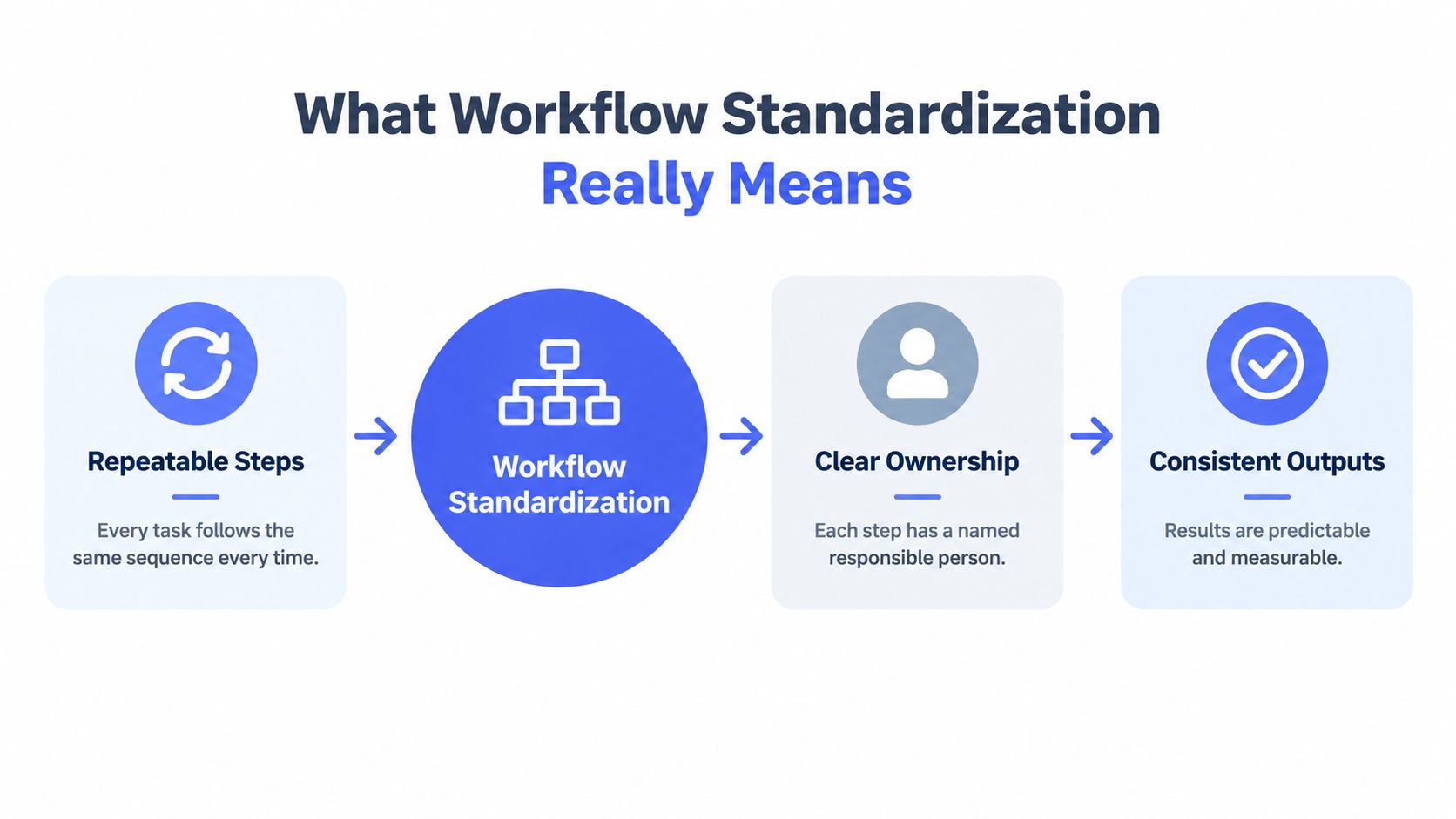
Workflow standardization is the deliberate design of a repeatable way to move work from intake to completion. A useful standard answers four questions:
- What happens first, next, and last?
- Who owns each step?
- What information must move forward?
- How does the team know the work is complete?
Think of a recipe. A recipe doesn't eliminate the cook's judgment, but it establishes the ingredients, sequence, preparation method, and expected result. If every cook changes the ingredients and order, the final dish becomes difficult to predict. A business workflow works in much the same way.
The three parts of a usable standard
Repeatable steps define the normal route. For example, a new vendor request might move through intake, information validation, risk review, approval, setup, and confirmation. The sequence gives people a common starting point and makes missing work easier to spot.
Clear ownership assigns responsibility at the step level. “The operations team handles it” is too vague. A usable standard identifies the role or person responsible for checking the request, approving the exception, updating the record, and closing the work.
Consistent outputs describe what each stage produces. That output might be a completed form, an approved record, a customer-ready message, or a decision with supporting evidence. Without an expected output, a task can appear complete while leaving the next person unable to proceed.
Documentation supports these three elements, but it isn't the same as standardization. The Yokogawa reference on production management cites a 2017 case-study analysis in which 100% of organizations had documented processes, while 48% reported no standardized processes. The same source reports maturity levels of 44% at level 3, 33% at level 4, and 21% at level 5 for documented processes, illustrating that formal documents alone don't prove consistent execution. Yokogawa's discussion of documented and standardized processes provides useful historical and operational context.
Standardization isn't the same as rigidity
A good standard separates the default path from the exception path. The default path tells most cases what to do. The exception path explains when a person can deviate, who approves the deviation, and where the reason gets recorded.
That approach is especially important for global teams. Local regulations, customer expectations, legacy systems, and language requirements may change how a task gets completed. Enterprise teams exploring enterprise workflow governance can use that distinction to define shared controls without pretending every department operates in identical conditions.
Practical rule: Standardize the decisions and records that must remain consistent. Leave room for professional judgment where the facts genuinely differ.
Benefits Trade Offs and When to Standardize
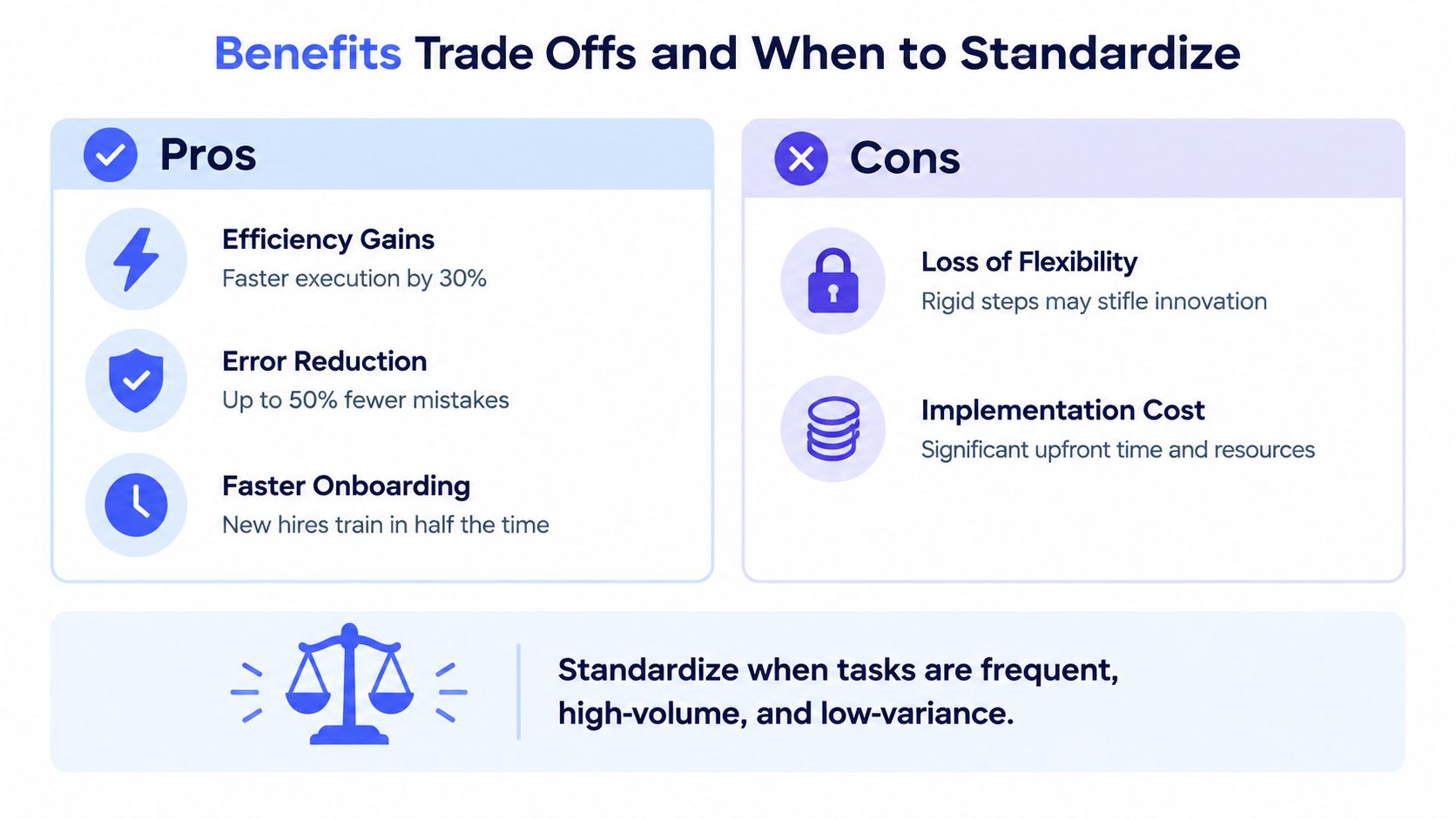
Standardization earns its place when it removes avoidable variation from work that happens often enough to justify a shared method. It can reduce small delays, prevent repeated checks, make training easier, and give managers a clearer view of performance.
A manufacturing case study demonstrates the mechanism clearly. Standardized-work procedures eliminated 31.6 seconds per cycle, increasing output from roughly 45 to 50 pieces to 58 pieces per 7-hour shift and raising productivity by 6.5%. The figures come from the manufacturing standardized-work case study. The broader lesson isn't that every office workflow will produce the same result. It's that removing small, repeated sources of delay can improve throughput without changing headcount or equipment capacity.
A separate review of workflow standardization describes consistency across underlying processes as the central goal. Evidence from engineering workflow management connects standardized process maps, clearer responsibilities, and training with fewer turnbacks and improved delivery efficiency. A simulation-based study also found that standardizing human activities and improving workplace layout reduced working time by about 10%, or around 42 minutes, as reported in the workflow standardization review and simulation study.
Where the trade off appears
The same rules that reduce variation can create friction when teams apply them to work that changes constantly. A mandatory form may slow an expert handling an unusual case. A rigid approval chain may add coordination cost. Excessive customization can also produce a process that looks standardized while every department follows a different version.
A more useful decision test asks whether the workflow is:
- Frequent: People perform it often enough to benefit from a shared route.
- Repetitive: The core tasks recur even when the context changes.
- Risk-sensitive: Errors create customer, financial, legal, privacy, or operational consequences.
- Observable: The team can define a meaningful completion state and measure it.
- Cross-functional: Handoffs regularly create confusion or rework.
Don't standardize every activity just because a template is available. Brainstorming, complex negotiations, research exploration, and creative judgment may need guardrails rather than fixed sequences.
The timing also matters. In legal operations data, nearly half of respondents identified fragmented workflows and manual handoffs as their main operational issue, while 72% said basic reporting still required manual consolidation across sources, according to Workstorm's operational pain-point research. The same source reports that only 4% described reporting as “complete and sufficient.” These figures point to a critical warning: standardizing task instructions before solving visibility can make reconciliation heavier, not lighter.
Standardize the work where variation creates measurable harm. Preserve flexibility where variation reflects legitimate expertise.
Frameworks and Stages for Implementing Standardization
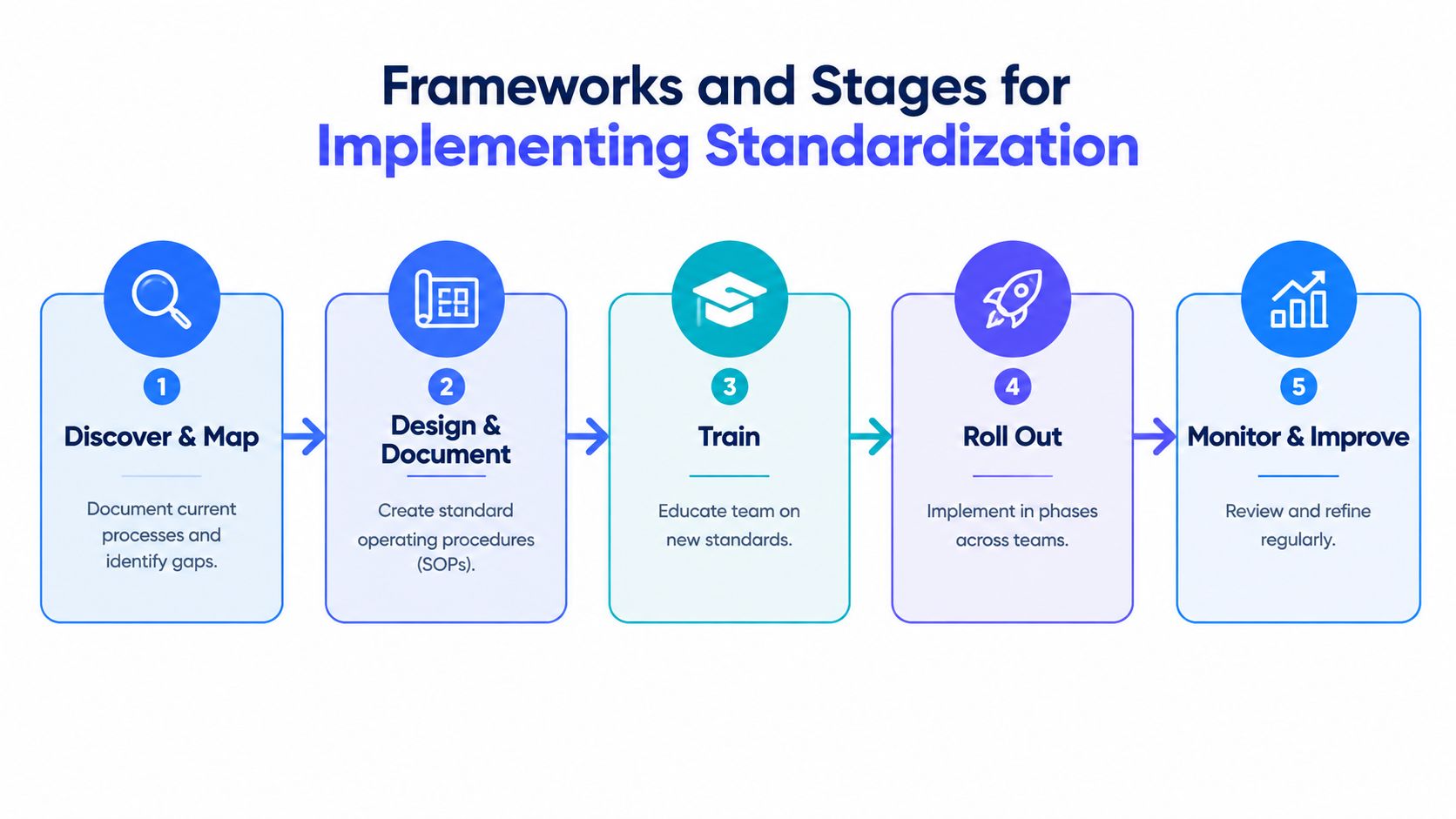
Implementation works best as a controlled progression. Teams often fail when they write a standard operating procedure before observing how work proceeds. Start with the actual process, including the informal messages, duplicate files, manual checks, and approval delays that people use to compensate for weak systems.
Discover and map the current route
Select one workflow with a visible problem, such as inconsistent client onboarding or incomplete incident handoffs. Follow several real examples from start to finish. Record the trigger, each action, the system used, the owner, the handoff, the decision point, and the final record.
Don't map only the official process. Ask people where they keep temporary notes, which fields they skip, when they move work into spreadsheets, and how they know whether someone else has acted.
Design the minimum standard
Create the smallest shared structure that can produce a dependable result. Define:
- Trigger: What starts the workflow?
- Required data: Which fields must be present before work begins?
- Core sequence: Which steps should occur in the normal case?
- Ownership: Who acts, reviews, approves, and closes?
- Exception rule: What qualifies as an exception?
- Status record: Where does the authoritative state live?
- Completion evidence: What proves the work is finished?
This is the minimum control surface. It should be broad enough to protect quality and narrow enough that people can follow it without building workarounds.
Document and train in context
Write the SOP in the language people use during the work. Include examples of valid inputs, incomplete requests, exception decisions, and acceptable outputs. A document stored in a knowledge base won't change behavior if employees can't find it at the moment of action.
Training should use realistic cases. Let the team run a normal request and an exception through the new process, then revise the standard where instructions conflict with actual work. For distributed teams, guidance on distributed team communication can complement workflow rules by clarifying how people announce handoffs, record decisions, and avoid duplicate updates.
Roll out in a bounded pilot
Pilot the standard with one team, workflow, or customer segment. Set a clear start condition, identify a process owner, and provide a channel for reporting confusion. Don't treat every deviation as disobedience. Some deviations reveal a missing rule, a poor data field, or an integration failure.
After the pilot, remove unnecessary steps and clarify the exceptions that appeared repeatedly. Then expand in phases, preserving the same core fields and status definitions while allowing local instructions where they're needed.
A useful implementation sequence looks like this:
- Observe actual work.
- Map systems and handoffs.
- Define the minimum control surface.
- Test it with normal and exceptional cases.
- Train people at the point of use.
- Pilot, review, and refine.
- Expand only after the status record and ownership model work.
The following video can help teams think about workflow structure and operational consistency in a practical format.
KPIs Governance and Keeping Standards Alive
A workflow can look efficient while remaining difficult to manage. Completion volume may rise even as rework, hidden queues, and reporting effort increase. Sustainable workflow standardization therefore needs two layers of measurement: indicators that reveal emerging problems and outcomes that show whether the process delivers its intended result.
| Metric or Control | What It Measures | When to Use It |
|---|---|---|
| Cycle-time variance | How consistently work moves through the process | Use when delays differ widely between similar cases |
| Rework rate | How often completed work returns for correction | Use when errors, omissions, or unclear outputs create repeat effort |
| Step adherence | Whether people follow the defined core sequence | Use during pilots and after major process changes |
| Handoff completeness | Whether the next owner receives the required context | Use for cross-functional or distributed workflows |
| Reporting completeness | Whether managers can see current status from the designated record | Use when teams consolidate updates manually |
| Exception volume | How often work leaves the default path | Use to identify missing rules or unnecessary rigidity |
| Data-quality review | Whether required information is accurate and usable | Use before adding automation or AI-assisted decisions |
| Named process owner | Whether one role maintains the standard | Use for every workflow that affects multiple teams |
| Review cadence | Whether the process receives deliberate evaluation | Use after rollout and whenever tools, policies, or risks change |
| Access and audit controls | Who can view, change, approve, or export information | Use when workflows contain confidential or regulated data |
The reporting layer deserves special attention. Workstorm's research reports that 72% of surveyed respondents still needed manual consolidation for basic reporting and that only 4% considered reporting complete and sufficient. Those figures suggest that a team may standardize task execution while leaving managers without a dependable view of status. Use the earlier source as a warning: a workflow isn't operationally mature if people must rebuild its state in a spreadsheet before discussing performance.
Governance for human and AI work
AI adds another control problem. Independent industry reporting found that 48% of respondents identified data quality as a challenge in 2025, while workflow-platform research cited fragmented systems, excessive customization, and strategic misalignment as persistent barriers to value realization in Attest's workflow research.
Before AI drafts, classifies, routes, or updates work, define the fields it may read, the actions it may take, the confidence or validation requirement, and the human review gate. Keep an audit trail for material decisions, protect sensitive information, and document which local rules apply across departments or jurisdictions.
Teams working on finance processes can also compare automation patterns in Loopfour's automation in finance guide, particularly when deciding which steps should execute automatically and which should remain validation points.
Governance principle: Don't ask whether AI follows the whole workflow. Ask which inputs, decisions, permissions, and review gates must remain controlled.
Common Pitfalls and How to Avoid Them
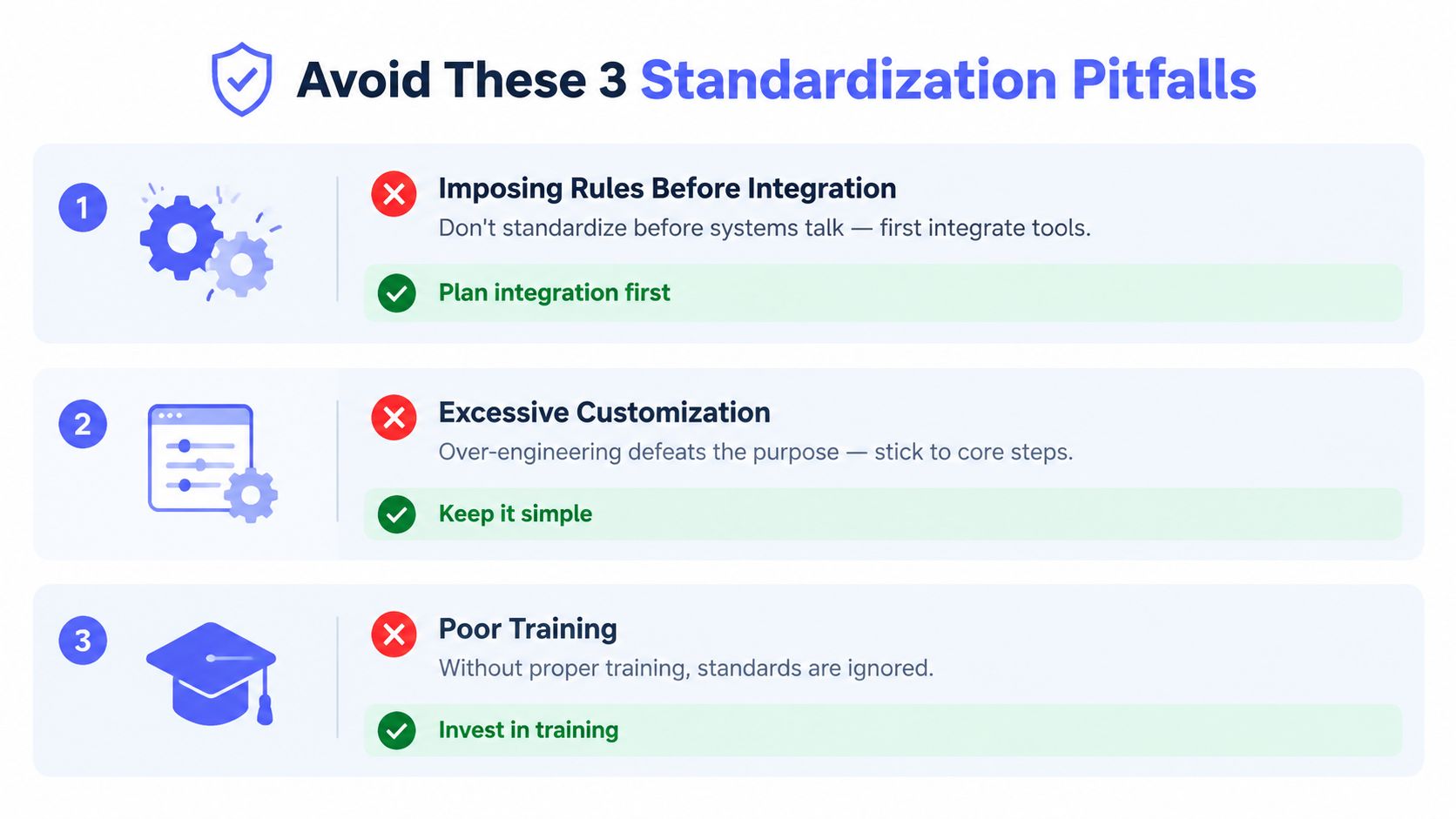
The most dangerous assumption is that tighter rules automatically create a better process. If systems still disagree, records still lack common fields, and employees still need side channels to complete work, a detailed standard can increase the number of handoffs without improving control.
Imposing rules before integration
A team may require every update to follow a new form while the CRM, ticketing system, and reporting dashboard use different identifiers. Employees then copy information between tools, and managers still can't trust the status view.
Fix: Identify the system of record first. Align key fields, define how records connect, and remove duplicate entry where possible. If integration isn't ready, label the manual control clearly and measure the reconciliation burden instead of hiding it.
Excessive customization
Department-specific versions often begin with reasonable exceptions. Over time, each version adds unique fields, approval paths, and terminology. The organization loses the shared baseline that made standardization useful.
Fix: Separate the core standard from local configuration. Keep shared triggers, ownership definitions, status values, and completion criteria stable. Allow local instructions only when they address a real regulatory, customer, or operational difference.
Poor training and weak feedback
Employees won't follow a process they can't understand during a busy workday. A launch announcement and a long document rarely provide enough guidance, especially when the workflow spans several applications.
Fix: Train with actual cases, show the exception route, and give users a way to report friction. Review repeated workarounds as process evidence. If many people bypass the same step, investigate whether the rule is unclear, the tool is slow, or the required information isn't available at that point.
Use this audit question set before expanding a rollout:
- Can people identify the current owner?
- Does every case have one authoritative status record?
- Can the next person act without searching private messages?
- Are exceptions visible and reviewable?
- Can managers measure completion without manual reconstruction?
- Does the process protect sensitive data and preserve an audit trail?
Real World Examples Templates and Tool Considerations
A standardized workflow can be small. A customer-support template might include the request category, customer impact, owner, next action, due condition, escalation rule, and closure evidence. A sales handoff might require the customer objective, agreed scope, decision maker, open risk, and next meeting outcome. An operations checklist might define the trigger, validation steps, approval gate, system update, and recovery action when a check fails.
Tool selection should follow the control surface, not lead it. Look for a clear status model, dependable integrations, permission controls, searchable records, exception handling, and reporting that doesn't depend on manual consolidation. Teams comparing platforms can use AY Automate's workflow automation overview as one reference point while testing how each option handles real handoffs.
Adoption also depends on how easily people can capture updates while working. Voice Control Pro inserts cleaned-up dictation into the active application, supports rewriting selected text and contextual screen questions through Hey Max, and offers Fly Mode for local processing when privacy requirements call for it. That makes it a possible input layer for documenting decisions, drafting handoffs, and updating records without repeatedly switching windows.
For broader tool choices, review this guide to productivity software for business and compare each tool against your workflow's required fields, ownership rules, reporting needs, and privacy constraints. The right setup won't eliminate judgment. It will make the normal path easier to follow and the exceptions easier to see.
Start with one workflow, define its minimum control surface, and run a bounded pilot. Keep the standard simple enough to use, measurable enough to manage, and governed enough to remain trustworthy as automation and AI enter the process.
Voice Control Pro helps you capture polished updates, handoffs, and workflow documentation directly in the app where you're working, using a repeatable press, speak, and release process. Visit Voice Control Pro to see how voice input and privacy-aware local processing can support clearer, more consistent work.