
You open your laptop to write a report. Before the first paragraph is complete, an email arrives, a team message needs a reply, a document asks for approval, and a phone call interrupts your train of thought. Thirty minutes later, you've stayed at the same desk, but your attention feels exhausted and the original task has barely moved.
That pattern isn't a personal failure. It's a work-design problem involving cognitive load, the mental effort required to hold information, make decisions, and complete a task. Cognitive load management helps you separate necessary difficulty from avoidable friction, then redesign your environment and workflow so your attention goes toward useful work.
Table of Contents
- Why Your Brain Feels Overloaded at Work
- The difference between effort and waste
- Understanding the Three Types of Cognitive Load
- Intrinsic load belongs to the work
- Extraneous load belongs to the system
- Germane load deserves protection
- What Research Shows About Cognitive Load and Performance
- Switching creates a hidden tax
- Lower load does not always mean better learning
- Practical Strategies to Reduce Extraneous Cognitive Load
- Redesign the workflow around fewer switches
- Make information easier to find
- Boosting Germane Load for Deeper Learning and Skill Building
- Match the challenge to the learner
- Use AI as scaffolding, not a substitute for judgment
- Role-Specific Applications for Writers, Support Agents, Students, and Developers
Why Your Brain Feels Overloaded at Work
The most expensive part of a fragmented workday is often invisible. You don't just stop writing when a notification appears. You also have to remember where you were, decide whether the interruption matters, respond or postpone it, and reconstruct the next step when you return. Each interruption competes with the information already held in working memory.
A developer may move from debugging a payment error to a project message, then to a pull request, then back to the error. A support agent may switch between customer histories, internal policy pages, chat windows, and escalation notes. A researcher may hold a developing argument in mind while monitoring email and collecting references. The work looks busy, but the mental system is repeatedly paying for re-entry.

The difference between effort and waste
Some tasks are inherently demanding. Drafting a complex proposal, learning an unfamiliar codebase, or resolving an ambiguous customer issue requires concentration. That effort is part of the job.
Other effort comes from the way work is arranged. You search across disconnected tools, interpret vague requests, reread old messages, switch between unrelated tasks, or reconstruct decisions that should have been recorded. This is extraneous cognitive load, and it consumes capacity without improving the result.
A 2025 office-worker study reported that digital fatigue predicted lower employee performance at B = -0.38, while cognitive overload predicted lower performance at B = -0.31. The same study found a positive effect for workload management at B = 0.29. These coefficients come from the reported workplace analysis, not a promise that one intervention will produce the same outcome in every team. They do show why workload design deserves attention alongside individual discipline. Read the reported workplace findings on digital fatigue and performance.
Common signs include:
- You reread the same paragraph without retaining it.
- Small decisions feel disproportionately difficult.
- You keep opening new tabs to avoid finishing the current task.
- You respond quickly but produce work that needs repeated correction.
- You finish many small actions while the important deliverable remains unfinished.
A practical response is to reduce the number of decisions your brain must make before productive work begins. Clear communication habits, including a more efficient approach to workplace communication, can help, but the larger principle is simple: protect attention before asking it to perform.
Understanding the Three Types of Cognitive Load
Cognitive load theory gives workplace teams a useful distinction. Intrinsic load comes from the task itself. Extraneous load comes from confusing instructions, poor interfaces, interruptions, and unnecessary process friction. Germane load is the effort that helps someone build understanding, recognize patterns, and improve future performance.
The framework developed through a research program rather than a recent productivity fad. Cognitive load theory was formally established in the 1980s, John Sweller published a foundational paper in 1988, Chandler and Sweller addressed intrinsic and extraneous load in 1991, Paas and van Merriënboer introduced germane load in 1994, and Sweller, van Merriënboer, and Paas published a landmark review in 1998. Explore the history and consolidation of cognitive load theory.
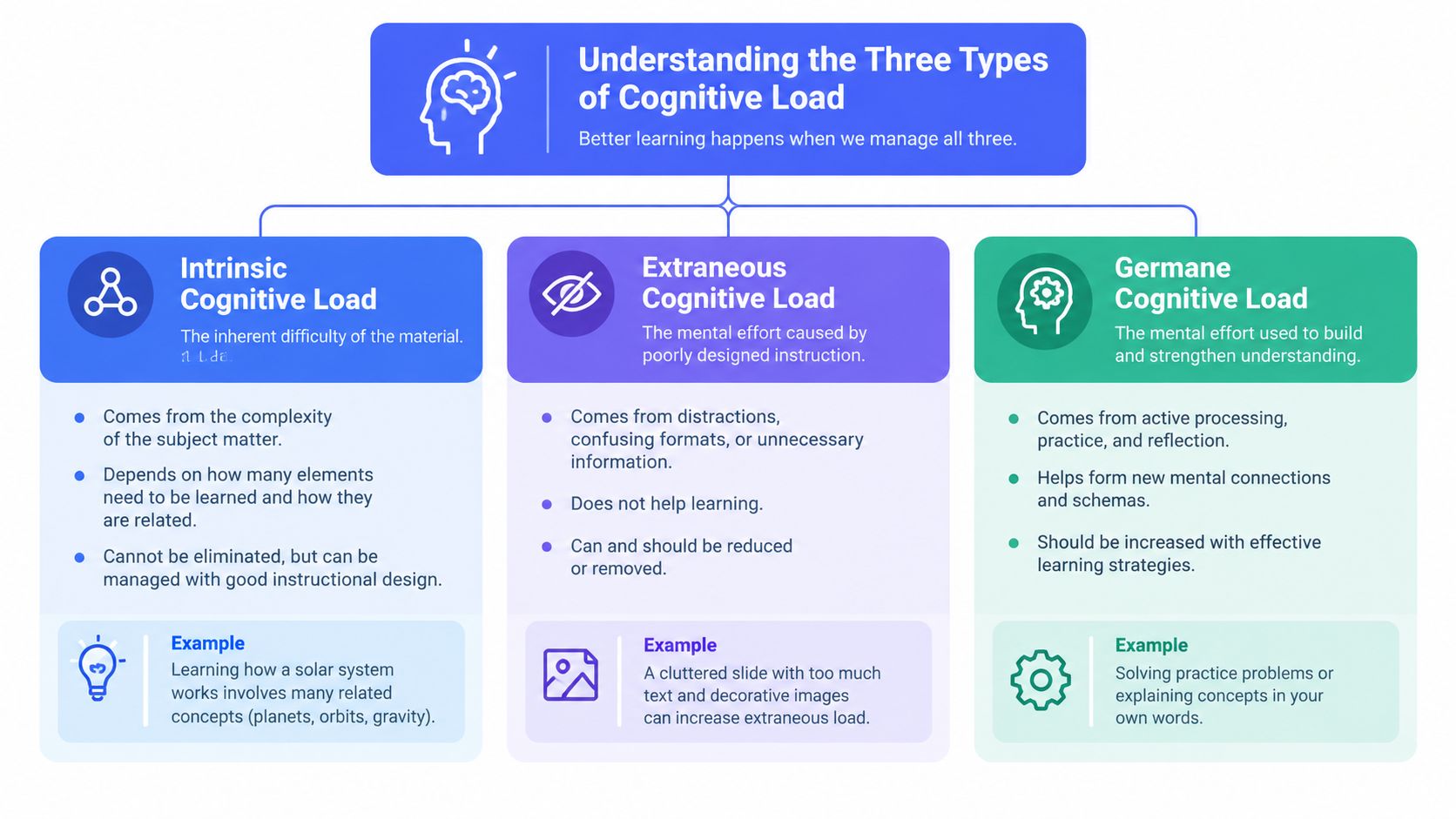
Intrinsic load belongs to the work
Consider a new support agent handling a complex billing dispute. The agent must understand the customer's account, interpret policy, identify the relevant transaction, and communicate a resolution. Those relationships create intrinsic load. Removing the complexity entirely isn't possible without removing the task.
You can manage it by sequencing information. Give the agent the policy vocabulary first, then a worked example, then a realistic case. In a software team, introduce the service architecture before asking a new developer to trace a production issue. The aim isn't to make difficult work trivial. It's to make the dependencies visible.
Extraneous load belongs to the system
Now add a poorly labeled dashboard, inconsistent terminology, duplicated notifications, and instructions split between several documents. The billing dispute hasn't become more intellectually meaningful, but the agent must spend more effort navigating the system.
Extraneous load often hides in small details:
- A form asks for information the user has already supplied.
- A project brief uses different names for the same feature.
- A writer must switch tools to dictate, edit, and retrieve background notes.
- A developer receives build alerts in the same channel as urgent incident messages.
This is the load to remove first because it offers the clearest opportunity for workflow improvement.
Germane load deserves protection
Germane load is the effort that builds a mental model. A writer studies why a strong argument works, a developer traces the logic behind a fix, and a student explains a concept without looking at notes. These activities may feel demanding, but they create capability rather than merely consuming attention.
The three forms interact. A complex task can overwhelm someone when intrinsic load is high and extraneous load crowds out the effort needed for learning. A well-structured task preserves enough capacity for germane processing, which is why simplification alone isn't the full objective.
What Research Shows About Cognitive Load and Performance
A support agent can finish a demanding case and still lose the next hour to tab switching, idle browsing, or repeated inbox checks. Workplace overload affects behavior as well as energy. In a diary study of 102 full-time researchers across 1,016 daily observations, higher daily cognitive load was associated with cyberloafing and had a curvilinear relationship with creativity. Moderate load could support idea generation, while higher load reduced daily creativity through more off-task behavior and problem-oriented mind wandering. Review the diary-study findings on cognitive load, creativity, and cyberloafing.
The practical goal is a workable level of demand. Writers need uncertainty to develop ideas, developers need complexity to reason through systems, and support agents need enough context to solve nonroutine cases. Excessive demand shifts attention toward avoidance, low-value browsing, and repetitive checking.
Switching creates a hidden tax
Task-switching research links switching frequency with working-memory performance. Less frequent movement between task sets is associated with higher estimated working-memory capacity, while frequent switching increases switch costs and weakens memory encoding. Read the task-switching research on working memory and memory encoding.
For a knowledge-work team, the finding supports clear operating rules:
- Keep one meaningful task active during a focus period.
- Batch similar communication, review, and administrative work.
- Record the next action before leaving a task.
- Separate urgent channels from routine updates.
- Close task instances you are not ready to handle.
A long task list can create the appearance of control while keeping every item mentally active. A shorter active queue reduces the information workers must reload after an interruption. The trade-off is slower response to low-priority messages, so teams should define escalation paths instead of treating every notification as urgent.
Lower load does not always mean better learning
Professionals often ask an AI tool to produce a complete answer, summarize a technical decision, or rewrite a draft. That may remove useful reasoning along with unnecessary friction. A 2026 review of generative AI and cognitive load reports that unstructured AI use can add coordination cost or displace cognition, while step-by-step prompts, worked examples, and task decomposition provide more consistent support without harming learning. Examine the review of generative AI and cognitive load.
Use automation for retrieval, formatting, transcription, and repetitive transformation. Keep interpretation, verification, prioritization, and expertise-building decisions with the worker. Good workflow design reduces wasted effort while preserving the thinking that improves performance.
Practical Strategies to Reduce Extraneous Cognitive Load
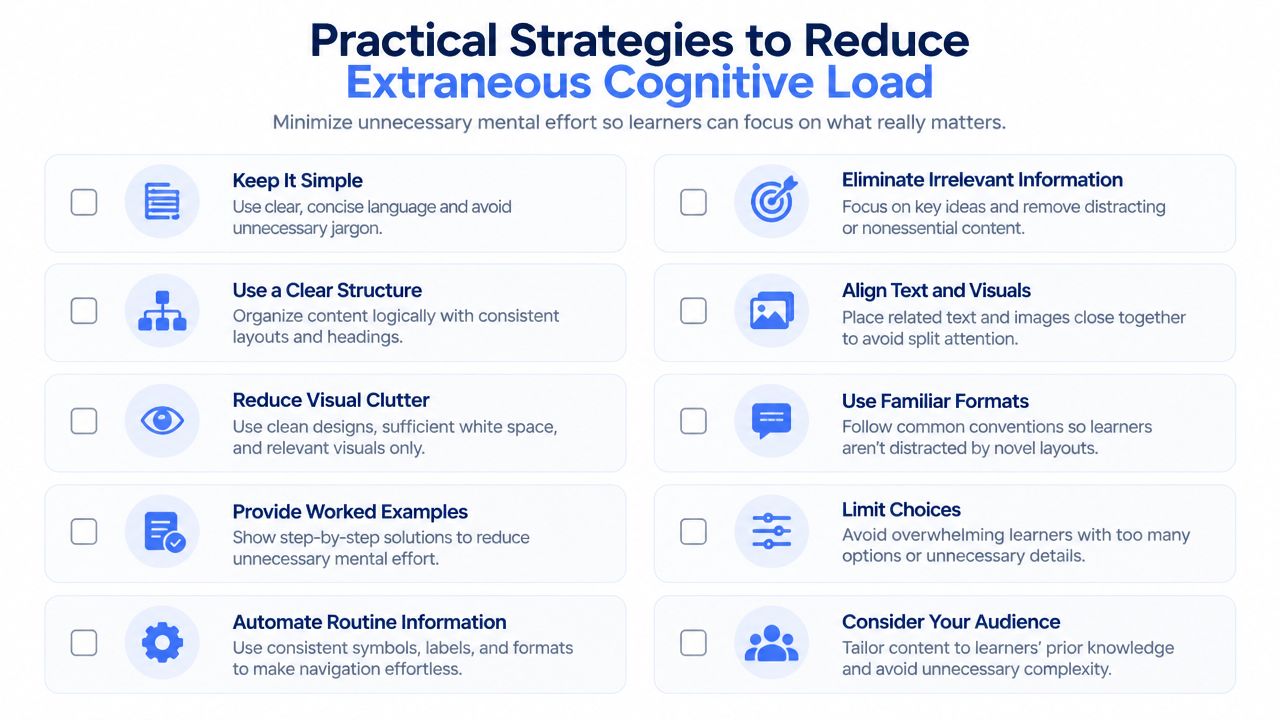
A developer loses the thread while switching between a failing test, chat messages, and three documentation tabs. A support agent faces the same problem when every channel signals urgency. Cognitive load rises before either person completes meaningful work, so the first intervention is usually workflow design rather than another productivity app.
Set up each work area around one primary task. Keep the active document, required references, and an interruption capture point visible. Silence notifications during drafting, analysis, or debugging, then schedule communication windows. Roles requiring rapid responses can use status rules and escalation paths instead of keeping every channel active at full intensity.
Redesign the workflow around fewer switches
Frequent task switching creates reorientation work and makes it harder to retain the details needed for the next decision. Batch similar work, limit the number of active task instances, and use a written recovery point when changing contexts, as noted earlier.
A practical operating pattern looks like this:
- Drafting block: Keep the brief, source notes, and working document together. Capture unrelated requests in an inbox rather than acting on them immediately.
- Communication block: Process email, chat, approvals, and short replies together. Saved responses can handle recurring questions without forcing a fresh composition each time.
- Review block: Check documents or code in a dedicated pass. Alternating creation and critique increases context changes.
- Recovery point: Record what is complete, the open question, and the next action before leaving the task.
Templates reduce repeated decisions without dictating every detail. A support team can standardize escalation notes with fields for customer impact, evidence, action taken, and requested owner. A developer can use a pull request template covering behavior changed, tests run, and known risks. A writer can maintain separate templates for research briefs, outlines, and final edits.
Make information easier to find
Use stable names, consistent folders, and one canonical location for current documents. If workers must compare several versions to identify the authoritative file, search effort and restart time increase. Clear labels preserve attention for judgment instead of retrieval.
The same principle applies to learning content. Sequencing, worked examples, and clear navigation can boost learner retention with this guide without adding unnecessary interactive elements.
Standardization should fit the work. Recurring communication, approvals, and production tasks benefit from workflow standardization principles that reduce blank-page decisions while leaving room for exceptions. Teams should standardize the handoff information, not every individual judgment.
Boosting Germane Load for Deeper Learning and Skill Building
A quieter workspace can improve attention, but it won't automatically build skill. Germane load appears when you use that protected attention to create connections, test understanding, and notice patterns.
For a new task, begin with a worked example. Study the completed result, identify the decisions behind it, and then attempt a similar task with less support. This is more effective than asking a beginner to solve a complex problem with no model, and more demanding than passively reading an explanation.
Match the challenge to the learner
A writer learning technical content might first annotate a strong article, then outline a related piece, then draft independently while checking claims. A support agent can review a resolved ticket, explain the reasoning behind the response, and handle a similar case without copying the wording. A developer can trace a known bug fix before diagnosing a new failure.
The productive question is, “What should this person be able to recognize or do next?” That question prevents training from becoming a pile of information. It also helps managers distinguish a useful challenge from avoidable confusion.
Use AI as scaffolding, not a substitute for judgment
Ask an AI assistant to decompose a task, show a worked example, generate practice cases, or critique a draft against explicit criteria. Don't outsource the entire reasoning chain when the goal is to learn the domain.
A useful prompt structure is:
- State the outcome.
- Provide the relevant context.
- Request a sequence of steps or a worked example.
- Attempt the task yourself.
- Ask for targeted feedback on your attempt.
- Verify the result against primary material or team standards.
This preserves germane effort while reducing administrative friction. The same principle applies to templates, macros, and voice tools. Use them to remove mechanical work, then spend your attention on interpretation, accuracy, and decisions that strengthen expertise.
Role-Specific Applications for Writers, Support Agents, Students, and Developers
The same cognitive load management principles look different across roles because the interruption pattern changes.
Writers should separate idea generation from line editing. During drafting, capture rough language quickly and keep research questions in a visible list. During revision, work from a defined pass such as structure, evidence, clarity, or grammar. Dictating a rough argument can help when typing becomes the bottleneck, while a later editing pass protects quality.
Support agents need a reliable case frame. Keep the customer's goal, current status, relevant policy, and next action visible in the ticket. Use response templates for recurring situations, but leave room for a sentence that acknowledges the specific customer context. Agents handling simultaneous conversations should distinguish urgent escalation signals from routine updates instead of treating every notification as equally important.
Students and researchers can protect learning by converting notes into questions and explanations. Don't merely collect summaries. Close the source, reconstruct the idea, identify what remains uncertain, and return to the material with a specific question. That approach preserves useful mental effort instead of turning study into passive information storage.
Developers should keep coding, debugging, and team communication as separate modes where possible. Before leaving a code task, record the failing behavior, the hypothesis being tested, and the next experiment. This makes re-entry cheaper without pretending that all context can remain active.
Voice input can reduce mechanical switching for people who draft across email, documents, chat, and development tools. This guide to writing faster and neater covers the broader workflow problem. Voice Control Pro inserts cleaned transcription at the cursor across apps, and its Hey Max assistant can rewrite selected text, answer contextual questions, analyze what's on screen, and launch installed apps by voice. Use it for capturing a draft or note without leaving the current task, then review the output where accuracy matters.
Voice Control Pro is a cross-platform voice-to-text tool for inserting polished transcription directly into the app you're using, with local processing available through Fly Mode and a free local mode. If reducing typing and window switching fits your workflow, try Voice Control Pro and use it to capture drafts, messages, notes, and prompts while keeping your attention on the work.