
You're probably in the same loop most knowledge workers live in now. A meeting ends, Slack is blinking, email needs replies, and the useful thought you had two minutes ago is already fading because you stopped to type a status update. The friction isn't dramatic. It's just constant. Cursor here, keyboard there, copy a note, switch windows, lose your place, fix a typo, keep moving.
That's why real time transcription software has stopped feeling like a niche accessibility tool and started becoming a daily workflow decision. Used well, it removes a layer of mechanical work from writing. You speak, the text appears, and you stay with the thought instead of babysitting the keyboard. Used badly, it creates a different kind of drag: laggy text, garbled speaker changes, or a privacy policy that raises more questions than it answers.
This shift is bigger than personal productivity. The global business transcription market is projected to grow from US$ 3.4 billion in 2026 to US$ 8.6 billion by 2033 at a 14.2% CAGR, and meeting transcription is projected to grow at over 25% CAGR, driven by remote work and the need for accurate documentation, according to business transcription market projections from Persistence Market Research. That tells you something important. This isn't a novelty category anymore. It's becoming part of standard business operations.
Table of Contents
- The End of Constant Typing
- What changes when voice becomes input
- Where people get disappointed
- How Your Voice Becomes Instant Text
- The interpreter model is the easiest way to understand it
- Where the processing happens changes everything
- Performance Metrics That Actually Matter
- Accuracy is only one part of the experience
- What to test before you commit
- The Big Trade-Off Privacy Versus Power
- Why cloud tools feel so good
- Why privacy concerns stop adoption fast
- A practical way to choose
- Matching Real Time Transcription to Your Job
- Different roles need different strengths
- Which Transcription Software Profile Fits You
- How to Start Using Voice Today
- Start small and test real work
- Use a simple decision filter
The End of Constant Typing
Typing isn't the problem by itself. The core issue is context switching. You're writing an email, then pausing to summarize a call, then jumping into a CRM note, then back to a draft. Each switch is small, but the accumulation is what makes the day feel chopped up.
Real time transcription software helps most when work is already moving faster than your fingers. Sales reps feel this in follow-up notes. Researchers feel it when they're trying to capture an idea before it slips. Managers feel it right after a meeting, when they need to turn discussion into decisions while the details are still fresh.
What changes when voice becomes input
The best setups don't try to replace writing. They replace the parts of writing that are mostly mechanical.
- Drafting first passes: Speaking a rough email or memo is often easier than typing from a blank page.
- Capturing live notes: During calls or interviews, voice input can preserve momentum better than stopping to summarize manually.
- Reducing typo cleanup: Good transcription software can produce cleaner text than rushed typing.
- Keeping attention on the work: Less app switching usually means fewer dropped thoughts.
Practical rule: If the task starts with “get this out of my head fast,” voice usually beats the keyboard.
There's also a mindset shift. People often assume dictation is only useful for long-form writing. In practice, it's just as valuable for short bursts: a chat reply, a bullet list, a task description, or a quick project update. The gain comes from lowering the cost of getting words onto the screen.
Where people get disappointed
The disappointment usually comes from expecting all transcription tools to behave the same way. They don't. Some are built for meetings. Some are built for dictated text insertion. Some are excellent in quiet solo use and weak in messy conversations. Some feel smart until you feed them sensitive material and realize you don't know where that data goes.
That's why feature lists alone aren't enough. The key decision comes down to three practical questions: how fast it appears, how well it holds up in real conditions, and whether the privacy model fits the work you do.
How Your Voice Becomes Instant Text
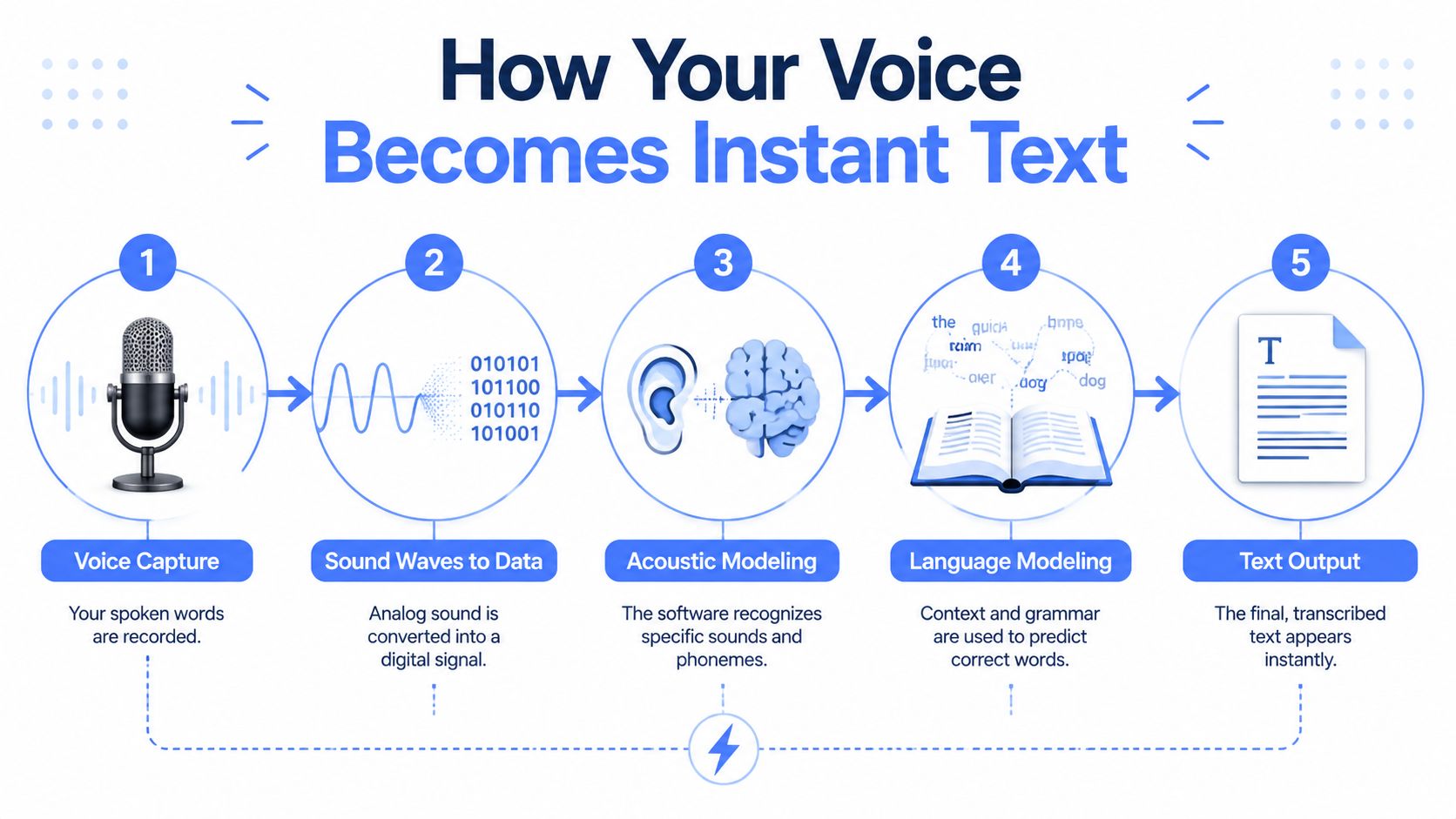
Real time transcription software operates like a very fast interpreter sitting beside you. It listens, figures out what you meant, and types the cleanest version it can before you've moved on to the next sentence.
The interpreter model is the easiest way to understand it
The first job is hearing the sound correctly. That's the speech recognition layer. It takes the audio coming from your microphone and breaks it into recognizable sounds, syllables, and likely words. If your mic is poor, the room is noisy, or two people speak at once, this stage gets harder immediately.
Then the system has to decide what those sounds probably mean in context. This is where language modeling matters. A strong model doesn't just hear a word. It compares possibilities and asks what fits the sentence best. That's how it can distinguish between similar-sounding words or add punctuation that makes the output readable.
Finally, the software has to return text in a form you can use. That includes capitalization, punctuation, spacing, and sometimes light cleanup. The goal isn't merely raw transcription. The goal is usable writing.
For readers comparing tools for daily drafting, this is why broad app comparisons like these best writing to text app options can be helpful at the start. They surface the practical differences between dictation-style tools, meeting transcription tools, and writing assistants, which often get lumped together even though they solve different problems.
Where the processing happens changes everything
The biggest architectural split is simple. Cloud-based systems send audio to remote servers for processing. On-device systems do the work locally on your computer or phone.
Cloud systems usually feel more capable in broad, messy situations. They often support more languages, more advanced formatting, and stronger contextual cleanup. They can also improve quickly because the heavy processing happens on large remote infrastructure instead of your laptop.
On-device systems make a different promise. Your audio stays local, the response can feel direct, and the privacy story is usually much easier to understand. That matters if you handle internal strategy, legal material, health information, or anything else you'd rather not route through a third-party service unless absolutely necessary.
The technical distinction sounds abstract until you use both models on a normal workday. Then it becomes obvious. One optimizes for convenience and reach. The other optimizes for control.
Neither model is universally better. The right one depends on the task in front of you. If you're brainstorming a rough blog intro, cloud features may be worth it. If you're documenting a sensitive client conversation, local processing can be the smarter choice even if it offers fewer extras.
Performance Metrics That Actually Matter
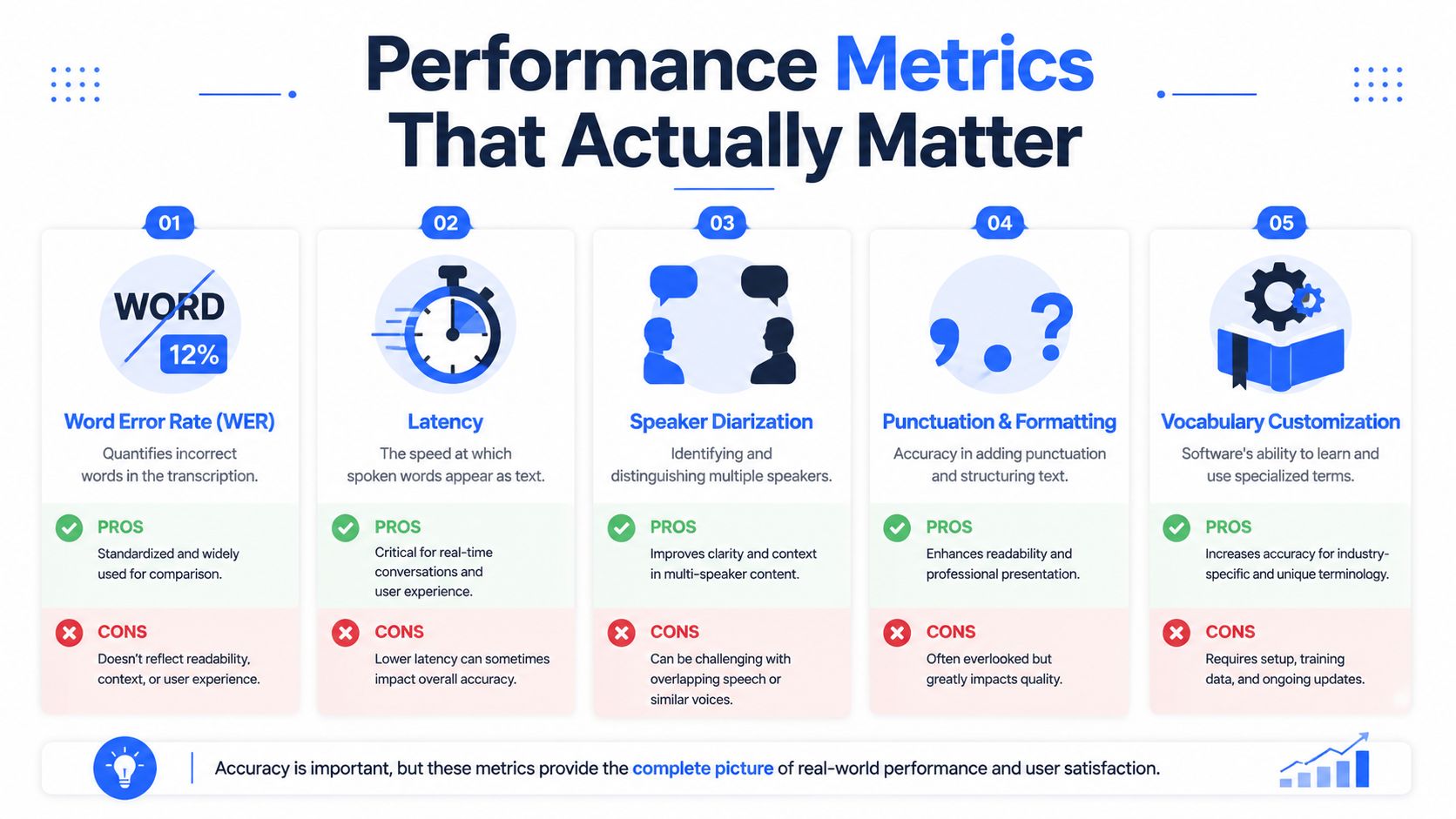
Most marketing for real time transcription software leans on one number: accuracy. That number is rarely useless, but by itself it doesn't tell you whether the product will feel good in actual work.
Accuracy is only one part of the experience
A better lens is word error rate, often shortened to WER. It's a more honest way to think about mistakes because it reflects substitutions, missed words, and extra words. But even that doesn't capture the whole experience.
If you're dictating into a document, latency often matters more than a small difference in final accuracy. When text appears nearly as fast as you speak, you stay in rhythm. When it lags, you start watching the screen, repeating yourself, or pausing to wait. That breaks flow fast.
Multi-speaker situations expose another weak point. Clean demos usually feature one calm speaker in a quiet room. Real life doesn't. In medical transcription, 40% of real-world failures stem from poor speaker diarization when voices overlap, not just raw accuracy, and a 2-second latency during a conversation can disrupt documentation flow and reduce provider adoption, according to TicNote's discussion of medical transcribing software.
That's a serious practical lesson. A tool can look excellent in a polished demo and still fail the moment two people interrupt each other.
What to test before you commit
Use short, ugly tests. Don't test with a perfect script in a silent room.
- Check latency first: Speak a sentence naturally and watch when the words appear. If you feel yourself waiting, that's a workflow problem.
- Test interruptions: Run a conversation with crosstalk or background noise. Meeting tools live or die here.
- Look at punctuation quality: Raw words aren't enough if every paragraph needs manual repair.
- Try your vocabulary: Product names, technical terms, and people's names reveal weaknesses fast.
- Test in the app you use: Browser demos can hide insertion issues that show up inside your CRM, editor, or chat tool.
For a practical benchmark mindset, this guide on speech to text accuracy tips is worth reading because it focuses on setup and testing habits rather than vendor hype.
A slightly less polished transcript that appears instantly is often more useful than a cleaner transcript that arrives late.
That's especially true for drafting, note capture, and live operational work. Final transcript quality matters. But if the delay knocks you out of the task, the software has already cost you something.
The Big Trade-Off Privacy Versus Power
This is the decision most guides underplay. You're not only choosing a feature set. You're choosing where your spoken information goes, who processes it, and how much capability you're willing to trade for control.

Why cloud tools feel so good
Cloud-based transcription tools are popular for a reason. They're usually easy to start, they often improve output with contextual cleanup, and they can support broader language coverage and more advanced features than a local model running on a standard laptop.
For general business use, that convenience is hard to dismiss. If your day is full of emails, internal notes, brainstorming, and meeting summaries that don't involve regulated data, a cloud tool may offer the smoothest experience. It can feel more forgiving with accents, more polished with punctuation, and better at turning speech into ready-to-send text.
The trade-off is that convenience comes with dependency. Your audio has to travel somewhere. Even when the vendor offers encryption and access controls, the key question isn't just “is it secured?” It's “what exactly happens to my data after I speak?”
Why privacy concerns stop adoption fast
This question takes on critical importance in healthcare, legal work, HR, finance, and confidential strategy discussions. A vague privacy page isn't enough when the material itself is sensitive.
That concern is showing up directly in buying decisions. Recent data from 2025 to 2026 shows that 68% of healthcare organizations rejected transcription vendors because they couldn't confirm whether Protected Health Information was used for model improvement, according to Accountable's review of HIPAA-compliant transcription software.
That number matters beyond healthcare. It highlights a broader procurement reality. Buyers aren't only evaluating output quality. They're evaluating policy clarity, retention controls, training practices, and whether the vendor answers direct questions without hedging.
If you're comparing vendors, resources on choosing data privacy solutions can help frame the right questions, especially around storage, third-party access, and retention behavior. Those are often the details buried below the feature grid.
If a vendor explains accuracy in detail but stays fuzzy on data flow, treat that as a warning sign.
A practical way to choose
The easiest way to decide is by separating your work into two buckets.
For low-sensitivity tasks, cloud-based processing often makes sense. Think brainstorming, rough drafting, personal notes, or general productivity work where the upside is speed and polish.
For high-sensitivity tasks, on-device transcription is usually the safer default. If the material includes protected health information, private employee issues, legal risk, acquisition planning, or proprietary customer data, local processing reduces exposure and simplifies the trust equation.
A hybrid workflow is often the most realistic answer. Use cloud power where convenience creates clear value. Use local transcription where privacy matters more than extra polish. If you want a deeper framework for thinking through that split, this comparison of cloud vs local speech recognition lays out the operational differences clearly.
Matching Real Time Transcription to Your Job
The best real time transcription software for a physician isn't the best one for a sales rep. The best one for a researcher may frustrate a developer. The category makes more sense when you match the tool to the job rather than searching for a universal winner.
The healthcare example makes the stakes obvious. The global medical transcription software market is projected to reach USD 11.84 billion by 2034 with a 17.10% CAGR, and North America held 44.84% market share in 2025, driven by efforts to reduce physician burnout and integrate with EHR workflows, according to Fortune Business Insights on the medical transcription software market. That's not just growth for growth's sake. It reflects how essential transcription has become in documentation-heavy work.
Different roles need different strengths
A sales rep usually cares about speed, quick note entry, and minimal friction inside a CRM. A medical professional cares about privacy, terminology, and reliability under pressure. A researcher often wants long-form thought capture and clean drafting. A developer may want quick comments, issue notes, and prompt iteration without leaving the editor.
These are different jobs with different failure points.
- Sales teams usually hate lag and extra clicks more than they hate small cleanup edits.
- Clinical users need clear privacy boundaries and strong handling of specialized vocabulary.
- Researchers and students benefit from tools that support rambling thought capture without punishing imperfect speech.
- Developers often want a system that works across apps, not just inside one dictated note field.
Which Transcription Software Profile Fits You
| User Persona | Primary Need | Key Feature to Look For | Voice Control Pro Solution |
|---|---|---|---|
| Sales rep working in a CRM | Fast follow-up notes and replies | Global voice input that works across apps | Cursor-based dictation into CRM, email, and chat fields |
| Medical professional documenting visits | Privacy and structured note capture | Local processing option and reliable terminology handling | Local dictation mode for sensitive workflows |
| Researcher or student | Capturing ideas before they disappear | Clean long-form dictation and easy revision | Voice drafting plus rewrite support for rough notes |
| Developer or prompt engineer | Quick iteration without breaking focus | Works in editors, issue trackers, and AI tools | Voice input across apps with voice-assisted rewriting |
Pick for the bottleneck, not the brochure. If your problem is privacy, don't optimize for feature count. If your problem is speed, don't buy a tool that only shines in post-call transcript review.
That's where many teams go wrong. They compare brands as if they're buying one thing. In practice, they're choosing among meeting capture, live dictation, note automation, and writing assistance. Those can overlap, but they aren't identical.
How to Start Using Voice Today
The biggest barrier to adopting real time transcription software usually isn't price or setup. It's habit. People are so used to typing that they only try voice once, in a noisy environment, with no real workflow in mind, and decide it's not for them.
A better approach is narrower and more practical.
Start small and test real work
Don't begin with your most important meeting or a complicated workflow. Start with one task you repeat every day.
Try one of these:
- A daily email block: Dictate rough replies, then edit only the final pass.
- Post-meeting notes: Speak the summary immediately after the call while details are still fresh.
- Idea capture: Use voice when walking through a problem or outlining a draft.
- Administrative updates: Status notes, CRM entries, and task descriptions are ideal training ground.
You'll learn quickly whether the tool fits your speech patterns, your microphone setup, and your preferred apps. That's more valuable than any feature comparison page.
For teams thinking beyond dictation into accessibility and live communication support, these real-time captioning solutions are also useful context because they show where live transcription overlaps with meetings, events, and broader communication workflows.
Use a simple decision filter
A good choice usually comes down to three checks.
First, workflow fit. Does the software work where you write, or does it force you into its own interface?
Second, privacy fit. Are you comfortable sending this kind of spoken content to the cloud, or do you need local processing for part of your work?
Third, performance fit. Does it stay responsive enough to preserve your flow, and does it handle your normal speaking conditions without constant correction?
If you want a practical setup path, this guide on how to set up voice control is a good place to start because it focuses on the basics that affect everyday use, like shortcuts, environment, and routine.
Voice works best when you treat it as a regular input method, not a special event. Once that clicks, the keyboard stops being your only way to get ideas into text.
If you want a low-risk way to build that habit, try Voice Control Pro. It gives you a simple voice-first workflow for inserting text across apps, and its free unlimited local dictation mode makes it easy to test real time transcription without adding privacy risk or committing to a new tool before you're ready.