
You're rushing between meetings, you hold a key, dictate a reply and watch a clean sentence appear. Then the same tool mangles a client's name in a noisy office. That's not random. Understanding how voice recognition works means looking at the whole setup, your voice, the room, the vocabulary and where the audio is processed, not just the model name.
Table of Contents
- Sound to Text in Five Stages
- The Five Stages
- Measuring Errors With WER
- How Acoustic Models Hear Individual Sounds
- Why Voices Make This Hard
- How Language Models Pick the Right Words
- A Second Pass Can Fix the First
- Where Domain Words Trip It Up
- End-to-End Neural Models and Real-World Accuracy
- Reported Word Error Rate by Speech Condition
- On-Device Versus Cloud Processing Compared
- On-Device Versus Cloud Voice Recognition
- Where Your Voice Data Goes and What to Ask
- Voice Data Types and the Question to Ask
- Choosing Local or Cloud Dictation for Your Work
- Which Processing Mode to Start With
- Run Your Own 200-Word Test
Sound to Text in Five Stages
You press a key on your phone, say "Send the draft before lunch," and words appear a moment later. Between sound and text, the system makes a series of probability choices. It doesn't look up your sentence in a dictionary.
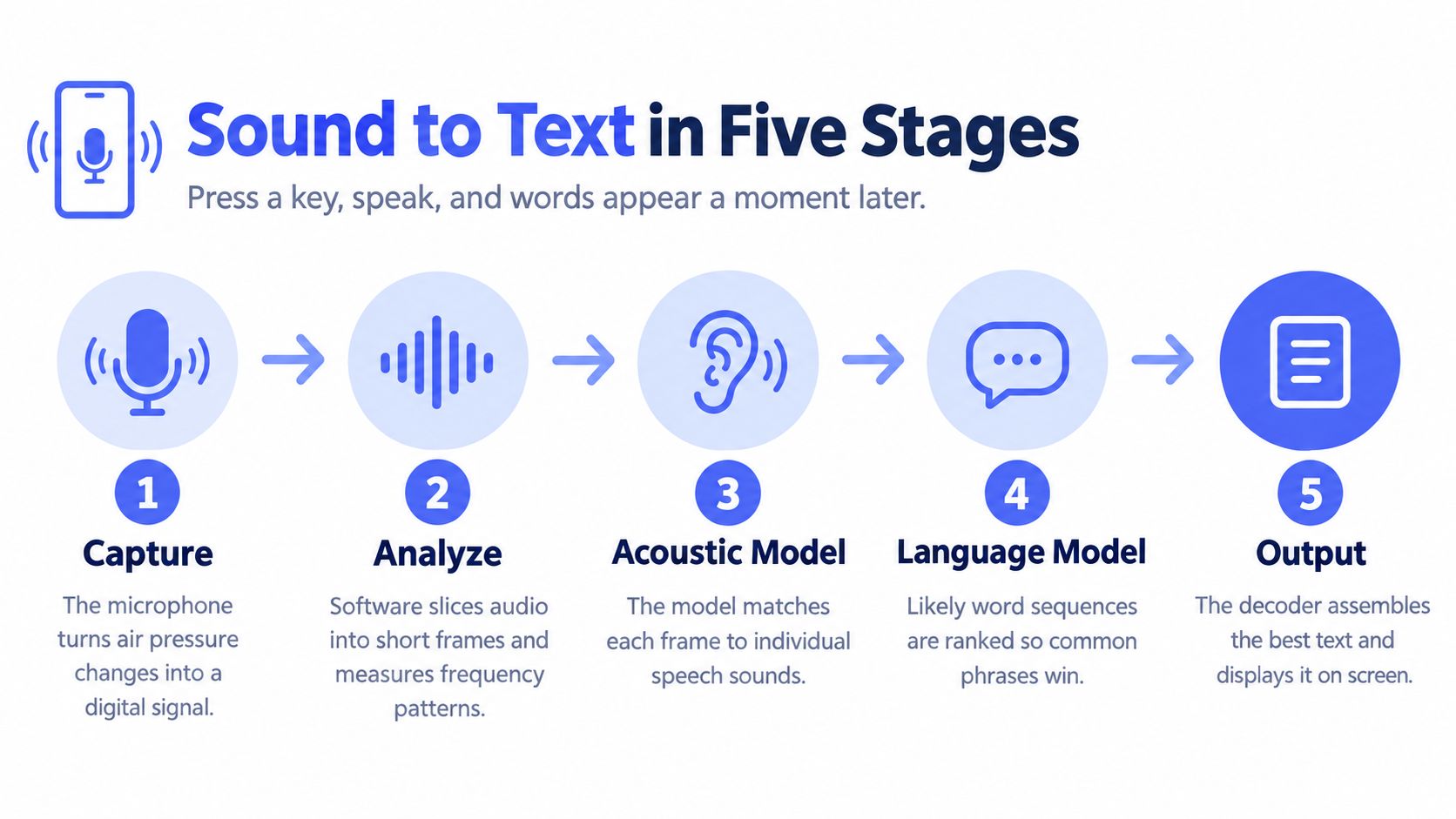
The Five Stages
- Capture: The microphone turns changes in air pressure into a digital signal, sampled thousands of times per second.
- Frame and extract features: Software cuts the audio into short slices of roughly 25 milliseconds and summarises each slice by its frequency content and energy. That pattern shifts constantly as your voice moves.
- Score sounds: An acoustic model estimates which speech sounds, such as phonemes, each slice most likely contains.
- Choose words: A language model and a search process called a decoder combine those sound scores with word probabilities to pick the most likely word sequence.
- Format: Punctuation, capitalisation and cleanup are added as a separate language task, not as part of hearing the sound.
This statistical decoding is central to modern systems. As the Communications of the ACM history of NIST speech evaluations explains, automatic speech recognition analyses changing frequencies and energy in short segments, then estimates likely phonemes, words and word sequences using acoustic and language models. Readers who want the broader model story can explore artificial intelligence in speech recognition after grasping this pipeline.
Measuring Errors With WER
The standard measure is word error rate, or WER. You count substitutions, deletions and insertions, then divide by the number of words spoken.
Worked example: You speak 20 words. The transcript replaces one word and drops another. That's 2 errors divided by 20, so your WER is 10%.
A substitution swaps a word, a deletion misses one, and an insertion adds one you didn't say. WER gives you a common yardstick, but it treats every word as equal. A wrong filler word and a wrong invoice total count the same, which is why you'll need to judge practical impact separately later.
If you can name capture, framing, sound scoring, word choice and formatting, you already understand the core idea. Recognition is the system betting, slice by slice, on the most probable text for the sound it received.
How Acoustic Models Hear Individual Sounds
Think of a listener in a noisy train station catching fragments through announcements and crowd noise. She doesn't hear whole words cleanly. She guesses which sound each fragment probably is, then pieces the message together.
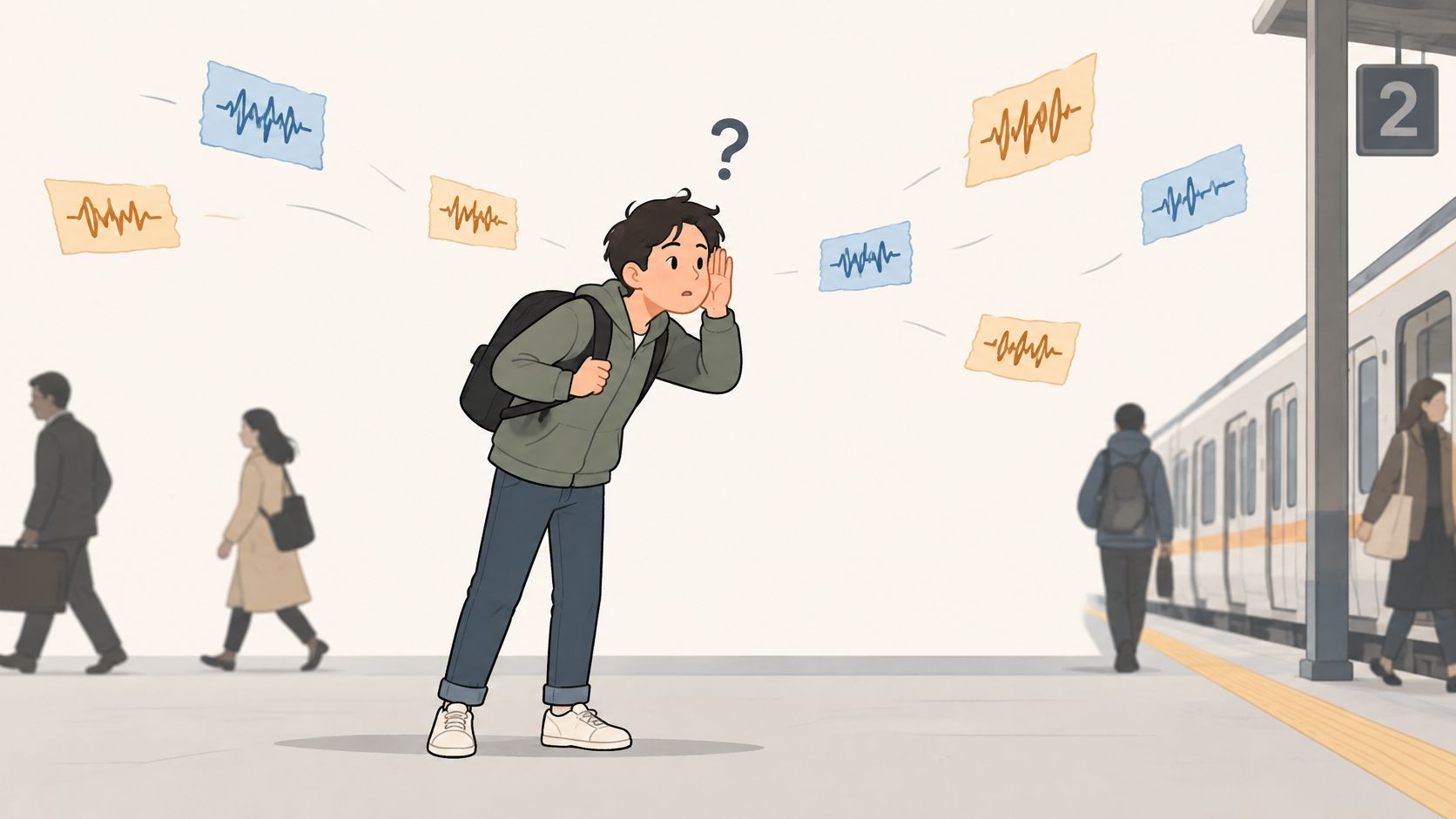
An acoustic model works at that fragment level. Speech is a constantly shifting mix of frequencies, and the model scores every short slice against a set of speech sounds. English is commonly described with roughly 40 phonemes, and tiny differences change meaning, such as the vowel in "beat" versus "bit."
The output isn't a decision. It's a ranked bet. For one slice, the model might assign a 70% chance to the "ee" sound and a 20% chance to the short "i" sound, with the remainder spread across other candidates. Those are illustrative scores for one slice, not a finished word.
Why Voices Make This Hard
Older systems paired Hidden Markov Models with statistical mixtures to track how sounds unfold over time. Modern systems use deep neural networks trained on thousands of hours of labelled speech. The newer approach learns subtler patterns, but it still depends on the voices it has heard during training.
Pitch, speaking speed and accent all move the frequencies for the same sound. A child, a fast talker and a speaker with a strong regional accent can produce quite different signals for one word. Training data that includes many voices helps the model generalise instead of memorising one type of speaker.
The short video below gives you another way to picture this listening step before you move to word choice.
The limit matters. The acoustic model outputs likely sounds, not finished sentences. On its own, it can't reliably decide between phrases that sound nearly identical, because that decision needs context from the words around them.
How Language Models Pick the Right Words
Say "recognize speech" quickly. Now say "wreck a nice beach." The sounds are almost the same, so acoustic scores can tie. Context breaks the tie, and that's the language model's job.
A language model estimates how likely each word sequence is, based on patterns it learned from large text collections. Older versions mainly counted short word combinations. Newer ones read the whole sentence, so they can use a word at the start to judge a word near the end.
Homophones show why you need this step. "To," "too" and "two" can sound identical. Only the surrounding sentence tells you whether someone is going to a meeting, adding an extra item or counting a pair. The same contextual logic supports automatic punctuation, because commas and full stops depend on sentence structure, not sound alone.
A Second Pass Can Fix the First
Some systems generate several candidate transcripts, then rescore them with a stronger language model. A 2024 IJCAI study found that fine-tuning a generative language model for second-pass rescoring improved word-error rate by 45.9% on the multi-accent SQuAD-SRC spoken-reading benchmark. In plain terms, better context corrected many errors the first pass made.
That result doesn't mean every tool gains the same amount. It shows a mechanism. When the sound is ambiguous, a model that understands likely phrasing can rescue the right candidate from the list.
Where Domain Words Trip It Up
Product names, acronyms, client names and technical terms are rare in general training text. The language model therefore prefers a common word that sounds similar, even when you said the specialist term clearly. A custom dictionary helps by adding those names and terms as known words the decoder can choose.
Practical rule: The more predictable your sentence, the more the language model helps. A list of random product codes gives it almost nothing to work with.
Dictate ordinary prose and context is your ally. Dictate SKUs, surnames and abbreviations back to back, and you're relying almost entirely on sound.
End-to-End Neural Models and Real-World Accuracy
Many modern systems merge the stages into one end-to-end neural network. Instead of separate components handing results along, a single model learns to map audio frames toward text, picking up acoustics and language patterns together during training. The pipeline doesn't disappear conceptually, but the boundaries blur inside the model.
The older benchmark results below are useful because they isolate one lesson clearly. Change the speech type or the amount of training data, and the error rate moves a lot.
Reported Word Error Rate by Speech Condition
| Speech condition | Benchmark and year | Best reported WER | What it shows |
|---|---|---|---|
| Broadcast news, early large-vocabulary tests | NIST Marketplace, 1995 | 27% | Early baseline with limited training data |
| Broadcast news, larger training corpora | NIST broadcast-news tests, 1998 | 13.5% | Lowest overall WER after more data became available |
| Switchboard-style telephone conversations | NIST, 2000 | 19.3% | Spontaneous speech is harder than prepared speech |
| CallHome telephone conversations | NIST, 2000 | 31.4% | Less predictable, acoustically difficult conversation |
Read the rows as a story about conditions. Prepared broadcast news improved sharply when larger corpora arrived. Telephone conversation stayed harder because people interrupt, mumble, restart sentences and speak over a narrower audio channel. The recogniser didn't suddenly get worse. The task got harder.
Recent work points to the same weak spots. A 2025 neural-network study on arXiv identifies background noise, simultaneous speakers, informal speaking styles and regional dialect variation as persistent weaknesses, and it reported 92% accuracy in noisy conditions versus 75% for the systems it compared. That gap is exactly why a polished benchmark may not predict your kitchen, call centre or shared office.
Numbers also hide consequences. A 5% error rate sounds small until the errors land on names, dates or figures. If a transcript gets ordinary connecting words right but changes a medication, a price or a client's surname, the usable accuracy for your job is much lower than the headline suggests.
Before trusting any tool, run three checks from these speech-to-text accuracy tips in your own setting:
- Correction behaviour: Can you fix a word quickly, and does the system learn the replacement?
- Confidence signals: Does it flag uncertain words, or present every guess with equal certainty?
- Your voice and room: Does it still work with your accent, microphone and background noise?
Accuracy isn't a single property sealed inside the model. It's what emerges when that model meets a particular speaker, room and vocabulary.
On-Device Versus Cloud Processing Compared
Both approaches run the same basic recognition pipeline. The difference is where the computation happens and how large a model that location can support. On-device recognition runs on your computer. Cloud recognition sends audio to remote servers.
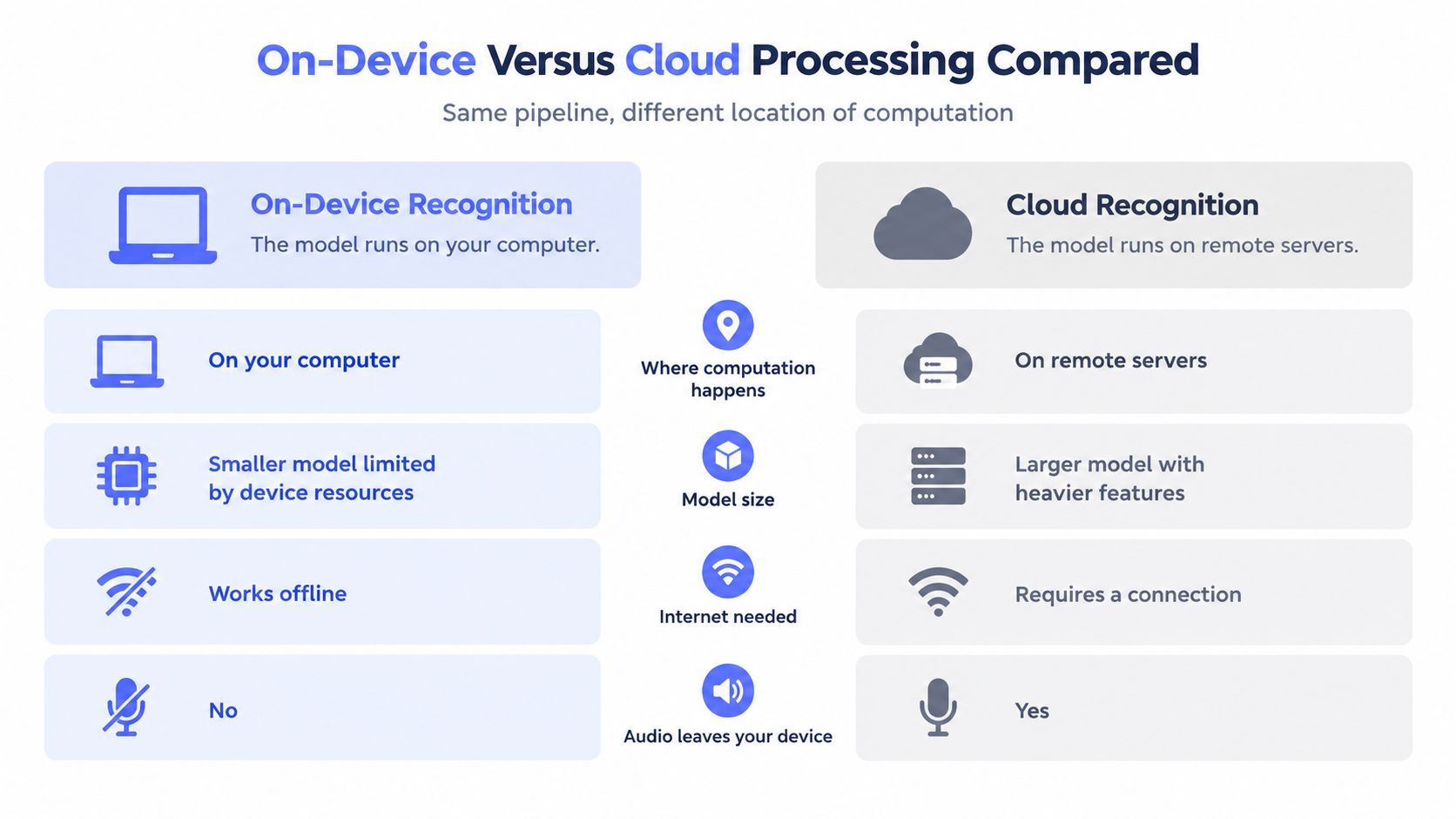
On-Device Versus Cloud Voice Recognition
| Factor | On-device (local) | Cloud |
|---|---|---|
| Where audio is processed | On your computer | Remote servers |
| Audio leaves your device | No, under local processing | Usually yes, before transcription |
| Model size and language coverage | Smaller models, narrower language range | Larger models, broader language range |
| Latency | Set by your hardware | Set by network speed and server load |
| Works offline | Yes | No |
| Retention and secondary use | Set by the app; check its settings | Set by the provider's retention and consent policy |
| Best fit | Confidential drafts, regulated or sensitive work | Maximum language range and heavy features |
Latency isn't automatically better on either side. Local processing avoids a network round trip, but a weak laptop can still feel slow. Cloud servers are powerful, yet a poor connection or a busy service adds delay before text returns.
Language coverage shows the size trade-off most clearly. A 2024 paper in the Journal of Machine Learning Research described a multilingual automatic speech-recognition model covering 1,107 languages and a language-identification model covering 4,017 languages. Breadth on that scale depends on large models and large datasets. A local model usually trades some of that reach for privacy, offline use and immediate control.
That's the honest framing. You're choosing between reach and control, not between a good system and a bad one. The right answer depends on the languages you speak, the connection you have and the material you're dictating.
Where Your Voice Data Goes and What to Ask
People often say "voice data" as if it's one thing. It isn't. A dictation tool can handle five different kinds of data, and each one raises a different question.
A transient audio stream is the sound passing through during recognition. Stored recordings are audio files kept afterwards. Derived transcripts are the text produced from that audio. Telemetry covers usage and performance data, and a voiceprint is a template used to identify a specific person.
That last category carries extra weight. European guidance summarised in heyData's deep dive into data privacy in voice AI treats voiceprints used for unique identification as special-category biometric data under GDPR Article 9, requiring stricter handling than ordinary transcription data. The same coverage notes a 2025 academic study arguing that on-device or edge processing can reduce exposure risk by keeping voice data from leaving the user's device, while privacy preservation remains a core design challenge.
Voice Data Types and the Question to Ask
| Data type | Where it typically goes | Question to ask |
|---|---|---|
| Transient audio stream | Processed then discarded locally, or streamed to a server | Does the microphone stream continuously, or only while I hold the key? |
| Stored recordings | Local disk or provider storage | Are recordings kept after transcription, and for how long? |
| Derived transcripts | Local history or an online account | Can I delete my history, and is deletion permanent? |
| Telemetry and usage data | Analytics systems | Is it shared with third parties? |
| Voiceprints | Biometric identifier, special-category data under GDPR Article 9 in EU guidance | Is a voiceprint created, and can I opt out? |
Add three follow-up questions before you rely on a tool for sensitive work. Is audio uploaded before transcription, or only after you choose a cloud feature? Are recordings retained for model improvement, and can you refuse that use? What capabilities disappear when you turn the connection off?
Those answers reveal the real trust boundary. A tool can delete audio quickly but keep transcripts for years, or process locally while sending detailed telemetry elsewhere. You won't know unless you ask about each data type separately.
The real comparison is which data is processed where, for how long, and for what secondary purposes.
Choosing Local or Cloud Dictation for Your Work
Start from your situation, not from a feature list. The table below gives you a sensible first mode to test, then you confirm it with your own material.
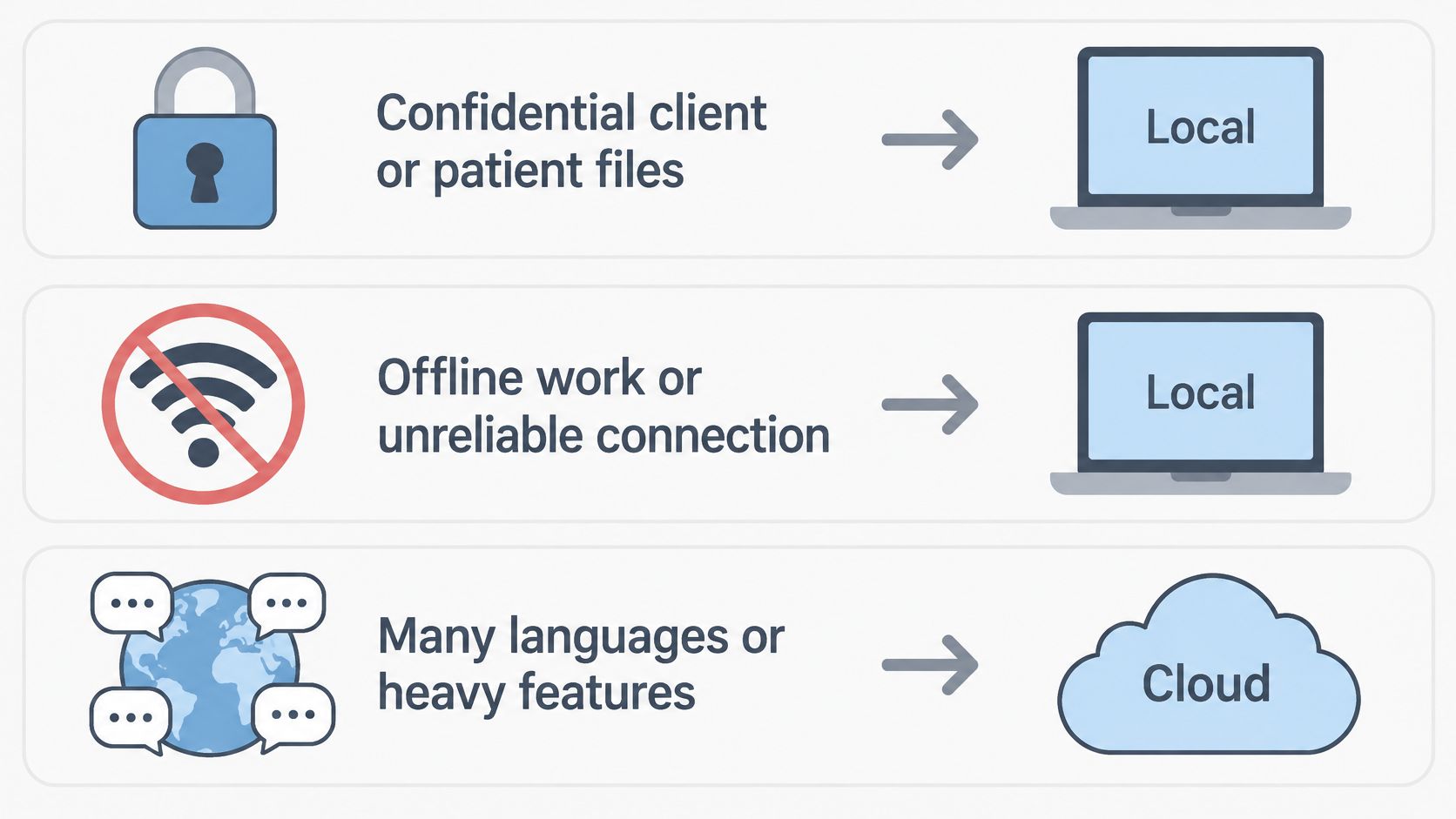
Which Processing Mode to Start With
| Situation | Start with |
|---|---|
| Confidential client or patient material | Local processing: Fly Mode or free local mode |
| Offline work or unreliable connection | Local processing |
| Many languages or heavy feature needs | Max, after confirming your language is supported |
| Noisy shared office | Test both modes in your own room before trusting either |
Here's how Voice Control Pro maps to those choices. Its Fly Mode runs all processing locally on your computer and pauses cloud features, and its free local mode gives unlimited dictation on an on-device AI model. Max adds 99+ language support, cleanup levels that match your writing style, a custom dictionary, transcription history and Hey Max tools for rewriting, screen questions and app launching. If you also dictate on your phone, this guide to format iPhone dictation with ease from Translate AI is a useful companion for tidying mobile transcripts.
Check one detail before you commit. Confirm that the language you need is supported in the exact mode you'll use, because local and cloud language lists don't always match.
Run Your Own 200-Word Test
- Pick real material: Choose a 200-word passage from your actual work, including names and terms you use weekly.
- Dictate normally: Use your usual app, microphone and room. Don't perform for the test.
- Count errors: Mark every substitution, deletion and insertion against the original.
- Calculate your WER: Divide the error count by 200. Ten errors means a 5% WER for your setup.
- Retest after fixes: Add missing names and terms to the custom dictionary, then dictate the same passage again.
That second score tells you more than any product page can. It reflects your voice, your room and your vocabulary, which are the conditions your dictation will face every day.
Put this test to work with a tool that lets you choose where your voice is processed, using local dictation for sensitive drafts and cloud-backed features only when you need broader language and cleanup support. Try the free local mode, run your 200-word test, and visit Voice Control Pro to set up dictation that matches the conditions you work in.