
You're probably here because you keep running into the same problem. A meeting starts moving fast, a lecturer changes slides before you've finished the last line, or an idea arrives quicker than your keyboard can keep up. You try to type faster, shorten words, or capture everything, and you still end up with notes that are incomplete, messy, and strangely hard to use later.
That usually isn't a handwriting problem or a typing problem. It's a workflow problem.
The people who know how to take notes faster don't rely on one trick. They use a system. They decide what deserves capture, use a format that reduces friction, and when speed really matters, they stop treating the keyboard as the default input method. The biggest gains come from reducing decisions, not just increasing keystrokes.
Table of Contents
- Why Writing Faster Is Not the Answer
- Prepare for Speed Before the Session Starts
- Build a page that makes decisions for you
- Do a two-minute mental outline
- Master Active Capture Techniques and Formats
- Use chunking instead of chasing every sentence
- Choose a format that fits the situation
- The 4x Speed Boost From Voice-to-Text Workflows
- Why voice changes the speed limit
- The clean capture problem
- How a 5-Minute Review Makes Your Notes Usable
- A fast review routine that actually works
- What most people skip
- Practice Drills and Putting It All Together
- Drill one for live listening
- Drill two for clean voice capture
Why Writing Faster Is Not the Answer
The usual advice is predictable. Learn abbreviations. Write smaller. Type faster. Use symbols. That can help at the margins, but it doesn't fix the core slowdown.
The bottleneck is selection speed. You're not just recording information. You're deciding, in real time, what matters, what can be ignored, and what should be rewritten into a shorter form. Guidance from UNSW on note-taking and paraphrasing points to the key idea: paraphrasing and capturing only keywords, not verbatim detail, improves retention while reducing note volume.
That's why frantic transcription fails. You spend your attention trying to preserve every sentence, and that leaves less attention for understanding the point behind the sentence.
Practical rule: If you're trying to record everything, you've already fallen behind.
Fast note-taking comes from three moves working together:
- Prepare the page before the session starts. A blank page creates hesitation. A pre-built structure removes it.
- Capture in compressed form. Keywords, decisions, questions, and actions move faster than polished prose.
- Consolidate while the material is still fresh. Notes aren't useful because you wrote them. They're useful because you can retrieve meaning from them later.
There's also a trade-off many overlook. A dense page can feel productive in the moment and still be slow in practice if it takes too long to review. Sparse notes can also fail if they're so cryptic that future-you can't decode them.
The target is not maximum volume. It's usable signal.
Once you start thinking that way, “how to take notes faster” stops being a question about your fingers and becomes a question about your system.
Prepare for Speed Before the Session Starts
Fast note-taking starts before anyone speaks. If you wait until the meeting or lecture begins to decide where things go, you'll waste attention on layout and labeling instead of listening.

A quick setup ritual solves most of that friction. Review the agenda, slides, brief, or calendar invite. You don't need a deep prep session. You only need enough context to predict the major buckets.
Build a page that makes decisions for you
Use the same template every time. Digital or paper both work. The point is consistency.
A simple page structure:
- Topic or meeting title with the date
- Key points for major ideas
- Decisions for anything settled
- Action items with names attached
- Questions for unresolved issues
- Follow-up for references, links, or next steps
That structure does two useful things. First, it prevents random note sprawl. Second, it makes you listen for categories instead of trying to capture speech line by line.
If you're using a voice-driven setup, it helps to configure shortcuts in advance so capture is immediate. A practical walkthrough on setting up voice control for daily use is worth doing before you try it in a real meeting.
Do a two-minute mental outline
Before the session starts, ask:
- What decisions are likely to happen?
- What information will I need to act on later?
- What would be expensive to miss?
Those questions change how you listen. You stop collecting trivia and start spotting outcomes.
Don't start with a blank page and a blank mind. Start with containers.
I've found that people often underestimate how much speed comes from removing tiny choices. Where should this go? Is this important? Should this be a bullet or a paragraph? Those micro-delays stack up.
A prepared page also makes mixed capture easier. You might type one short line, dictate a longer summary, and add one follow-up question. That's far faster than trying to produce clean final notes in one pass.
Master Active Capture Techniques and Formats
The fastest note-takers don't transcribe. They compress.
That means listening for meaning in blocks, then translating that meaning into shorter language. If you try to mirror spoken language in real time, you'll either miss the next point or create notes so dense that they're painful to review.
Use chunking instead of chasing every sentence
A strong manual method is chunking and translating. According to this explanation of chunking for note-taking, using that approach instead of verbatim transcription can increase note-taking speed by approximately 40%, and the method works by listening for 10 to 20 seconds, digesting the point, and then writing only the main idea.
In practice, that looks like this:
Speaker says: “We're delaying the rollout because support still needs the new macros, sales needs revised pricing language, and legal hasn't approved the updated terms.”
Fast note version:
- Rollout delayed
- Blockers. support macros, sales pricing copy, legal approval
- Need final sign-off before launch
That's the difference between recording words and capturing meaning.
A few shorthand habits also help:
- Drop filler words. Articles and repeated phrases rarely matter in notes.
- Use your own abbreviations. They only need to make sense to you.
- Prefer nouns and verbs. “Need approval Friday” is faster than a full sentence and still clear.
- Write questions, not full explanations. A sharp question can preserve the point with fewer words.
If you want to build speed in parallel with drafting skill, Kohru's writing productivity system has useful ideas on reducing friction when turning rough thoughts into usable text.
Choose a format that fits the situation
Different sessions reward different note structures. Using the wrong one slows you down.
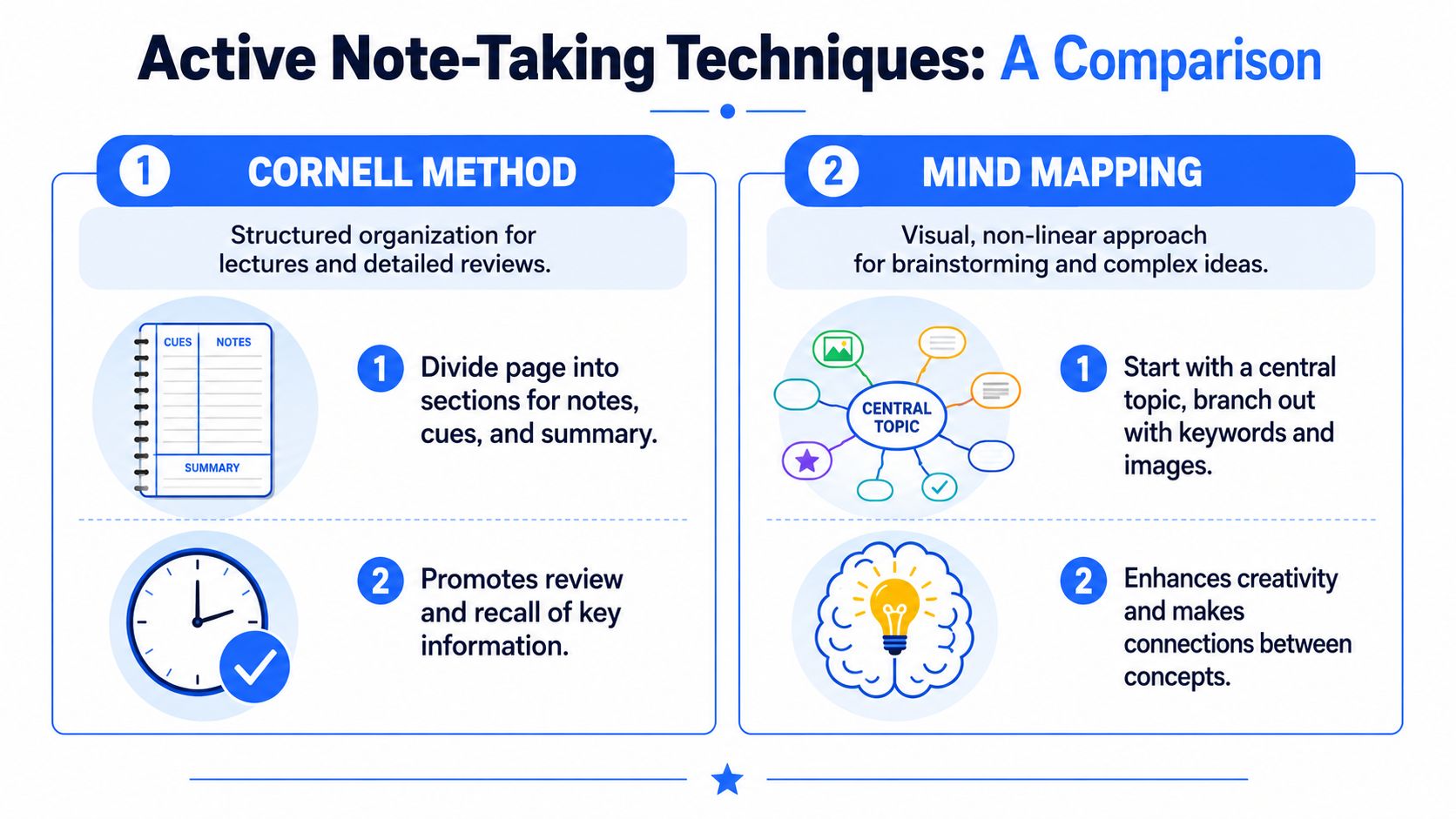
| Format | Best For | Speed | Review Efficiency |
|---|---|---|---|
| Outlining | Meetings, lectures with clear hierarchy | Fast once headings are obvious | High for sequential topics |
| Cornell Method | Classes, training, material you'll revisit | Moderate during capture | Very high for review and recall |
| Mind Mapping | Brainstorms, strategy sessions, concept-heavy discussions | Fast for idea generation | Good when relationships matter more than sequence |
Outlining is usually the quickest for structured discussions. It works well when one point leads to the next and you can nest details underneath major headings.
Cornell is slower at the moment of capture if you're not used to it, but it pays off later because the layout supports cues, summaries, and retrieval.
Mind mapping is useful when the conversation jumps between themes. It's less effective for task-heavy meetings where you need clean action items.
Use the format that reduces cleanup later, not the one that looks smartest on paper.
One mistake I see often is people forcing one format onto every situation. That creates drag. A project kickoff, a lecture, and a brainstorm don't produce information in the same shape. Your notes shouldn't either.
The 4x Speed Boost From Voice-to-Text Workflows
Typing has a hard ceiling. Voice changes that ceiling.
Why voice changes the speed limit
Guidance on taking notes quickly with voice input states that voice-to-text input can be up to four times faster than traditional typing, with speaking rates averaging 125 to 150 words per minute compared with typing speeds of 30 to 40 words per minute for average users.
That difference matters most in live settings. When you speak a summary instead of typing every clause, you stop fighting the keyboard and stay with the flow of the conversation.
This works especially well for:
- Meeting summaries when you need key decisions and next steps
- Lecture capture when concepts arrive faster than you can type
- Research notes when you want to think out loud and preserve the result
- Post-call debriefs when speed matters more than polished first-draft prose
Voice also changes your behavior. People tend to speak in ideas, not in keystrokes. That naturally pushes notes toward summaries, observations, and action items.
The clean capture problem
Dictation isn't automatically efficient. The common failure mode is messy output. You get the words quickly, then lose time fixing punctuation, removing filler, splitting run-on sentences, and cleaning structure.
That's why I don't treat raw transcription as the goal. The goal is clean capture. The note should arrive close to usable.
One option in this category is Voice Control Pro, which inserts dictated text wherever your cursor is, works across apps, and includes cleanup and rewrite features so the first version is closer to a finished note. If you want a broader workflow around this approach, this guide on a daily speech-to-text workflow for writing is a practical reference.
A simple voice workflow looks like this:
- Speak one idea at a time, not a whole ramble.
- Pause between topics so the note has natural structure.
- Dictate summaries, decisions, and tasks. Don't narrate every detail.
- Clean immediately if needed, while context is fresh.
For a closer look at what this kind of workflow looks like on screen, this demo is useful:
The trade-off is straightforward. Voice gives you speed, but only if the output lands cleanly enough that review stays short. If your dictation workflow creates transcripts you dread opening later, the speed gain disappears.
How a 5-Minute Review Makes Your Notes Usable
Fast capture is only half the job. Notes become valuable when you can return to them and immediately recover the point.
The Cornell system gets this right. This Cornell note-taking reference states that reviewing notes within 8 to 24 hours significantly improves retention, with a 40% increase in recall when that window is followed instead of delaying review.

A fast review routine that actually works
You don't need a full rewrite. You need a quick pass that turns rough capture into reliable reference.
Try this five-minute routine:
- Read once for clarity. Fix obvious errors, remove duplicates, and make fragments understandable.
- Mark the key takeaway. Highlight the one idea the session was really about.
- Pull out actions. Put names beside tasks and circle unresolved questions.
- Write a short summary. Two or three sentences at the top is enough.
- Add one retrieval cue. A prompt such as “Why did we delay launch?” makes later review faster.
That final step matters more than people think. Notes are easier to use when they contain prompts, not just records.
What most people skip
Many people believe note-taking ends when the meeting ends. That's why they end up rereading entire pages later.
A rough note reviewed once is more useful than a perfect note you never revisit.
If your notes feed into study or long-term learning, it's smart to pair that quick review with a memory system. For that, discover this spaced repetition method, which complements note review well when you need to keep material available over time.
If you're using voice for capture, proofreading speed matters too. This walkthrough on proofreading dictated text faster on desktop is useful because it focuses on trimming cleanup time rather than polishing endlessly.
The point isn't aesthetic. It's access. Good notes should be easy to scan, easy to search, and easy to act on.
Practice Drills and Putting It All Together
The fastest way to improve is to practice the full loop under light pressure. Not in your most important meeting. Not during a high-stakes lecture. Train the skill where mistakes are cheap.
There's another reason to do this now. Existing advice often overlooks that voice-to-text adoption has surged 65% among knowledge workers, but 78% of users report frustration with post-processing dirty transcriptions, which is why clean capture workflows matter so much. That pattern explains why some people try dictation once, get a messy result, and go back to typing.
Drill one for live listening
Open a short video or recorded talk. Use only the chunk-and-translate approach.
Rules:
- Listen for a short block
- Stop and write only the main point
- Capture one supporting detail at most
- End with a one-sentence summary
You're training compression, not completeness.
Drill two for clean voice capture
Take a recent email, article, or meeting update and dictate a summary from memory. Then spend five minutes reviewing it.
Focus on:
- Whether the first draft lands in usable shape
- Whether actions are easy to spot
- Whether the note still makes sense after a short break
These elements make the whole system click. Preparation reduces hesitation. Active capture reduces overload. Review makes the note usable.
A common approach to how to take notes faster assumes speed lives in one habit. It doesn't. It lives in the sequence. Know what to ignore. Use a format that fits the situation. Let voice handle input when the keyboard becomes the bottleneck. Then do a brief review while the material is still warm.
That's the version of note-taking that saves time.
If you want a cleaner voice-first workflow for meetings, lectures, and daily writing, Voice Control Pro is built for direct dictation into any app with cleanup features that reduce post-processing. It's a practical option when you want faster capture without turning every note into an editing project.