
You're probably here because a piece of writing in front of you feels familiar. Maybe it's a child's sentence with reversed letters. Maybe it's your own email draft that somehow swapped common words, dropped letters, or came out more jumbled on the page than it sounded in your head. That gap can be frustrating, especially when the ideas are strong but the written version doesn't reflect them.
Understanding the why behind dyslexic writing helps remove shame from the process. Writing isn't just “knowing how to spell.” It asks the brain to juggle handwriting, spelling, sentence planning, punctuation, and organization at the same time. Research shows that children and adults with dyslexia have statistically significant impairments across handwriting, spelling, and written composition, with performance around 1.0 to 1.1 standard deviations below the mean compared with non-dyslexic peers. That means these patterns are real, common, and explainable.
This guide gives a practical look at dyslexia examples of writing. For each one, you'll see the error, the likely reason behind it, a teaching response, and a tech workflow that reduces friction. If you also need language for workplace communication, these scripts for manager feedback can help you explain support needs clearly.
Table of Contents
- 1. Letter Reversals and Mirror Writing
- What it can look like
- What helps in practice
- 2. Phonetic Spelling and Unconventional Word Formations
- Why the spelling makes sense to the writer
- A better workflow for polished spelling
- 3. Word Sequencing and Transposition Errors
- How meaning gets scrambled
- Teaching move and tech support
- 4. Inconsistent Spacing and Text Formatting
- Why spacing gets uneven
- How to reduce visual clutter
- 5. Omission and Addition of Letters Syllables
- What these errors reveal
- A practical correction routine
- 6. Poor Sentence Structure and Grammar Errors
- When the sentence falls apart
- How to build stronger sentences
- 7. Slow Writing Speed and Cognitive Fatigue
- What the slowdown really means
- A lower-friction writing system
- 7-Point Comparison of Dyslexic Writing Errors
- From Challenge to Advantage A New Writing Workflow
1. Letter Reversals and Mirror Writing
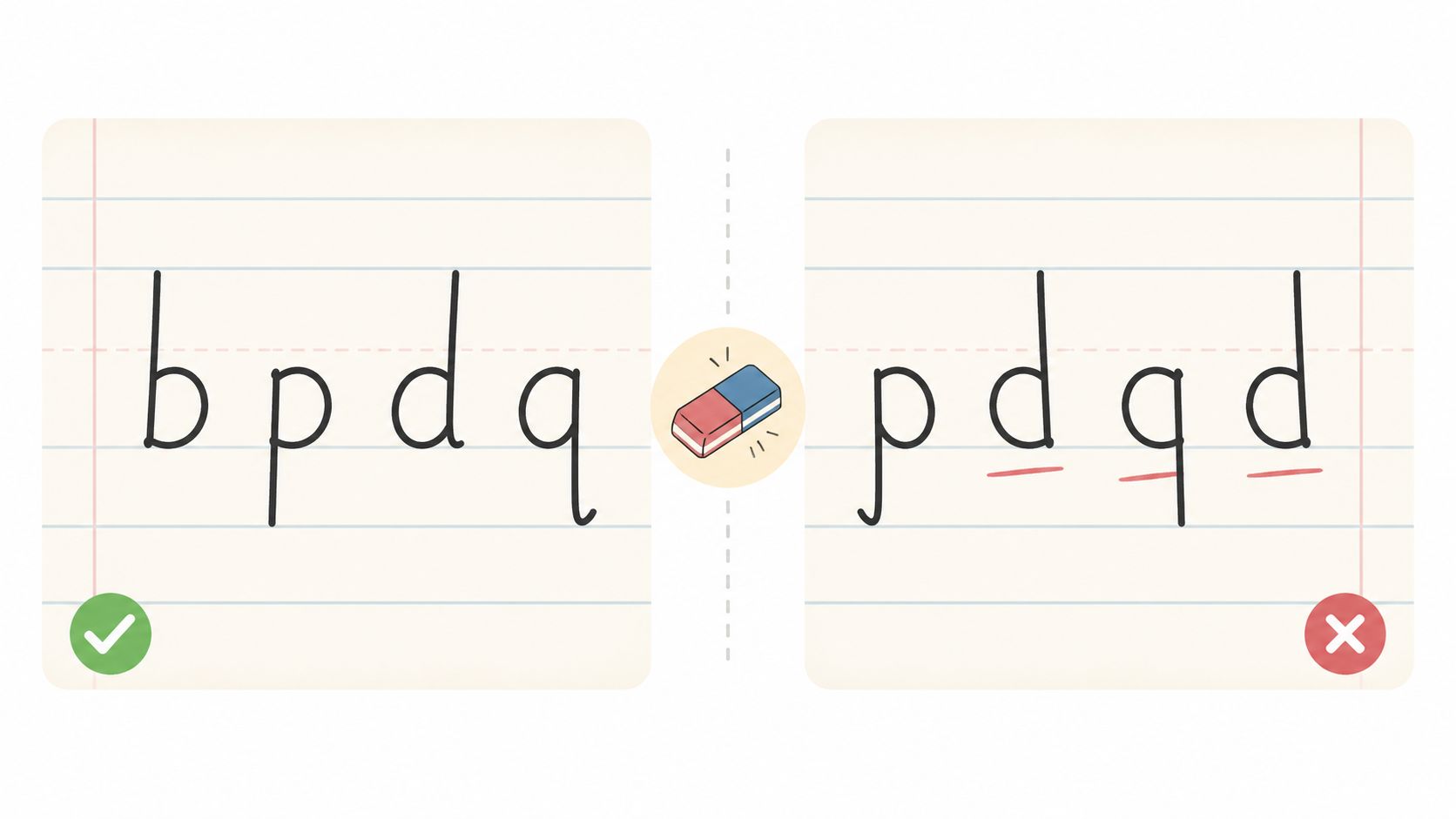
Letter reversals are one of the most recognized dyslexia examples of writing, but they're often oversimplified. A student may write b for d, p for q, or produce a word like saw when they meant was. Some writers also mirror part of a word or, when tired, start shaping letters in the wrong direction.
What it can look like
These errors are tied to difficulty with letter orientation and automatic recall during writing. Clinical descriptions of dyslexic writing patterns include messy handwriting, inconsistent letter formation, and reversals such as mixing up b and d, along with omitted letters or words, as described in this review of writing difficulties in dyslexia.
In class, that might look like a child writing “dad” as “bad,” or copying a sentence accurately at first and then reversing letters once speed increases. In adult writing, the pattern is often less obvious. A professional might draft a quick note with a few strange letter substitutions that slip past spellcheck because the result is still a real word.
Practical rule: Treat reversals as a signal to slow down transcription, not as proof that the writer “isn't trying.”
What helps in practice
Direct teaching still matters. Use sky-writing, finger tracing, verbal cues like “bat before ball” for b, and short proofreading passes that check only one confusion pair at a time. Don't ask the writer to fix everything at once.
For technology, Voice Control Pro can reduce the need to manually form every letter in time-sensitive writing.
- Dictate first: Use voice-to-text for emails, chats, and notes when manual handwriting or typing causes frequent reversals.
- Clean up common patterns: Use cleanup levels to catch awkward text before sending.
- Save personal corrections: Add commonly confused words or names to the custom dictionary.
- Polish the final draft: Run the transcribed text through Hey Max for a final rewrite pass when tone and clarity matter.
A short demo can help families and teachers explain what's happening visually:
2. Phonetic Spelling and Unconventional Word Formations
Many dyslexic writers spell words the way they sound. You might see fone for phone, nite for night, thru for through, or oclock for o'clock. These spellings aren't random. They often show that the writer heard the sounds correctly but didn't retrieve the conventional visual spelling quickly enough.
Why the spelling makes sense to the writer
Phonetic spelling can be a sign that the writer is leaning on auditory knowledge. In other words, the language system is working, but standard orthography isn't automatic yet. That's why a child can be bright, verbal, and insightful but still hand in a paper with highly unconventional spellings.
This matters in adulthood too. Content aimed at dyslexia often centers on school-age mistakes, but many adults still deal with subtler writing issues in professional documents, such as inconsistent spelling of common words, unusual spacing, or difficulty organizing ideas. That professional gap is discussed in this article on dyslexia writing examples in adult contexts.
A better workflow for polished spelling
A helpful teaching response is to separate drafting from editing. Let the person get ideas out first, then clean the language afterward. That protects momentum.
For tech support, voice dictation is especially useful here because spoken language is converted into standard spelling before the writer has to wrestle with every word form.
- Brainstorm by voice: Dictate rough ideas naturally instead of stopping over every uncertain spelling.
- Use standardization tools: Cleanup levels can normalize casual or phonetic forms into more polished English.
- Protect important vocabulary: Add names, technical terms, and repeated problem words to a custom dictionary.
- Refine for formal writing: Use voice editing on desktop with spoken commands to revise without breaking focus.
A teacher can also say, “Your spelling shows me what you heard. Now let's teach the print version.” That reframes the error as useful information.
3. Word Sequencing and Transposition Errors
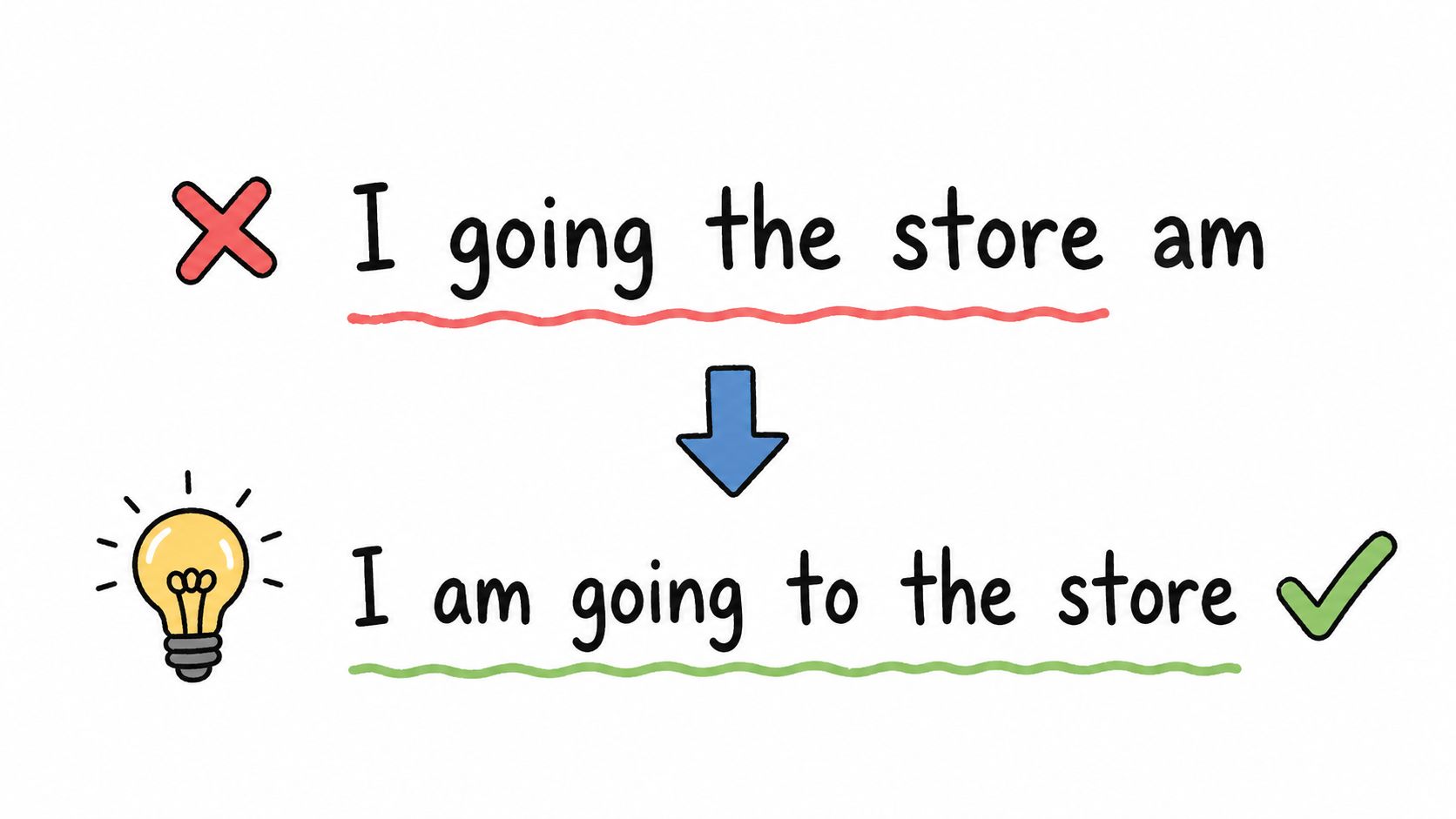
Some writing errors aren't about individual letters. They're about order. A writer may type adn for and, teh for the, or rearrange an entire sentence into something like “I going the store am.” The ideas are present, but the sequence breaks down.
How meaning gets scrambled
This kind of error often comes from difficulty managing sequences while also composing. The writer is trying to hold onto the message, the sentence frame, and the spelling at once. When that load gets too high, parts switch places.
In real life, this can create high-stakes confusion. A support agent may mean “I've updated your account and sent the invoice,” but the typed sentence comes out with reversed word order or missing connectors. A manager might understand the intent, but the writer still looks careless.
When a sentence sounds clear aloud but looks scrambled in print, the problem often sits in transcription, not thinking.
Teaching move and tech support
One effective teaching move is oral rehearsal. Ask the writer to say the sentence in full before writing it. Then have them write or dictate the same complete thought, not one word at a time.
Voice Control Pro fits that pattern well.
- Dictate complete sentences: Speaking whole thoughts helps preserve natural syntax and word order.
- Review once, not endlessly: Do one clean read-through after dictation to catch software quirks rather than manually rebuilding every sentence.
- Use rewrite help: Hey Max can smooth sentence flow when words are technically correct but awkwardly arranged.
- Raise cleanup for formal work: Higher cleanup settings are useful when precision matters in reports, CRM notes, or client messages.
Students and adults with dyslexia also show disrupted writing flow online. Research found that they make significantly longer pauses before words, especially before short words, grammatical inflections, and punctuation. That helps explain why sequencing errors often appear right where the sentence should have flowed automatically.
4. Inconsistent Spacing and Text Formatting
Sometimes the issue isn't spelling at all. It's visual layout. Words run together like thequickbrownfox, or the page is scattered with uneven spaces, irregular capitalization, and paragraphs that don't break where they should. Readers may call it sloppy, but that label misses the point.
Why spacing gets uneven
Spacing and formatting rely on visual-spatial control plus enough working attention left over to monitor the page. If most of the writer's effort is going into spelling and sentence construction, visual presentation often becomes the first thing to slip.
In younger students, this can show up as crowded handwriting and inconsistent gaps between words. In adults, it might look like chaotic meeting notes, dense CRM entries, or emails with line breaks in odd places. The content may still be strong, but the format makes it harder to read.
How to reduce visual clutter
This is one place where technology can remove a lot of friction. When a writer dictates instead of manually typing every word, spacing and punctuation become less of a motor task and more of a language task.
Try a simple workflow:
- Compose by voice: Voice Control Pro inserts properly spaced text directly into the active app.
- Say punctuation aloud: Commands like “comma,” “period,” and “new paragraph” help shape readable text as you go.
- Use cleanup for appearance: Cleanup levels can standardize capitalization and general polish.
- Start from templates: Reuse email, report, or case-note formats so the writer doesn't rebuild layout each time.
A teacher can support this offline too. Wide-lined paper, finger spacing tools, and boxed writing areas can reduce visual overload while the student builds more reliable habits.
5. Omission and Addition of Letters Syllables
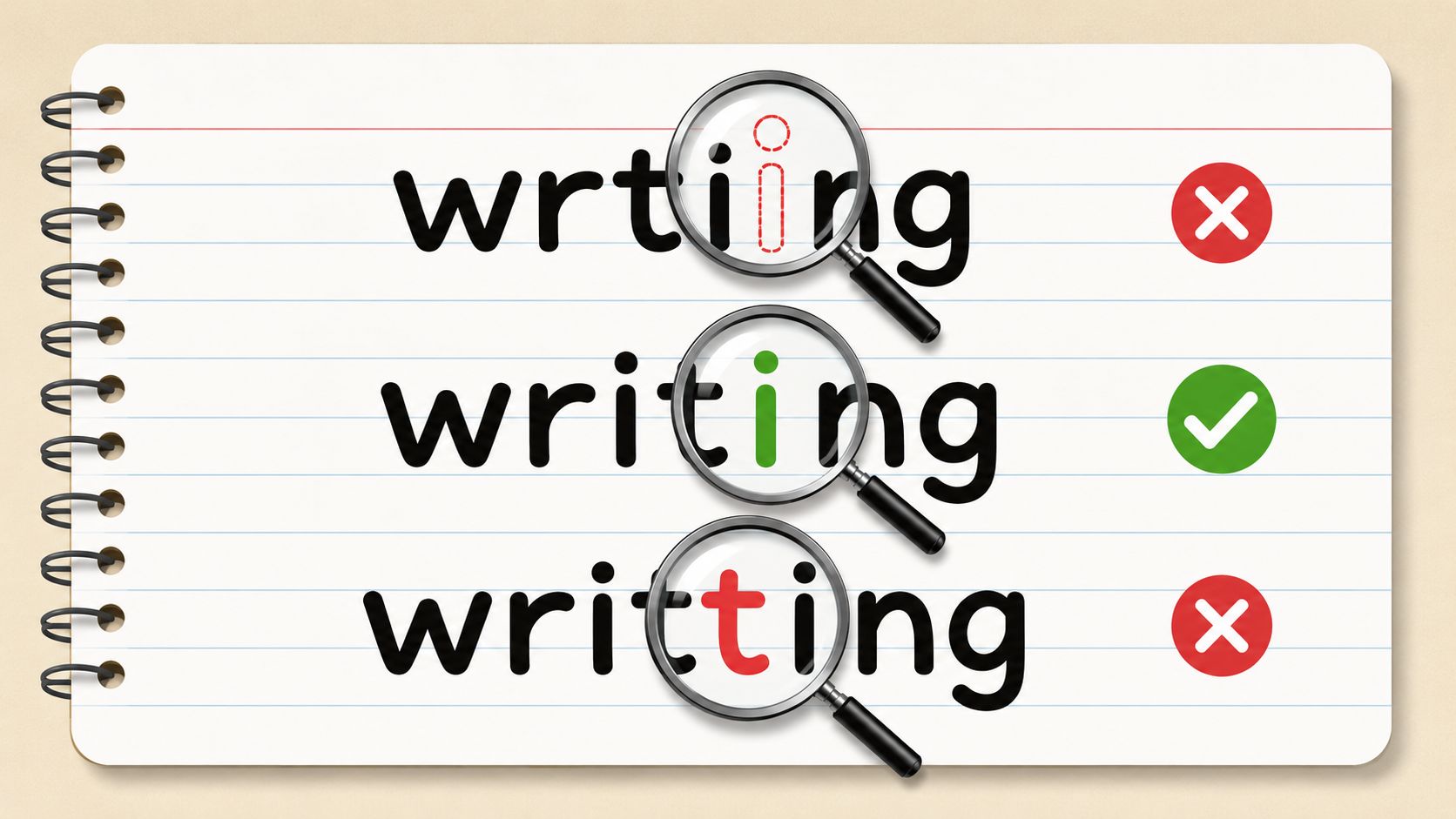
Another common pattern is leaving pieces out or adding extra pieces in. You might see wrting for writing, knowlege for knowledge, adress for address, or comitting for committing. These errors can happen even when the writer knows the word well.
What these errors reveal
Omission and addition errors often point to incomplete encoding. The writer starts with the correct word in mind, but some letters or syllables don't make it fully onto the page. Other times, the hand keeps moving and an extra letter appears because the writer is balancing speed, sound, and memory all at once.
These patterns line up with a broader finding from the research: impaired spelling directly explains written composition deficits in a significant majority of cases discussed in this analysis of dyslexia and writing. In plain language, if spelling isn't automatic, bigger writing tasks get harder too.
A practical correction routine
A useful classroom strategy is error pattern tracking. Don't just mark a paper wrong. Group the mistakes. If a student regularly drops the second syllable in longer words, that tells you what to teach next.
For digital writing, use a repeatable support system:
- Dictate the first draft: Speaking full words often captures complete forms more reliably than manual typing under pressure.
- Store repeated corrections: A custom dictionary helps with names, jargon, and words the writer frequently trims.
- Use stronger cleanup for final drafts: Professional or formal cleanup settings can catch more issues before submission.
- Review patterns over time: Transcription history can reveal personal error habits, which is useful for both self-awareness and instruction.
- Polish key documents: Let Hey Max review important messages, summaries, or reports before they go out.
A marked-up page is less useful than a pattern map. The pattern tells you what to teach and what to automate.
6. Poor Sentence Structure and Grammar Errors
A writer can know the topic and still produce sentences that feel broken. You may see “I going to store,” “The report show the data,” or a long run-on that keeps extending because the writer is trying to hold the idea together long enough to finish it.
When the sentence falls apart
Grammar problems in dyslexic writing often begin earlier than grammar itself. If the writer is using most of their energy on spelling and transcription, there may be little attention left for verb endings, sentence boundaries, or clear structure.
This is one reason writing can look much weaker than speaking. The person may explain an idea clearly in conversation, then struggle to build the same thought on paper. That mismatch is common, especially in school essays, workplace summaries, and reflective writing.
How to build stronger sentences
The most helpful teaching response is usually oral before written. Let the writer say the sentence, hear it back, and then shape it into text. For longer pieces, build one sentence at a time and connect them after.
Technology can make that process much easier.
- Speak naturally: Dictation captures conversational grammar better than word-by-word typing.
- Revise by section: Draft one paragraph or one response at a time to keep structure manageable.
- Use AI for refinement: The AI text refinement workflow for dictation users is useful when you want to preserve the original idea but improve grammar and clarity.
- Ask focused questions: With Hey Max, select a passage and ask for cleaner grammar, a more professional tone, or a shorter version.
- Reuse good structures: Templates for update emails, reports, and proposals reduce sentence-planning load.
A practical prompt for students and professionals alike is: “Say it. Capture it. Then refine it.” That sequence respects how the idea first arrives.
7. Slow Writing Speed and Cognitive Fatigue
Some of the hardest dyslexia examples of writing aren't visible in the final sentence. They show up in the time it takes, the stress it causes, and the amount of mental energy the writer burns just getting a paragraph out. A person may explain a concept fluently aloud, then produce only a few written lines before fatigue sets in.
What the slowdown really means
Research on online writing behavior helps explain this. Teenagers with dyslexia produce shorter writing passages without pauses than typical peers, which suggests their writing is interrupted more often by the effort of transcription. The issue isn't lack of ideas. It's that the act of writing keeps breaking the flow of those ideas.
That's why a student may know the answer but leave half the page blank. It's also why a capable professional can talk through a complex update in two minutes but need far longer to type it out cleanly. Dyslexia is also widespread. Estimates suggest it affects 15% to 20% of the population worldwide, so this experience is far more common than many workplaces assume.
A lower-friction writing system
When writing is slow, the fix isn't “try harder.” The fix is reducing the number of tasks happening at once. Let speech handle input, then let editing happen after.
A practical Voice Control Pro workflow looks like this:
- Use voice for all first drafts: Emails, notes, reports, chat replies, and documentation are easier when ideas enter at speaking speed.
- Separate drafting from polishing: Get the message down first, then edit.
- Create reusable voice commands: Save repeated phrases, signatures, or recurring responses.
- Hand editing to Hey Max: Use it for rewriting, trimming, or clarifying after dictation.
- Keep work moving locally: Fly Mode can help when you want uninterrupted local processing.
- Capture ideas immediately: If a thought is clear now, dictate it now instead of waiting until fatigue builds.
- Adopt a speed-first workflow: This guide on writing faster with voice dictation is especially relevant when manual input creates a bottleneck.
There's also encouraging intervention evidence here. In a single-case study using speech-to-text tools, seven of eight participants increased text productivity while maintaining or improving word-level accuracy. That result matches what many teachers and assistive technology specialists see in practice. Once the spelling-to-composition bottleneck is reduced, writing flow often improves.
7-Point Comparison of Dyslexic Writing Errors
| Issue | 🔄 Implementation complexity | ⚡ Resource / efficiency | ⭐ Expected outcomes | 📊 Key advantages / Impact | 💡 Ideal use cases |
|---|---|---|---|---|---|
| Letter Reversals and Mirror Writing | Low–Moderate, detection + simple cleanup or voice integration | Low, voice-to-text or auto-cleanup; minimal setup | High, largely eliminated with voice + cleanup | Improves legibility, reduces proofreading time, preserves credibility | Professionals drafting emails/documents who need clear text |
| Phonetic Spelling and Unconventional Word Formations | Low, automatic spelling correction and custom dictionary | Moderate, transcription + cleanup; supports multi-language | High, standardized spelling after cleanup | Faster initial composition; captures intended pronunciation | Knowledge workers needing polished docs quickly |
| Word Sequencing and Transposition Errors | Moderate, sentence-level correction and real-time transcription | Moderate–High, requires live transcription and rewrite tools | High, voice preserves order; rewrite fixes transpositions | Restores sentence clarity; reduces revision passes | Technical docs, reports, formal correspondence |
| Inconsistent Spacing and Text Formatting | Low, automatic formatting and templates | Low, voice-to-text auto-formats; template use minimal overhead | High, immediate professional layout | Improves readability and visual professionalism | Reports, research papers, customer support replies |
| Omission and Addition of Letters/Syllables | Moderate, custom dictionary, transcription history, cleanup rules | Moderate, needs dictionary tuning and cleanup levels | High, transcription + cleanup recovers missing/extra letters | Consistent spelling; fewer manual corrections | Time-sensitive communications and documentation |
| Poor Sentence Structure and Grammar Errors | High, advanced rewriting/grammar models and contextual editing | High, rewrite assistant (Hey Max) and higher cleanup levels | Moderate–High, substantial improvements but may need review | Restores tone and syntax; improves credibility | Reports, proposals, academic writing requiring polish |
| Slow Writing Speed and Cognitive Fatigue | Low, adopt voice-to-text, Fly Mode, and custom commands | Very high efficiency, voice ~3–4x typing speed; local modes reduce latency | Very High, large productivity and fatigue reduction | Increases output, preserves thought flow, reduces effort | Knowledge workers, students, developers needing faster output |
From Challenge to Advantage A New Writing Workflow
The patterns above aren't signs of laziness, carelessness, or low ability. They're signals about how language is being processed during writing. When you understand the pattern, you can respond more accurately. A reversal suggests orientation trouble. A dropped syllable points to encoding strain. A tangled sentence often reflects overload during transcription, not lack of understanding.
That distinction matters at school and at work. Dyslexia affects roughly 1 in 5 people in the United States, with estimates ranging from 5% to 17% depending on diagnostic threshold. Many adults remain undiagnosed, including people in roles where writing is constant and high stakes. If a bright employee dreads email, rewrites simple updates repeatedly, or avoids documentation, it's worth considering whether the barrier is transcription rather than knowledge.
The most effective shift is simple. Separate idea generation from text production. Don't demand that spelling, formatting, grammar, and organization all happen at the exact same moment if that combination causes the writer to freeze.
For educators, that may mean allowing oral rehearsal, dictation, sentence frames, and focused proofreading. For professionals, it may mean speaking the first draft, then using cleanup and rewriting tools to prepare the final version. For dyslexic writers themselves, it often means recognizing that the difficulty is real and that support is not a shortcut. It's an access strategy.
Voice tools are especially helpful because they align with a common strength. Many dyslexic writers can explain ideas clearly out loud even when writing them manually is slow and draining. Voice Control Pro turns that strength into a workflow. You speak naturally, insert text where your cursor is, then refine only what needs refining. That lowers stress, protects momentum, and lets the finished document reflect the quality of the thinking behind it.
If you remember one thing, let it be this. Good support doesn't just correct errors. It changes the path so the writer can succeed with less friction.
If writing feels easier out loud than on the page, Voice Control Pro gives you a practical way to work with that strength. You can dictate directly into any app, use cleanup levels to polish rough text, save tricky terms in a custom dictionary, and ask Hey Max to rewrite or clarify selected passages. For dyslexic writers, that means fewer battles with spelling and formatting, faster first drafts, and a smoother path from strong ideas to professional writing.